


Sobald Sie die Grundlagen beherrschen, ermöglichen erweiterte Formularfelder die Unterstützung komplexerer Workflows, reichhaltigerer Datenstrukturen und hochwertigerer Einreichungen.
PlatoForms bietet erweiterte Felder für Szenarien, in denen Standard-Eingaben an ihre Grenzen stoßen. Zum Beispiel bei internen Genehmigungen, Bewerbungen mit unterstützenden Dokumenten oder zeitkritischen Prozessen.
✨ Tipp: Erweiterte Felder bauen auf den Kerneingaben auf. Wenn Sie noch an Ihrer grundlegenden Feldstruktur feilen, beginnen Sie hier: Essentielle Formularfelder in PlatoForms.
In diesem Blog werden wir erkunden:
Was sind erweiterte Formularfelder?
Erweiterte Formularfelder gehen über einfache Dateneingaben hinaus.
Sie unterstützen strukturierte Daten, Dateiverarbeitung, zeitbasiertes Verhalten, Zahlungen und Schutz vor Missbrauch. Das macht sie besonders nützlich für interne Workflows, Bewerbungen und hochwirksame Einreichungen.
Richtig eingesetzt, fügen diese Felder Klarheit und Effizienz hinzu. Falsch eingesetzt, können sie Reibung erhöhen. Daher ist die Absicht entscheidend.
Erweiterte Felder und wann man sie verwendet
Dateiupload
Dateiupload-Felder ermöglichen es Benutzern, Dokumente oder Bilder direkt an eine Einreichung anzuhängen.
Typische Anwendungsfälle:
- Bewerbungen
- Einreichung von Verträgen oder Vereinbarungen
- Unterstützende Dokumente für Genehmigungen
Bildauswahl
Bildauswahl-Felder ermöglichen es Benutzern, Optionen visuell statt textlich auszuwählen.
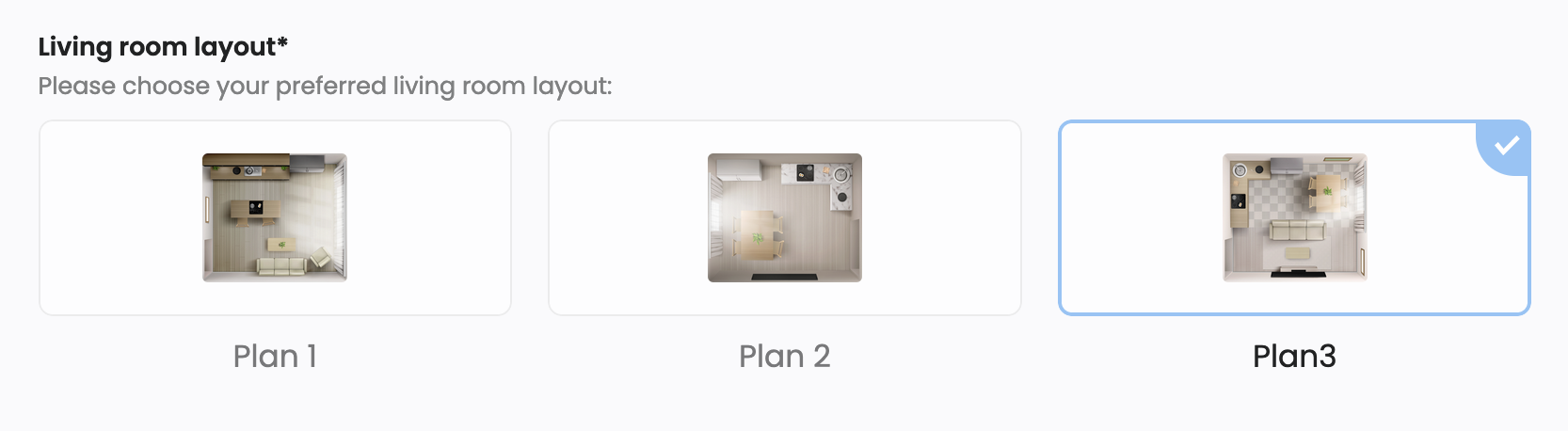
Typische Anwendungsfälle:
- Produkt- oder Optionsauswahl
- Visuelle Umfragen
- Nebeneinander-Vergleiche
Tabelle
Tabellenfelder erfassen strukturierte Daten in Zeilen und Spalten.
Typische Anwendungsfälle:
- Inventarlisten
- Kostenaufstellungen
- Wiederholte, strukturierte Eingaben
Wiederholungsfeld
Wiederholungsfelder ermöglichen es Benutzern, eine Gruppe von Feldern mehrfach zu duplizieren.
Typische Anwendungsfälle:
- Hinzufügen mehrerer Artikel
- Auflistung von Berufserfahrung, Ausbildung oder Referenzen
💡 Profi-Tipp: Verwenden Sie Wiederholungsfelder hauptsächlich für optionale oder sekundäre Informationen (zum Beispiel „Weitere Berufserfahrung“). Für grundlegende erforderliche Eingaben führt das individuelle Auflisten von Feldern in der Regel zu einer besseren mobilen Benutzererfahrung.
Countdown
Countdown-Felder fügen einem Formular ein sichtbares Zeitlimit hinzu.
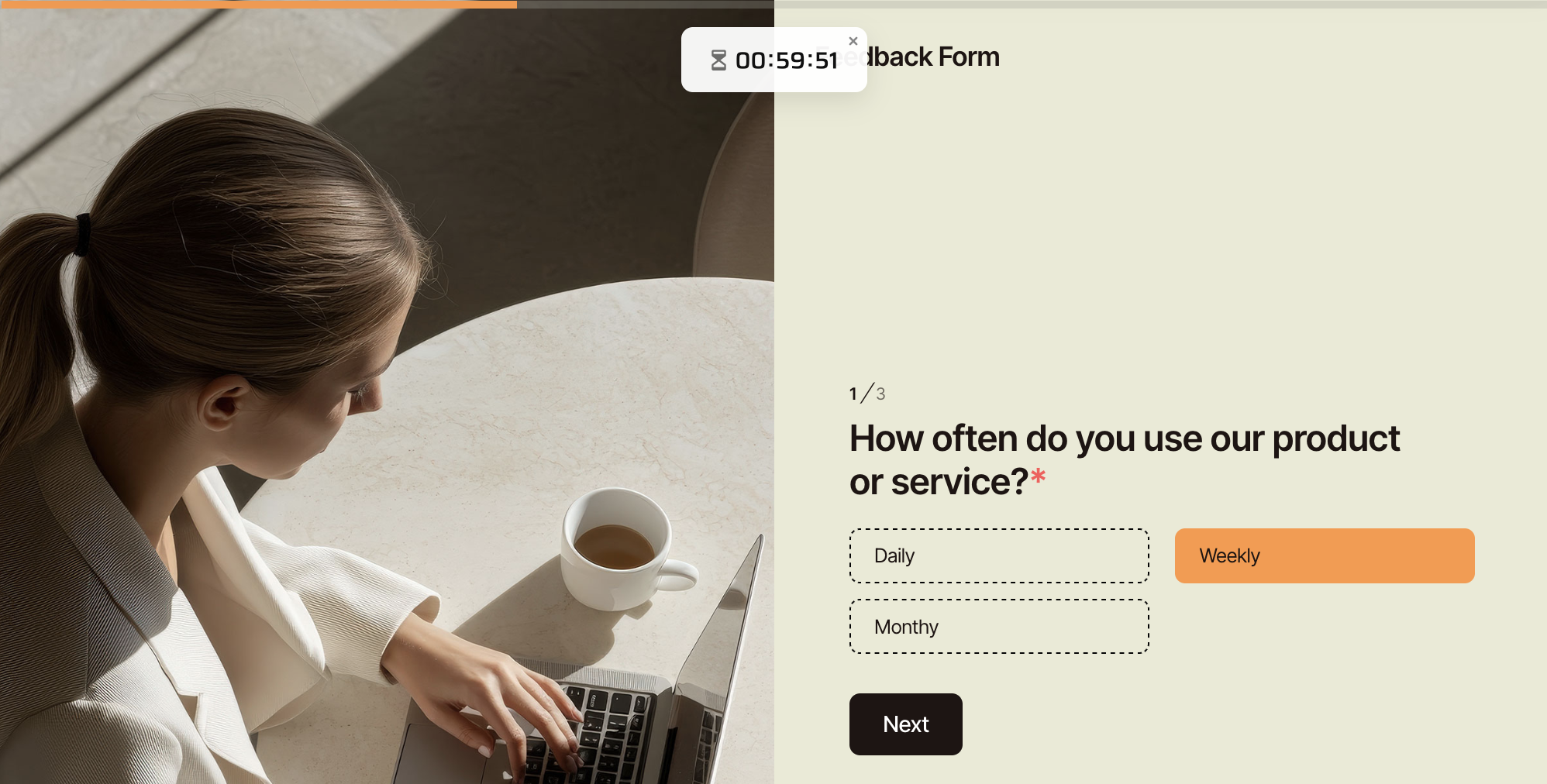
Typische Anwendungsfälle:
- Online-Tests oder Bewertungen
- Zeitbegrenzte Bewerbungen
- Interne Workflows mit strengen Fristen
💡 Profi-Tipp: Platzieren Sie das Countdown-Feld nahe der oberen Seite des Formulars. Wenn Benutzer den Zeitdruck erst nach dem Scrollen entdecken, kann dies zu Frustration und Abbrüchen führen.
Sorgfältig eingesetzt, fügen Countdown-Felder Klarheit und Dringlichkeit hinzu. Übermäßiger Einsatz kann jedoch Druck und Abbrüche erhöhen.
Stripe-Zahlung
Stripe-Zahlungsfelder ermöglichen die sichere Zahlungsabwicklung direkt innerhalb eines Formulars.
Typische Anwendungsfälle:
- Veranstaltungsregistrierungen
- Kostenpflichtige Bewerbungen oder Dienstleistungen
ReCaptcha

ReCaptcha-Felder schützen Formulare vor Spam und automatisierten Einreichungen.
Typische Anwendungsfälle:
- Öffentlich zugängliche Formulare
- Hochfrequentierte Landingpages
Einbettung, Video und dekoratives Bild
Diese Felder fügen reichhaltige Inhalte und visuelle Struktur hinzu, ohne Daten zu erfassen.
Typische Anwendungsfälle:
- Instruktions- oder Erklärungsinhalte
- Marken- und Layout-Verbesserung
Verwendung erweiterter Felder mit bedingter Logik
Erweiterte Felder sind am effektivsten, wenn sie mit Bedingter Logik kombiniert werden.
Durch das Ein- oder Ausblenden von Feldern basierend auf vorherigen Antworten können Sie die kognitive Belastung reduzieren und die Formulare fokussiert halten.
💡 Experten-Tipp: Kombinieren Sie erweiterte Felder mit Logikregeln, um dynamische Formulare zu erstellen. Beispielsweise wird ein Stripe-Zahlungsfeld nur angezeigt, wenn ein Benutzer „Kostenpflichtige Registrierung“ in einem Auswahlfeld auswählt.
Dieser Ansatz hält komplexe Workflows überschaubar, ohne Benutzer zu überfordern.
Erweiterte Anwendungsfälle und Feldkombinationen
Erweiterte Felder sind am effektivsten, wenn sie auf spezifische Workflow-Bedürfnisse angewendet werden.
| Anwendungsfall | Empfohlene Felder |
|---|---|
| Bewerbung | Dateiupload (Lebenslauf), Wiederholungsfeld (Berufserfahrung), Unterschrift |
| Interne Genehmigung | Tabelle, Dateiupload, Abschnittstrennung, Unterschrift |
| Zeitbegrenzte Bewertung | Countdown, Auswahl, Texteingabe |
| Veranstaltungsregistrierung (Kostenpflichtig) | Texteingabe, Auswahl, Stripe-Zahlung |
| Visuelle Auswahl / Vergleich | Bildauswahl, Dekoratives Bild |
| Öffentliches Einreichungsformular | Dateiupload, ReCaptcha, Beschreibung |
Diese Kombinationen helfen, Benutzerfreundlichkeit, Datenpräzision und betriebliche Effizienz auszubalancieren.
Webformulare vs. PDF-basierte Formulare
Erweiterte Felder sind hauptsächlich für Online-Webformulare konzipiert.
Während PDF-basierte Formulare einen Teil der Kernfelder unterstützen, sind erweiterte Funktionen wie Countdown, Zahlungen, Einbettung und Wiederholungsfelder nur in Webformularen verfügbar, da sie interaktiv sind.
📖 Für eine detaillierte Übersicht, siehe Feldtypenübersicht in den PlatoForms-Dokumenten.
Fazit
Erweiterte Formularfelder erschließen leistungsstarke Workflows. Aber nur, wenn sie mit Bedacht eingesetzt werden.
In der Praxis funktionieren sie am besten, wenn die Grundlagen bereits klar und gut strukturiert sind.
PlatoForms gibt Ihnen die Flexibilität, einfach zu beginnen und zu komplexen, zeitkritischen oder zahlungsgetriebenen Formularen zu skalieren, wenn Ihre Bedürfnisse wachsen.
Nächste Schritte
Für detaillierte Konfigurationen und feldspezifische Optionen erkunden Sie die vollständige Dokumentation: Formularfelder-Übersicht.


