How to Create Forms with AI in PlatoForms (No Templates, No Manual Setup)

Describe what you need. Let AI build the form. Fine-tune and publish in minutes.
Luna Qin Last modified: December 30, 2025
Reading time: 4 minutes.

Use Google Gemini AI for form creation

Building a form used to mean choosing templates, dragging fields, and tweaking layouts one by one.

Now it’s no longer necessary.

With AI-powered form generation, you can describe what you need in plain language—and let the system build the form structure for you.

In this guide, we’ll show how PlatoForms AI Form Generator works, when it’s useful, and how it fits together with templates, custom web forms, and fillable PDFs.


What Is an AI Form Generator?

An AI form generator lets you create forms by describing your intent, instead of manually building every field.

Instead of asking:

  • “Which field type should I add?”
  • “How many pages should this form have?”
  • “Should this be conversational or classic?”
AI chatbot interface for form creation

You simply describe the form you want.

PlatoForms AI automatically:

  • Suggests relevant fields (text, dropdowns, checkboxes, dates, signatures)
  • Builds a clean, editable form layout
  • Adapts the structure based on your description

You stay in control—but skip the repetitive setup work.

👉 See how AI Form Generator works


When AI Form Generation Makes Sense

AI-generated forms work best when:

  • You’re starting from scratch
  • You know the goal, but not the exact structure yet
  • Speed matters more than pixel-perfect design
  • You plan to iterate after publishing
conversational ai interface

Common examples:

  • Employee onboarding forms
  • Performance evaluations
  • Lead intake forms
  • Surveys and internal checklists
  • Registration or application forms

If you already have a designed PDF, AI is still useful—but you may want a different starting point (we’ll cover that below).


Step-by-Step: Generate a Form with PlatoForms AI

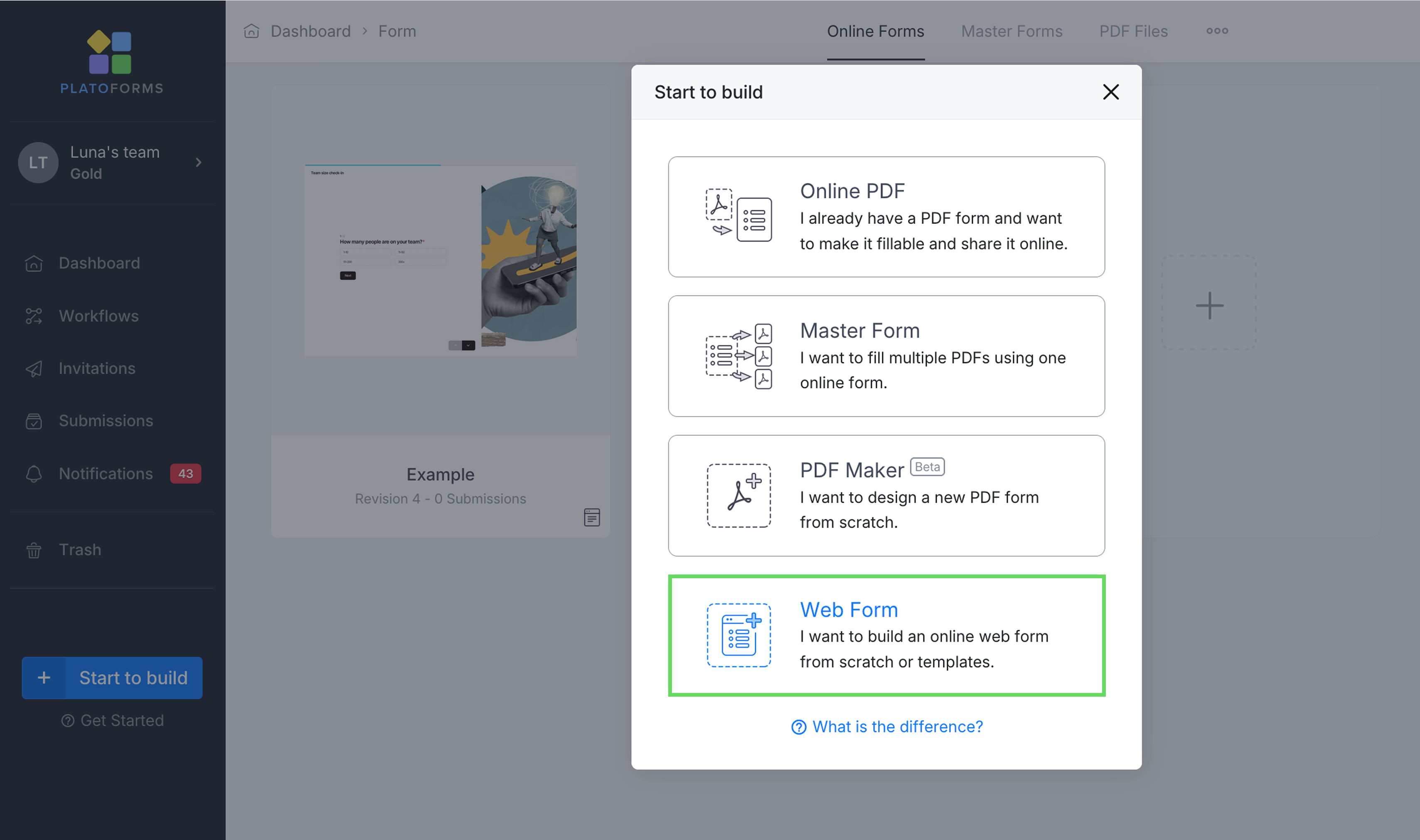
Step 1: Start a New Web Form

From your dashboard, click Start to BuildWeb Form.

create a web form from platoforms dashboard

You can choose:

  • Classic Form (all questions on one page)
  • Conversational Form (one question at a time)
  • Or start from a template

You can switch between Classic and Conversational layouts later.


Step 2: Describe Your Form in Plain Text

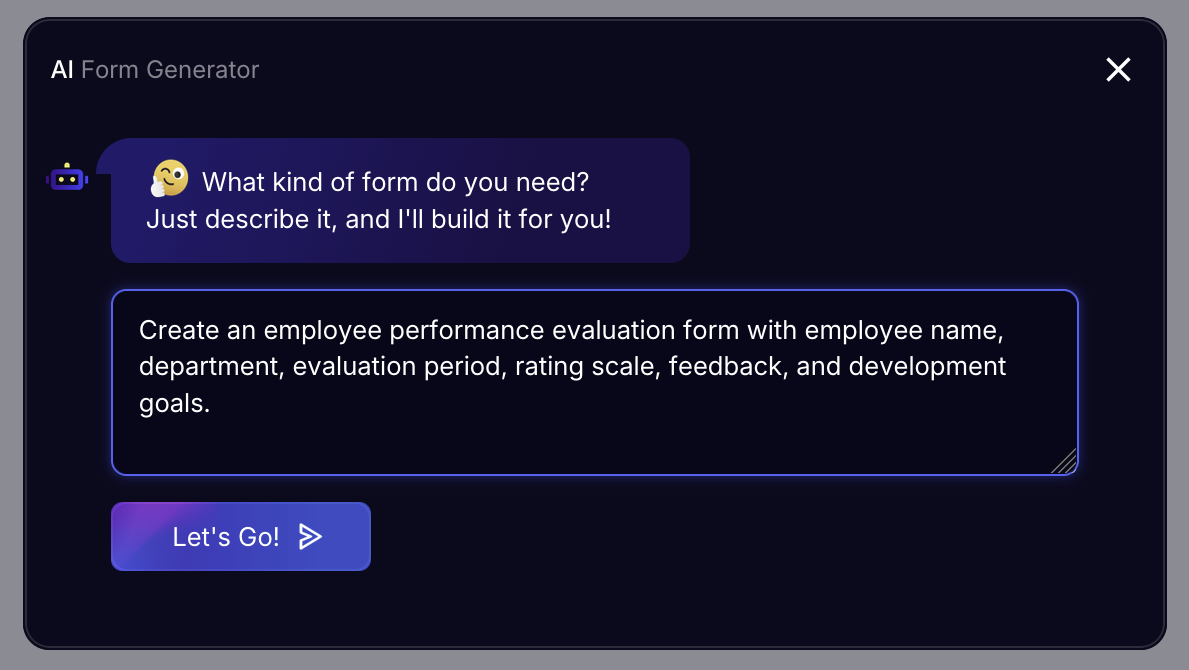
Inside the form builder, you’ll see an AI input bar.

create a web form from prompts via chatbox

Type something like:

“Create an employee performance evaluation form with employee name, department, evaluation period, rating scale, feedback, and development goals.”

Pro Tip: The more specific you are (e.g., “add a signature field”), the better the AI can structure your initial draft.

Click Let’s Go.


Step 3: Choose Form Length & Layout

AI will ask you to select:

  • Short – minimal fields
  • Standard – balanced structure
  • Extended – detailed evaluation

Then choose:

  • Classic layout
  • Or Conversational layout (chat-style)

👉 Learn more about Conversational Forms

Click Continue.


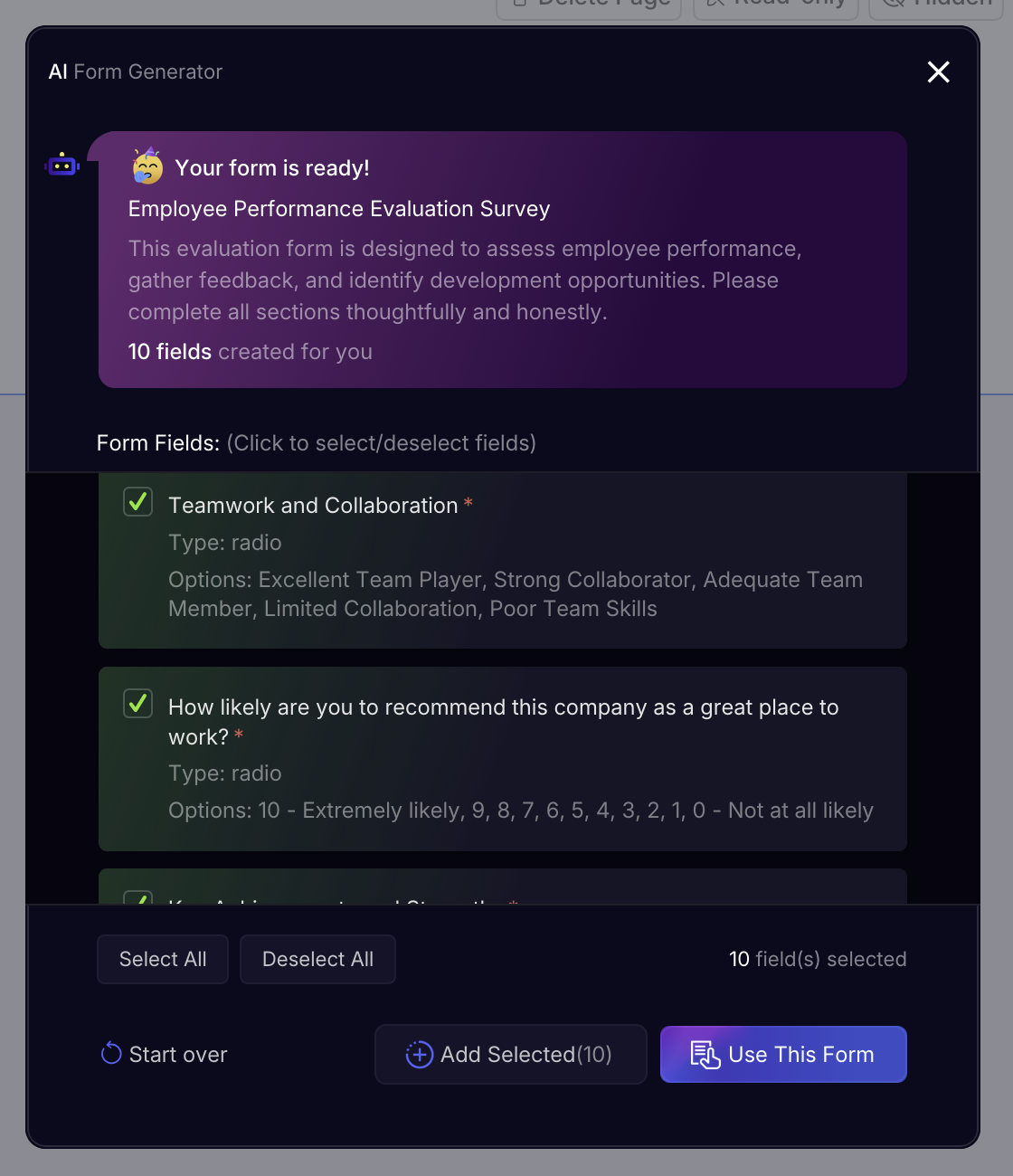
Step 4: Review and Adjust AI Suggestions

Once the form is generated, you can:

  • Select or remove suggested fields
  • Change field types
  • Edit labels, placeholders, and order
  • Add logic or validation rules

AI gets you 80% there—you fine-tune the rest.

ai suggests fields from user's prompts

Step 5: Publish and Share

After editing:

  • Publish the form
  • Share via link or QR code
  • Embed it on your website
  • Collect submissions in one dashboard

👉 Manage and export submissions


AI Forms vs Templates: When to Use Which?

AI forms and templates aren’t competitors — they solve different problems.

Use case AI Form Generator Templates
Starting point When you want a fast, flexible starting point When you want a proven, ready-made structure
Form type Unique, internal, or custom workflows Common forms (RSVP, surveys, donations, HR)
Setup effort Minimal setup, generated from description Minimal editing, already structured
Discovery No need to browse template categories Choose from categorized templates
Customization Ideal if you plan to customize heavily Best when only light edits are needed
Time to launch Minutes, with iteration Immediate, near plug-and-play
AI robot presenting different form field layout options to a user

👉 Browse Form Templates

You can also generate a form with AI and later turn it into a reusable template.


What About PDFs? Where AI Fits In

AI form generation works best for online web forms.

If you already have a PDF, PlatoForms offers two additional paths:

1. Convert PDF into Fillable Form (Preserve Design)

  • Upload your PDF
  • Keep the original layout, fonts, and formatting
  • AI helps detect fields automatically
  • Users fill it out online

👉 Create Fillable PDF Form

2. Convert PDF into Custom Web Form

  • Use the PDF as content reference
  • Redesign into a mobile-friendly web form
  • Combine AI-generated fields with modern UX

👉 Build a Custom Web Form

AI helps in both flows—but the outcome is different.


Limitations of AI Form Generation (What It Won’t Do)

AI is powerful—but not magic.

It won’t:

  • Know your company’s internal policies
  • Replace domain-specific judgment
  • Design highly branded layouts automatically
  • Handle complex workflows without configuration

That’s why PlatoForms combines:

  • AI generation
  • Manual editing
  • Templates
  • Workflows
  • Fillable PDFs

So you can choose the right tool for each job.


Putting It All Together: A Flexible Form Workflow

Many teams use PlatoForms like this:

  1. Start with AI Form Generator
  2. Fine-tune with manual edits
  3. Switch to Conversational mode if needed
  4. Reuse as a template
  5. Export submissions as PDFs

That flexibility is the real advantage.


Ready to Try It?


AI helps you move faster.
PlatoForms helps you move forward—without locking you into one way of working.

About the Author

Luna Qin

Luna Qin is a Content Strategist at PlatoForms with seven years of experience working on enterprise form and workflow platforms. Her earlier documentation work at Apple shaped her clean, user-first writing style. At PlatoForms, she focuses on producing clear, research-driven guides that help teams build better online forms and automate complex PDF processes.


Stay in the Loop!

Subscribe to our blogs for exclusive insights, tips, and updates.

Related Content Read more