Advanced Form Fields in PlatoForms (With Real Use Cases)

How to handle complex workflows with uploads, payments, time limits, and structured data
Luna Qin Last modified: January 10, 2026
Reading time: 3 minutes.

Cover for Blog: Advanced Form Fields in PlatoForms

Once you’ve covered the basics, advanced form fields allow you to support more complex workflows, richer data structures, and higher-value submissions.

PlatoForms provides advanced fields for scenarios where standard inputs start to break down—such as internal approvals, applications with supporting documents, or time-sensitive processes.

✨ Tip: Advanced fields build on top of core inputs. If you’re still refining your basic field structure, start here: Essential Form Fields in PlatoForms.

What are advanced form fields?

Advanced form fields go beyond simple data entry.

They support structured data, file handling, time-based behavior, payments, and protection against misuse—making them especially useful for internal workflows, applications, and high-impact submissions.

Used well, these fields add clarity and efficiency. Used poorly, they can increase friction—so intent matters.

Advanced fields and when to use them

File Upload

File Upload fields allow users to attach documents or images directly to a submission.

Typical use cases:

  • Job applications
  • Contract or agreement submissions
  • Supporting documents for approvals

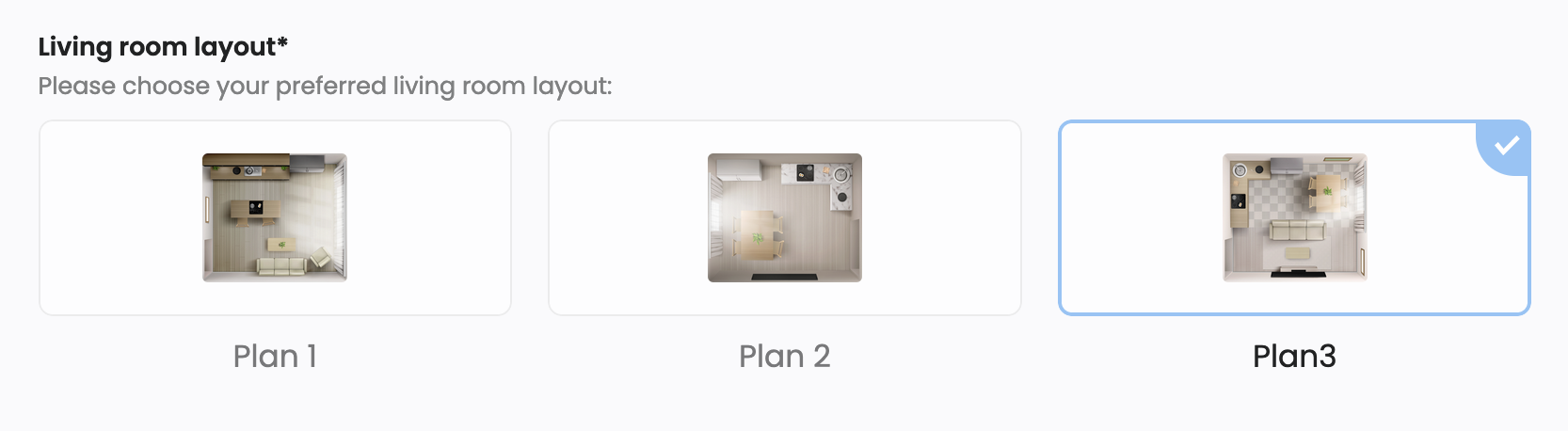
Picture Choice

Picture Choice fields let users select options visually instead of using text.

Picture Choice

Typical use cases:

  • Product or option selection
  • Visual surveys
  • Side-by-side comparisons

Table

Table fields collect structured, row-and-column data.

Typical use cases:

  • Inventory lists
  • Expense breakdowns
  • Repeating, structured inputs

Repeat Field

Repeat Fields allow users to duplicate a group of fields multiple times.

Typical use cases:

  • Adding multiple items
  • Listing work history, education, or references

💡 Pro Tip: Use Repeat Fields primarily for optional or secondary information (for example, “Other work experience”). For core required inputs, listing fields individually usually results in a better mobile completion experience.

Countdown

Countdown fields add a visible time limit to a form.

Countdown field configuration in PlatoForms

Typical use cases:

  • Online tests or assessments
  • Time-limited applications
  • Internal workflows with strict deadlines

💡 Pro Tip: Place the Countdown field near the top of the form. If users only discover time pressure after scrolling, it can trigger frustration and abandonment.

Used carefully, Countdown fields add clarity and urgency—but overuse can increase pressure and drop-offs.

Stripe Payment

Stripe Payment fields enable secure payment collection directly within a form.

Typical use cases:

  • Event registrations
  • Paid applications or services

ReCaptcha

ReCaptcha

ReCaptcha fields protect forms from spam and automated submissions.

Typical use cases:

  • Public-facing forms
  • High-traffic landing pages

Embed, Video, and Decorative Image

These fields add rich content and visual structure without collecting data.

Typical use cases:

  • Instructional or explanatory content
  • Branding and layout enhancement

Using advanced fields with conditional logic

Advanced fields are most effective when combined with Conditional Logic.

By showing or hiding fields based on previous answers, you can reduce cognitive load and keep forms focused.

💡 Expert Tip: Combine advanced fields with logic rules to create dynamic forms. For example, only display a Stripe Payment field if a user selects “Paid registration” in a Choice field.

This approach keeps complex workflows manageable without overwhelming users.

Advanced use cases and field combinations

Advanced fields are most effective when applied to specific workflow needs.

Use case Recommended fields
Job Application File Upload (Resume), Repeat Field (Work History), Signature
Internal Approval Table, File Upload, Section Break, Signature
Time-limited Assessment Countdown, Choice, Text Input
Event Registration (Paid) Text Input, Choice, Stripe Payment
Visual Selection / Comparison Picture Choice, Decorative Image
Public Submission Form File Upload, ReCaptcha, Description

These combinations help balance usability, data accuracy, and operational efficiency.

Web forms vs PDF-based forms

Advanced fields are primarily designed for Online Web Forms.

While PDF-based forms support a subset of core fields, advanced features such as Countdown, Payments, Embed, and Repeat Fields are available only in web forms due to their interactive nature.

📖 For a detailed breakdown, see Field types overview in PlatoForms Docs.

Conclusion

Advanced form fields unlock powerful workflows—but only when used intentionally.

In practice, they work best when the essentials are already clear and well-structured.
PlatoForms gives you the flexibility to start simple and scale up to complex, time-sensitive, or payment-driven forms as your needs grow.

Next steps

For detailed configuration and field-level options, explore the full documentation: Form Fields overview.

About the Author

Luna Qin

Luna Qin is a Content Strategist at PlatoForms with seven years of experience working on enterprise form and workflow platforms. Her earlier documentation work at Apple shaped her clean, user-first writing style. At PlatoForms, she focuses on producing clear, research-driven guides that help teams build better online forms and automate complex PDF processes.


Stay in the Loop!

Subscribe to our blogs for exclusive insights, tips, and updates.

Related Content Read more