












We’ve supported Stripe as a payment option in PlatoForms since 2021. This guide covers what Stripe does well, what to think through before setting it up, and how to handle the cases where Stripe alone isn’t enough.
On this page
- Extensive integrations
- Detailed reporting and fraud tools
- Invoicing and payment links
- Developer-friendly API
What to know before you commit
What Stripe does well
Extensive integrations
Stripe connects to hundreds of third-party tools out of the box—CRMs, accounting software, e-commerce platforms, and more. Common integrations include Slack, Salesforce, Shopify, WooCommerce, and QuickBooks. For most online businesses, Stripe fits naturally into the existing stack without custom development work.
Detailed reporting and fraud tools
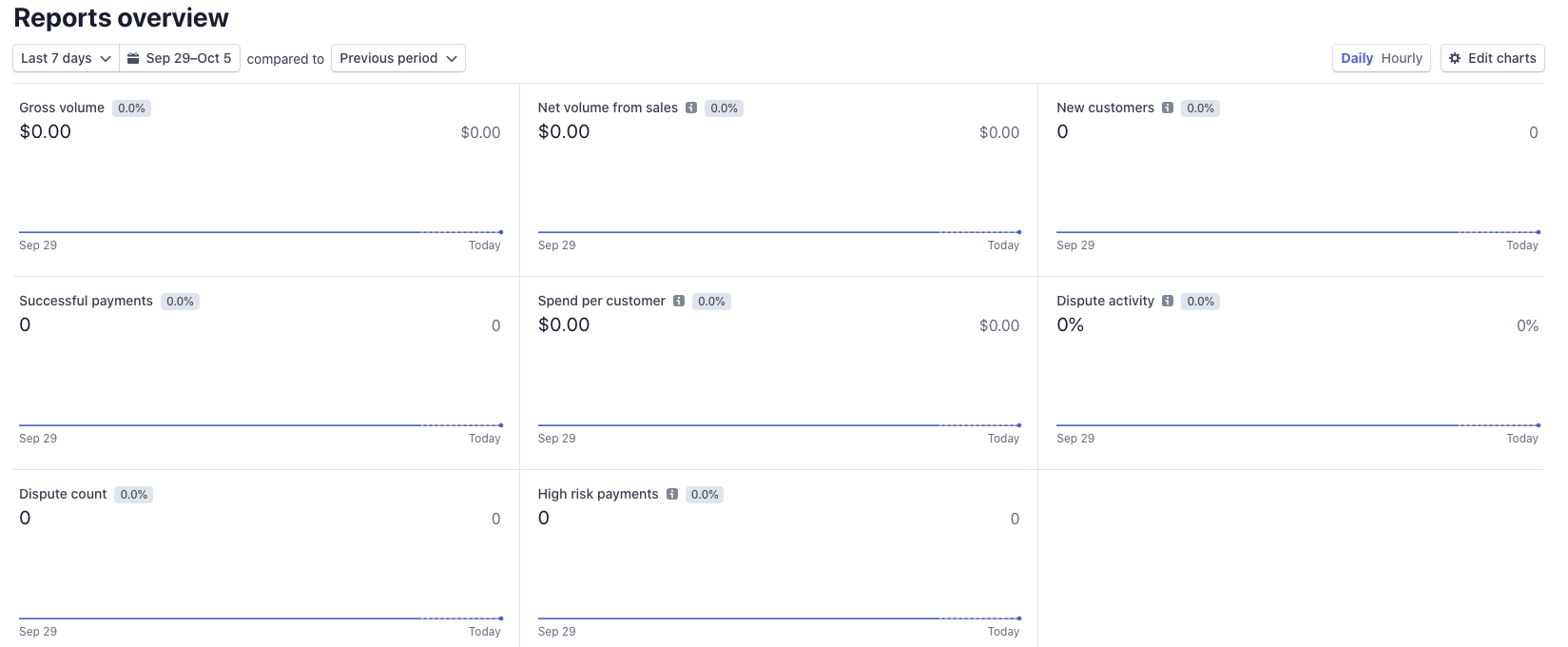
Stripe’s reporting dashboard gives a real-time picture of your payment activity: new customers, sales volume, successful payments, refunds, and fees. You can filter by date range, compare periods side by side, and export data for external analysis.
For fraud prevention, Stripe Radar—its built-in AI-driven risk tool—lets you set risk score thresholds and write custom rules based on your business’s transaction patterns. This is considerably more configurable than what most payment processors offer at the same price tier.
Invoicing and payment links
Stripe’s built-in invoicing lets you send payment requests directly to customers and share payment links without building a checkout flow. For businesses that bill clients on a project basis, or that run subscription services, this removes a lot of friction from the collection process.
Developer-friendly API
Stripe’s API is one of the most widely respected in the payments industry. It’s free, clean, consistently maintained, and has documentation for JavaScript, Ruby, PHP, Python, Java, and Node.js. Developers can build fully custom checkout experiences, issue physical and virtual payment cards, and manage transactions all through the same API.
For non-developers, Stripe also offers pre-built checkout options and no-code integrations—so you don’t necessarily need a technical team to get started.

Read more: API Integration for Online PDFs, How Does It Help?
What to know before you commit
Interface has a learning curve
Stripe’s dashboard is powerful, but the volume of settings, data views, and configuration options can be overwhelming when you’re getting started. Most users find it manageable once they’re past the initial setup—but if you’re new to payment platforms, expect to spend time getting oriented.
Available in 46 countries
Stripe is only available to businesses registered in its supported countries. Currently that covers 46 countries, so if your business is based outside those regions, Stripe isn’t an option regardless of its other merits.
If your customers also pay with PayPal
Stripe handles credit and debit card payments extremely well, but it’s a card-first processor by design. A share of online buyers have a strong preference for PayPal—as of the end of 2025, PayPal reported approximately 439 million active accounts globally. An Ipsos study commissioned by PayPal found that 59% of PayPal users have abandoned a transaction specifically because PayPal wasn’t available at checkout.

If your audience includes PayPal users, the practical solution is to create a separate form with the PayPal widget. PlatoForms supports both Stripe and PayPal integrations — each form uses one payment method, so you can run parallel forms for different customer preferences without rebuilding your workflow from scratch.
Read more: Stripe vs PayPal: Which One Should You Use?
See Does PlatoForms support PayPal? for a quick overview of what’s included.
Who this setup fits—and who it doesn’t
Good fit if:
- You primarily collect card payments and want a robust, developer-friendly processor
- You need detailed reporting or custom fraud rules
- You’re running subscriptions, recurring charges, or invoice-based billing
- You want to offer PayPal as an option — create a parallel PayPal form without rebuilding your Stripe form
Not the right fit if:
- Your business is based outside Stripe’s 46 supported countries
- Your customers are primarily in markets where local payment methods (bank transfer, local wallets) dominate over cards
- You need a fully managed point-of-sale system—Stripe Terminal exists, but Stripe isn’t primarily designed for in-person retail
Getting started
PlatoForms connects directly with Stripe—your online PDF forms can collect card payments without redirecting customers to a separate checkout page, with no transaction fees added on top of Stripe’s standard rates. If you also want to offer PayPal, both integrations can run from the same form.
Not sure which setup fits your workflow? How PlatoForms handles payment forms has an overview.


