
Find trending topics and quick answers here
Hi, how can we help?
What is the difference between a page break and a section break?
Question
What is the difference between a page break and a section break?
Answer
PlatoForms gives you two ways to organize a form: page breaks and section breaks. They look similar in the builder but serve different purposes — one controls navigation, the other controls layout.
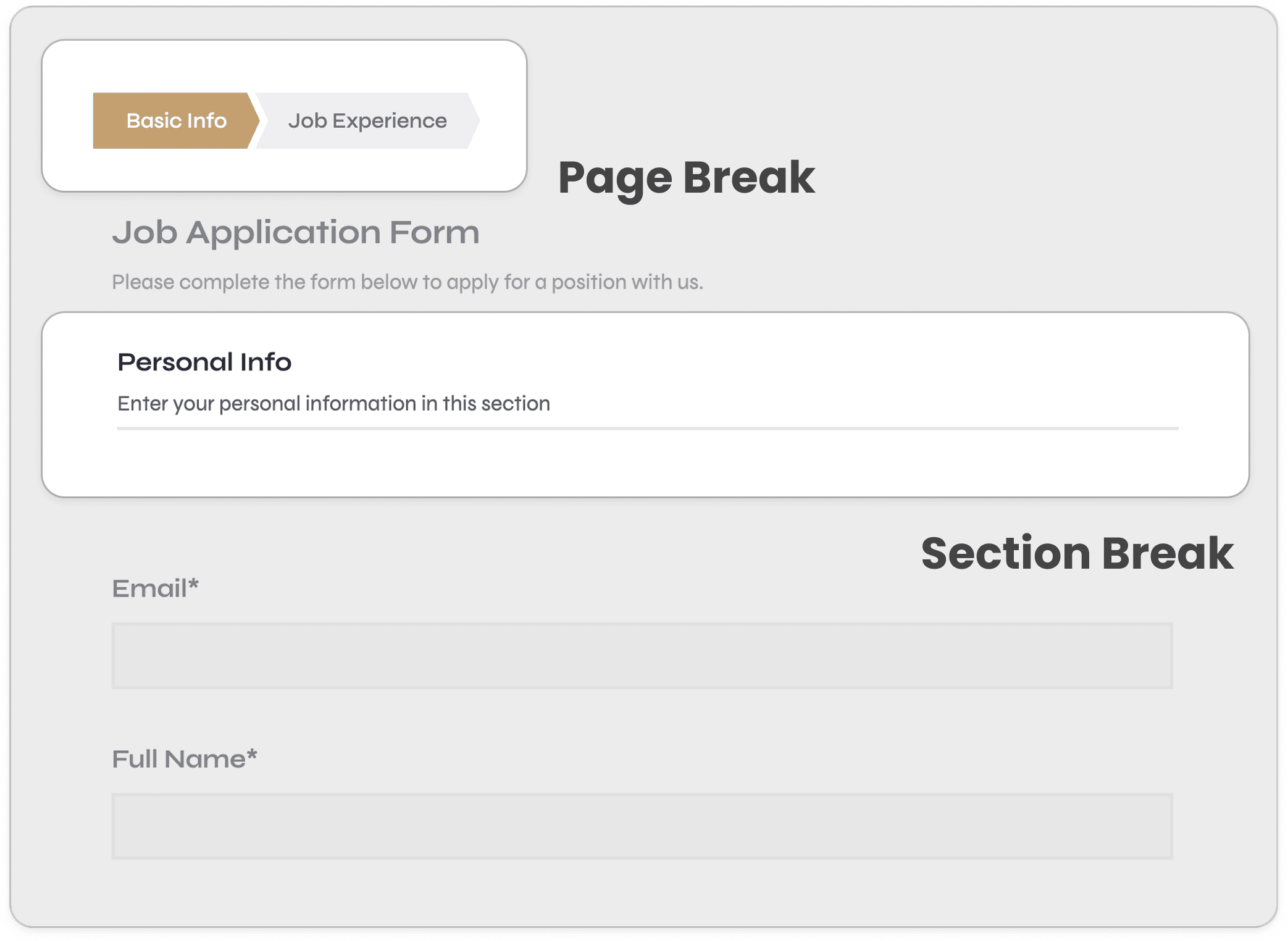
Page break — Divides your form into multiple pages. Respondents navigate between them using Next and Back buttons, and a step indicator (Step 1, Step 2…) shows their progress throughout.
Section break — Organizes fields into named groups within the same page. Respondents see all sections at once by scrolling — no navigation required. Each section can have its own title and help text.
How they compare
| Dimension | Page break | Section break |
|---|---|---|
| Navigation | Next / Back buttons to move between pages | Scroll up and down within one page |
| Progress indicator | Shows Step 1 / 2 / 3 … | No step counter |
| Logic control | Hide, show, or skip entire pages via Logics | Hide or make entire sections read-only via Logics |
| Respondent experience | Step-by-step wizard feel | One continuous scrollable form |
| Delete options | Remove break only, or remove break + all fields on that page | Remove break only, or remove break + all fields in that section |
When should I use a page break?
Use a page break when your form is long, has branching logic, or when you want respondents to focus on one topic at a time before moving forward. Page breaks are ideal for:
- Multi-step application or onboarding flows where each step has a clear theme
- Forms with conditional logic that skips entire sections based on earlier answers
- Long forms where showing everything at once would feel overwhelming
- Situations where you want to validate one page’s fields before allowing the respondent to continue
When should I use a section break?
Use a section break when you want to group related fields visually on the same page without requiring the respondent to navigate. Section breaks are ideal for:
- Shorter forms where all fields fit comfortably on one page
- Grouping related fields together — for example, separating “Personal details” from “Address” from “Preferences”
- Adding a section title and help text to give context without splitting the form into steps
- Using an invisible section break to hide or show a group of fields via Logics, without displaying any visual divider
Can I use both at the same time?
Yes — and this is the recommended approach for complex forms. Page breaks and section breaks work together in a two-level hierarchy: pages define the steps, and sections organize the fields within each step.
For example, a Step 1 could contain two sections — “Personal information” and “Work history” — while Step 2 contains “Document upload” and “Declaration”. The respondent sees a clean step-by-step flow, and each step is internally well-organized.
Typical use cases
Page break — Employee onboarding
Step 1 Personal details → Step 2 Emergency contact → Step 3 Document upload → Step 4 Review & submit
Section break — Client registration
All on one page: Basic info section / Address section / Communication preferences section
Page break — Conditional survey
Logic skips irrelevant steps based on Step 1 answers, creating a personalized question path for each respondent
Section break (invisible) — Dynamic field groups
Wrap a group of fields in an invisible section break, then use Logics to show or hide the entire group based on a previous answer
Have more questions? Visit our FAQs page or contact us.