Can your collaboration stack keep up with the way your team actually works?
Remote work in 2025 isn’t just chat + weekly calls. The best stacks think ahead: they summarize long threads, automate follow-ups, and make async feel natural. Below is a compact, opinionated list of five tools that play nicely together—plus quick tips to wire them into one calm system.
What we will cover:
How we picked these tools
- Useful out of the box (sane defaults, low setup tax)
- Strong integrations (connects without duct tape)
- Async-friendly (summaries, reminders, clear ownership)
- Resilient at small and mid-size (doesn’t require an ops team)
Top 5 tools for remote collaboration in 2025
1) Notion / ClickUp — Your team’s “shared brain”
Best for: Projects, docs, knowledge, and light CRM in one place.
- Notion → flexible wiki + databases; great for cross-functional spaces and lightweight product specs.
- ClickUp → stronger roadmaps/dashboards; suits teams that live in timelines, goals, and workload views.
Try this: enable AI summaries on long pages or task threads so status reviews take minutes, not meetings.
2) Slack / Google Chat — The real-time (and near-time) layer
Best for: Fast decisions, short updates, and lightweight automations.
- Slack → richer ecosystem and automations (Workflow Builder).
- Google Chat → tight with Docs/Meet; simple for Google-native teams.
Try this: create a #daily-updates channel; pin a short post template. Use message shortcuts to trigger an approval or create a task—no app-hopping.
3) PlatoForms — The bridge between people and paperwork
Best for: Approvals, signatures, and multi-step workflows tied to forms and PDFs.
PlatoForms is an AI-powered form builder that turns PDFs into interactive online workflows — including conversational forms that guide users step by step like a friendly chat.
Turn static PDFs into online, routable workflows with digital signatures, required fields, and reminders. Great for onboarding packs, vendor forms, NDAs, and client sign-offs.
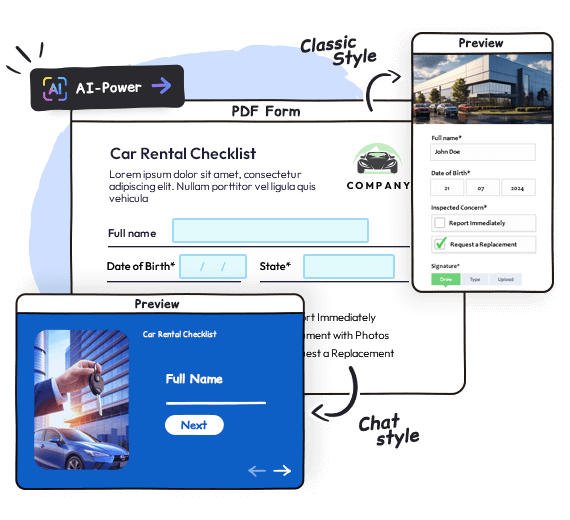
- Auto-detect fields with AI
- Multi-step routing + role-based access
- Reminders to reduce “stuck” submissions
- Exports and integrations to push data where it belongs
Helpful reads:
- Create Workflow for your PDF
- Set automatic reminders
- Integrations: Zapier / Make / Integrately
- Submission charts & exports
4) Zapier / Make — The invisible automators
Best for: Passing data between tools and removing repetitive admin.
- Zapier → simpler, fast to ship common recipes.
- Make → visual builder for branching logic and multi-step flows.
Use cases that just work:
- New PlatoForms submission → create a ClickUp task and post to Slack.
- Status changes in ClickUp → update a Notion database row.
- Form approved → send a signed PDF to Drive and notify the requester.
5) Loom — The meeting you don’t have to schedule

Best for: Walkthroughs, handoffs, and stakeholder updates you can watch on 2× speed.
Record screen + face, auto-generate transcript and summary. Perfect for design reviews, onboarding steps, and “show, don’t type” updates.
Tip: pair a Loom explainer with an embedded PlatoForms link underneath—watch, then approve.
A simple wiring diagram (who does what)
- Plan & remember: Notion / ClickUp
- Talk & nudge: Slack / Google Chat
- Approve & sign: PlatoForms
- Move data: Zapier / Make
- Explain async: Loom
Keep each tool in its lane. If chat becomes a wiki, you’ll lose things. If docs become a task tracker, you’ll lose dates. If everything becomes a meeting, you’ll lose time.
Setup recipes you can do in 30 minutes
Recipe A — “Zero-inbox approvals”
- Build an approval form in PlatoForms (requester → manager → finance).
- Turn on Reminders so steps don’t stall.
- Zapier/Make: on approval, post to Slack
#approvals-donewith PDF link; create a ClickUp task if finance action is needed.
Recipe B — “Weekly status without a meeting”
- In Notion/ClickUp, add a “This week” view with owner + next step.
- Everyone records a 2-minute Loom against their item.
- Post links in Slack thread; use AI summaries to capture risks/blocks.
Recipe C — “Handoffs that don’t break”
- Client signs SOW via PlatoForms → auto-store signed PDF.
- Make: create a project in ClickUp and a Notion brief from a template.
- Slack bot posts project links + deadlines to
#new-projects.
Conclusion
Great remote stacks aren’t about “one super app.” They’re a quietly connected set of tools that keep context flowing without constant meetings. Start with one recipe, wire the tools together, and let the system do the follow-ups—so your team can do the work.
New to PlatoForms?
Turn PDFs into online workflows with signatures, reminders, and integrations.
👉 Get started · Docs · API