

Google Forms is one of the first tools healthcare providers reach for when setting up patient intake forms, consent forms, or health surveys. It’s free, familiar, and quick to deploy. But the most important question—is it HIPAA compliant?—deserves a careful answer before any patient data flows through it.
The short answer: free Google Forms is not. Google Workspace with a signed BAA is technically possible, but significant compliance gaps remain.
This guide covers what HIPAA actually requires for online forms, where Google Forms falls short even under a Business Associate Agreement, and how PlatoForms addresses those gaps for healthcare workflows.
What HIPAA Requires for Online Forms
Any form that collects Protected Health Information (PHI)—names, dates of birth, diagnoses, insurance details, or contact information linked to health data—brings HIPAA obligations. According to the HHS Security Rule, covered entities and their business associates must implement specific technical safeguards. The core requirements for any tool handling PHI:
- Business Associate Agreement (BAA) — Any vendor handling PHI on your behalf must sign a BAA, formally accepting responsibility for protecting that data.
- Access controls — Only authorized personnel should be able to view or manage PHI.
- Audit controls — The system must log who accessed what, and when.
- Transmission security — PHI must be encrypted in transit.
- Automatic logoff — Sessions must time out after inactivity on unattended workstations.
- Integrity controls — PHI must not be altered or destroyed without authorization.
OCR’s 2022 guidance on online tracking technologies (revised 2024) extended these requirements explicitly to web-based tools: any third-party tool that collects PHI on a covered entity’s behalf — including patient intake forms and contact forms on healthcare websites — must operate under a signed BAA.
Is Google Forms HIPAA Compliant?
Free Google Forms: No.
The free version of Google Forms has no BAA available. There is no HIPAA compliance framework for free accounts. Using it to collect patient data — even for something as routine as an appointment request form — creates direct compliance exposure.
Google Workspace (paid plans): Partially.
Google offers a BAA for paid Google Workspace accounts. Under this agreement, certain covered services — including Forms — are included. A BAA alone, however, does not make Google Forms fully HIPAA-ready. The functional gaps are significant.
6 Limitations of Google Forms for Healthcare
1. No audit log for form responses
HIPAA’s audit control requirement means you must be able to record and review who accessed PHI and when. Google Forms provides no per-response access log. You can see submission timestamps, but you cannot track which staff member viewed a specific patient’s submission or when.
2. Responses land in Google Sheets — with broad sharing defaults
Linking a Google Form to a Google Sheet is the standard way to manage responses. But spreadsheet access follows Google’s general sharing settings, which are easy to misconfigure. There is no HIPAA-specific access layer: if a sheet is shared with “your organization,” everyone in it can see every patient response.
3. No e-signatures or traceable consent
Healthcare consent workflows often need a documented signature and evidence of what the patient agreed to. Google Forms has no native e-signature field. A typed name or checkbox may show agreement, but Google Forms does not generate a signature certificate with a consent notice, signed-document fingerprint and tamper-evident event timeline.
4. No automatic session timeout
HIPAA requires covered entities to implement automatic logoff policies. Google Forms has no built-in session timeout. A form left open on a shared workstation or tablet at a front desk remains fully accessible until the browser is manually closed.
5. No PDF generation from submissions
After a patient submits a form, most healthcare workflows require a completed document: for the patient’s records, for the provider’s file, for insurance documentation. Google Forms can export data to a spreadsheet, but it cannot generate a filled PDF from a submitted form.
6. Notification emails may expose PHI
Google Forms sends full response data in notification emails by default. Unless your email provider is also HIPAA-compliant and covered by a BAA, those notification emails represent a PHI transmission risk — outside of any access controls you’ve set up on the form itself.
How PlatoForms Handles HIPAA Compliance
PlatoForms offers HIPAA compliance as a built-in feature on Silver and Gold plans. When a Team Admin enables it, a set of security controls activates that address each of the gaps above. All form data and submissions are encrypted in storage and transmission.
Business Associate Agreement
PlatoForms provides a signed BAA to the Team Admin when HIPAA compliance is activated. This establishes the formal legal relationship required before PHI can be collected. See the HIPAA compliance guide for setup steps and what’s covered. A downloadable BAA template and full security documentation are also available in the Trust Center.

Secure Domain
All published forms move from form.platoforms.com to secure.platoforms.com. If you use a custom domain, the URL remains the same while the underlying security layer is upgraded.
Automatic Lock and Logout
- 15-minute auto-lock: The page locks after 15 minutes of inactivity. The account password is required to unlock it.
- 30-minute auto-logout: Sessions end automatically after 30 minutes of inactivity or when the browser closes. The “Keep me logged in” option is disabled on HIPAA accounts.
These controls directly satisfy the HIPAA automatic logoff requirement.
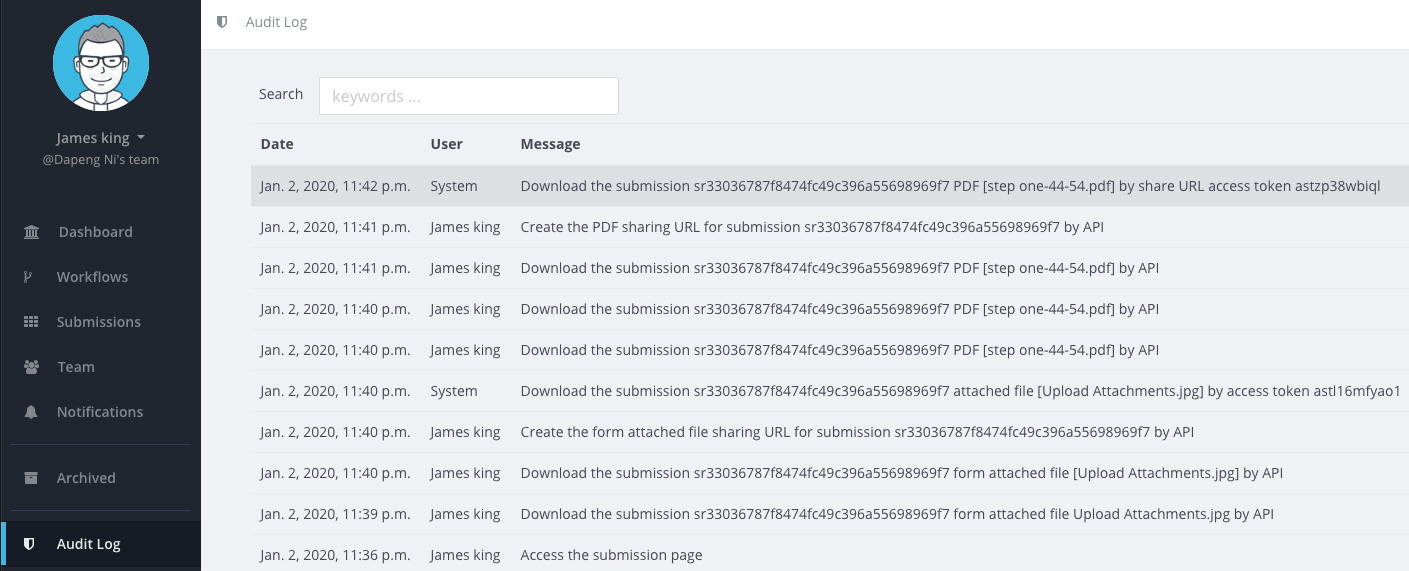
Team Audit Log
Team Admins have access to a full audit log covering sharing, authentication, and access activity — the documented record that HIPAA audit controls require.
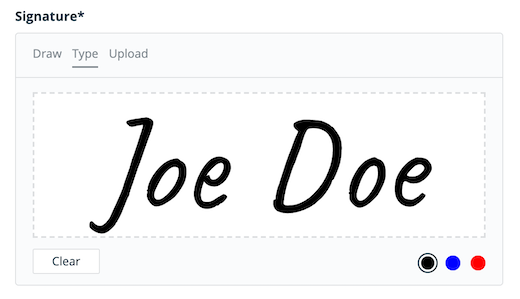
E-Signatures with Certificate
PlatoForms includes a built-in Signature field. When a form is sent through an invitation or workflow step with the certificate turned on, PlatoForms generates a signature certificate recording the consent notice, signer details, signed PDF fingerprint and tamper-evident event timeline.
PDF Generation
After submission, PlatoForms generates a completed PDF with the patient’s data filled in. This can be automatically emailed to the patient as their copy, archived to a HIPAA-compliant cloud drive, or retained in your submissions dashboard.
Conditional Logic for Intake Forms
Patient intake forms are rarely one-size-fits-all. With question-level conditional logic, you can show or hide fields based on previous answers — revealing a medication disclosure section only for patients who report a relevant condition, for example — without the section-based workarounds that Google Forms requires.
Side-by-Side Comparison
| Feature | Google Forms (Workspace + BAA) | PlatoForms (HIPAA plan) |
|---|---|---|
| Price | ✅ Included with Workspace ($6+/user/mo) | Requires Silver/Gold plan |
| Setup time | ✅ Minutes, no learning curve | Moderate onboarding |
| BAA available | ✅ Paid plans only | ✅ |
| Encrypted storage & transmission | ✅ | ✅ |
| Audit log for response access | ❌ | ✅ |
| Automatic session timeout | ❌ | ✅ (15-min lock, 30-min logout) |
| E-signatures with certificate | ❌ | ✅ |
| PDF generation from submissions | ❌ | ✅ |
| PHI-safe email notifications | ⚠️ Requires separate HIPAA email provider | ✅ HIPAA-compliant senders |
| Secure form domain | ❌ | ✅ (secure.platoforms.com) |
| Access control on responses | ⚠️ Via Google Sheets (easy to misconfigure) | ✅ Team-level; sharing links can be opened without login |
| Conditional logic | ⚠️ Section-based only | ✅ Question-level |
| Existing tool integration | ✅ Native Google ecosystem | ⚠️ Via third-party connectors |
Common Healthcare Forms Built with PlatoForms
- Patient intake form — collect demographics, insurance details, and medical history before an appointment
- Medical consent form — document informed consent with e-signature and timestamp
- Patient assessment form — structured clinical intake for evaluations and ongoing care
- Telemedicine consent form — collect consent and technical acknowledgments before virtual visits
- Post-visit survey — gather patient feedback, with conditional follow-up questions for dissatisfied responses
- Medical treatment waiver — document informed risk acknowledgment for procedures
Each template is ready to customize, convert from an existing PDF, or generate with AI — and published on the secure domain automatically once HIPAA is enabled for your team.
One Thing to Watch: External Integrations
Enabling HIPAA on PlatoForms covers your forms and submission data within PlatoForms. If you connect external services — cloud drives, Zapier, or third-party email providers — those services need their own HIPAA compliance and BAA. See the HIPAA compliance guide for details on what’s covered and what isn’t.
This applies to AI integrations too. MCP connections to tools like ChatGPT, Claude, or Cursor create a data path outside PlatoForms that your BAA does not cover. On PlatoForms, MCP integrations and voice form filling are disabled by default when HIPAA is enabled.
The Practical Takeaway
The stakes are concrete. In 2023, OCR investigated Deer Oaks Behavioral Health after a coding error in a patient portal exposed PHI publicly for 17 months — names, dates of birth, diagnoses, patient IDs — resulting in a $225,000 settlement. No malicious intent: just a digital tool without the access controls HIPAA requires.
Google Forms with a Workspace BAA is a starting point, not a complete solution. For routine administrative tasks with low PHI sensitivity — anonymous staff surveys, internal scheduling — it may be sufficient. For anything involving patient data, the missing audit controls, e-signatures, and session management create real compliance gaps that a BAA alone cannot close.
PlatoForms is designed for the workflow healthcare actually runs on: intake forms that generate signed PDFs, consent forms with verifiable signatures, and submission data that only authorized staff can access.
HIPAA compliance is available on Silver and Gold plans. A signed BAA is provided on activation. You can start a 15-day free trial of paid features to build and test your forms with test data, then subscribe to one of those plans and turn on HIPAA compliance before you collect patient information.
Already collecting patient data in Google Forms? Import your existing forms into PlatoForms — no rebuilding required.
Frequently Asked Questions
Is Google Forms HIPAA compliant?
Free Google Forms is not HIPAA compliant — there is no BAA available for free accounts. Google Workspace (paid plans) does offer a BAA that covers Forms, but a BAA alone doesn’t address key functional gaps: no audit log for response access, no automatic session timeout, no e-signatures, and no PDF generation from submissions.
Can I use Google Forms for patient intake?
Not with a free account — this creates direct HIPAA exposure. With Google Workspace and a signed BAA, it’s technically permissible, but the missing audit controls and session management mean it may still fall short of a complete HIPAA implementation. For patient-facing intake that involves PHI, a purpose-built solution with those controls built in is the safer choice.
Does Google Workspace include a BAA for Google Forms?
Yes. Google offers a BAA for paid Workspace accounts (Business Starter and above), and Forms is listed as a covered service. However, the BAA establishes legal responsibility — it doesn’t add audit logs, e-signatures, or session timeouts to the product itself. Those functional gaps remain regardless of the BAA.
What makes a form builder HIPAA compliant?
A HIPAA-compliant form builder needs: a signed BAA, encrypted data storage and transmission, access controls limiting who can view PHI, audit logging of access activity, automatic session timeout, and ideally e-signature support for consent workflows. Most general-purpose form builders satisfy only some of these requirements.
Does PlatoForms sign a BAA?
Yes. PlatoForms provides a signed BAA to the Team Admin when HIPAA compliance is enabled on a Silver or Gold plan. See the HIPAA compliance guide for the full setup process.
Try PlatoForms with Your Own Form
Turn an existing PDF into an online form, or create a new form for your team.
Create your free PlatoForms account →