Filling out the same information across multiple business forms wastes time and increases errors. Whether you’re in real estate, HR, education, or running an online business, duplicating data across documents is frustrating and inefficient.
Master Forms by PlatoForms solves this.
With Master Forms, you create reusable fields once, link them to multiple PDFs, and generate all documents from a single form submission. Your clients or employees fill out one form — and the system automatically populates all linked PDFs with consistent, accurate data.
This guide explains what Master Forms are, how they work, and why they’re essential for modern business workflows.
Table of Contents:
Read more: Not Really Sure Where To Use PDF Master Forms? Here Are A Few Ideas That Could Help
What is a Master Form?
A Master Form is a centralized form template where you define reusable fields once, then map those fields across multiple PDF documents.
How it works:
- Create a Master Form with common fields (name, address, date, signature, etc.)
- Upload and link as many PDF forms as needed
- Map Master Form fields to specific locations on each PDF
- Publish one form URL
- When users fill the form, PlatoForms automatically generates all linked PDFs with the same data
Key concept:
Master Forms eliminate repetitive data entry by centralizing shared fields and distributing them across multiple documents automatically.
How Master Forms work
Step 1: Create Master Form
↓
Add reusable fields (text, dropdowns, signatures, file uploads, etc.)
↓
Step 2: Link PDFs
↓
Upload multiple PDF templates
↓
Step 3: Map fields
↓
Drag Master Form fields onto each PDF
↓
Step 4: Publish
↓
Share one URL or embed code
↓
Step 5: User fills form once
↓
System auto-generates all linked PDFs as a zip package
Important:
- Users see and fill one form with all the necessary fields
- Behind the scenes, PlatoForms maps data to multiple PDFs
- Final output: zip file containing all completed PDFs
Master Form vs Traditional Method
| Traditional Way | PlatoForms Master Form |
|---|---|
| ❌ Fill same info 5-10+ times across forms | ✅ Fill once, auto-populate all PDFs |
| ❌ Send individual PDFs via email | ✅ Share one link for entire package |
| ❌ High risk of typos and inconsistent data | ✅ Guaranteed data consistency |
| ❌ Time: 20-40 minutes per transaction | ✅ Time: 3-5 minutes |
| ❌ Manual copying prone to errors | ✅ Automated accuracy |
| ❌ Difficult to update forms | ✅ Update Master Form, all PDFs reflect changes |
| ❌ Poor mobile experience | ✅ Mobile-optimized form interface |
Step-by-step: How to create a Master Form
Step 1 — Create the Master Form
- Log in to PlatoForms
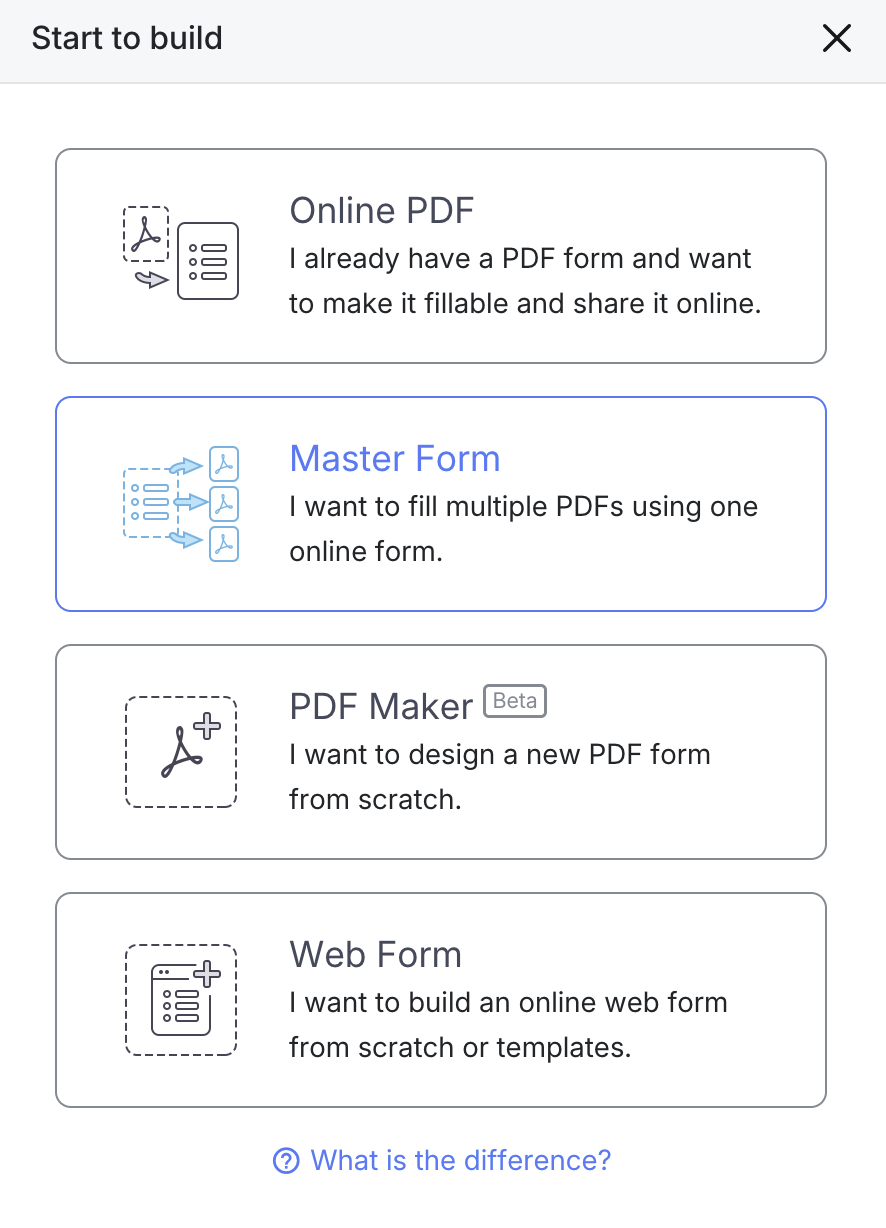
- Click Start to Build
- Select Master Form for Multiple PDFs
Step 2 — Add reusable fields
Add all fields that will be reused across multiple PDFs:
Common field types:
- Text input (name, address, email, phone)
- Date picker
- Dropdown menus
- Checkboxes
- Signature fields
- File upload fields
- Radio buttons
- Number fields
Check available field types in PlatoForms.
Think about all the information that appears on multiple forms. Add it to the Master Form once, and you can map it everywhere.
Step 3 — Customize field properties
For each field, configure:
- Field label
- Required/optional status
- Validation rules
- Default values
- Conditional logic (show/hide based on other inputs)
- Multi-language support
Step 4 — Preview your Master Form
Before linking PDFs, click Preview & Design to test the user experience.
Recommendation: Add sample data to see how the form renders with realistic information.
Step 5 — Upload and link PDFs
- Go back to the Dashboard
- Find your Master Form
- Click Link → Link New PDF
- Upload your first PDF template
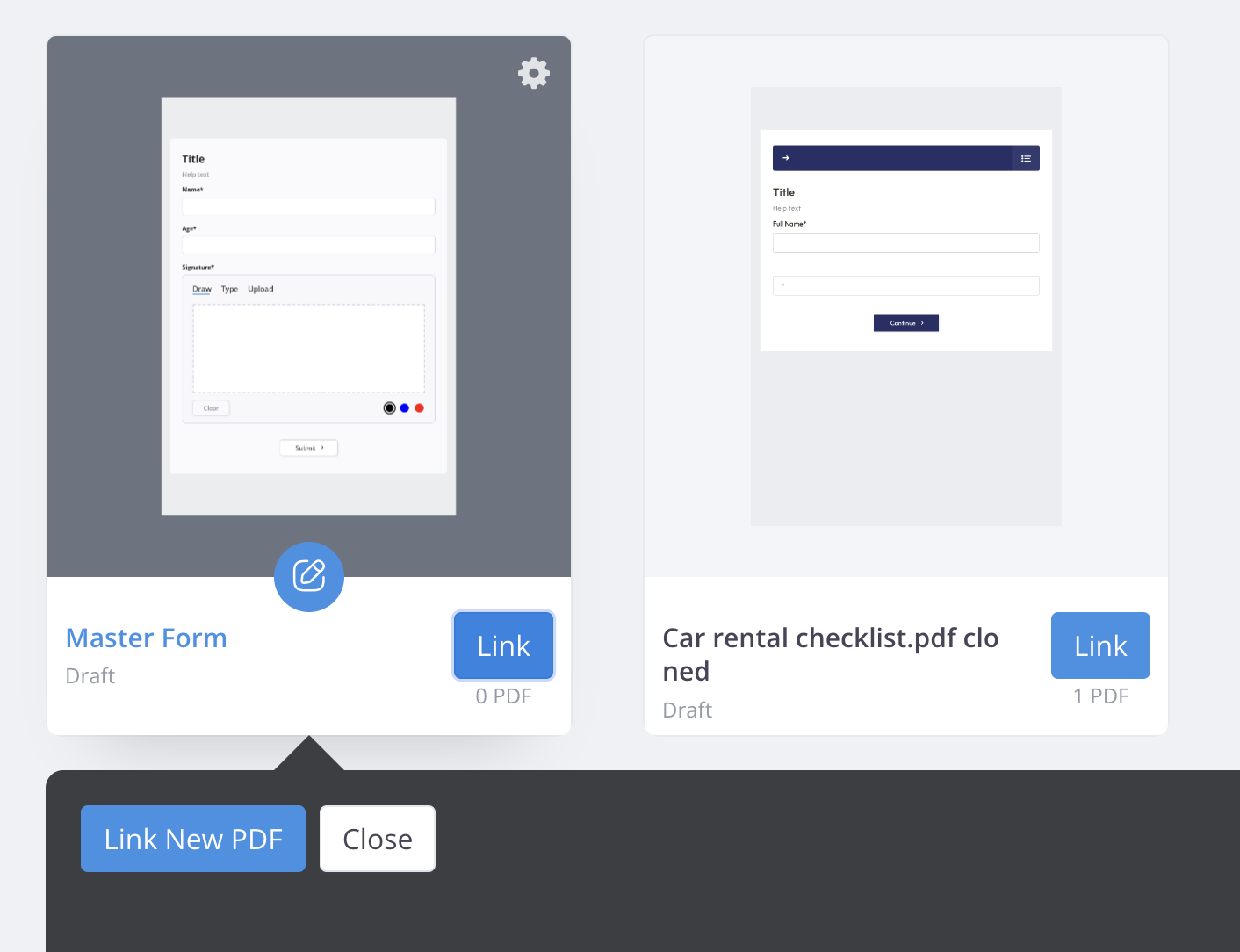
You can link unlimited PDFs to one Master Form.
Step 6 — Map fields to PDFs
For each linked PDF:
- Hover over a field in the Master Form (left panel)
- Click Add to PDF
- The field appears in the PDF Form Area (right panel)
- Drag and drop it to the correct position on the PDF

Important: You can add the same field multiple times. For example, if you need a signature on every page, add the signature field to each page.
Step 7 — Publish your Master Form
Click Publish at the top left.
You’ll receive:
- Public URL — Direct link to your form
- Embed Script — Code to embed on your website
- QR Code — Scannable code for mobile access
Key point:
No matter how many PDFs are linked, you share one URL. Users fill one form, and the system generates all PDFs automatically.
Step 8 — Receive submissions
When a user submits the form:
- You receive an email notification
- Submission appears in the Submissions Dashboard
- Download a zip file containing all linked PDFs with data filled in
Real-world use cases
1. Real estate transactions
Challenge:
Real estate deals require multiple forms: purchase agreements, disclosure statements, inspection reports, title transfers, and more. Filling each form separately with the same buyer/seller information wastes time and creates errors.
Master Form solution:
- Create fields: buyer name, address, property address, agent info, date
- Link PDFs: purchase agreement, disclosure form, inspection report, title documents
- Buyer fills one form
- System generates complete document package
2. Employee onboarding

Challenge:
New hires must complete W-4, I-9, direct deposit forms, emergency contacts, benefits enrollment, company policies acknowledgment, and more.
Master Form solution:
- Create fields: name, SSN, address, bank info, emergency contacts
- Link all HR PDFs
- Employee fills once
- HR receives complete onboarding package
Benefits:
- Consistent data across all forms
- No missing information
- Faster onboarding process
3. Education and examinations
Challenge:
Schools distribute exam forms, answer sheets, consent forms, and registration documents — often requiring the same student information repeatedly.
Master Form solution:
- Create fields: student name, ID, grade, parent info
- Link exam forms, permission slips, registration
- Student/parent fills once
- School receives all required documents
Benefits:
- Reduces printing costs
- Eliminates data entry errors
- Streamlines administration
4. Online businesses and client intake
Challenge:
Service businesses (legal, consulting, healthcare) require multiple intake forms, agreements, and consent documents.
Master Form solution:
- Create fields: client name, contact info, preferences
- Link service agreements, intake forms, consent forms
- Client fills once
- Business receives complete client package
Benefits:
- Professional client experience
- Faster project kickoff
- Organized client records
Benefits for your business
1. Massive time savings
Example calculation:
Without Master Forms:
- 5 PDF forms × 6 minutes each = 30 minutes per transaction
- 100 transactions per month = 50 hours
With Master Forms:
- 1 form × 5 minutes = 5 minutes per transaction
- 100 transactions per month = 8.3 hours
Savings: 41.7 hours per month (5+ working days)

2. Guaranteed data consistency
When users fill one Master Form, all linked PDFs receive identical information. This eliminates:
- Typos and transcription errors
- Inconsistent formatting
- Missing data across documents
- Manual reconciliation work
3. Better user experience
Traditional method:
- “Please fill out these 7 PDFs”
- Users download, fill, re-upload each one
- High abandonment rate
Master Form method:
- “Please fill out this form”
- One-time submission
- Higher completion rate
4. Easy updates and maintenance
When you need to change a field:
- Edit the Master Form once
- Changes apply to all linked PDFs
- No need to update each PDF individually
5. Professional document delivery
Users receive a complete, organized package:
- All forms in one zip file
- Consistent formatting
- Ready for processing
- Professional impression
6. No printing costs
Everything is digital:
- No paper forms
- No printing expenses
- No physical storage
- Easy archiving and retrieval
7. Mobile-friendly
Master Forms work perfectly on phones and tablets:
- Responsive design
- Touch-friendly fields
- Auto-save functionality
- Works in any browser
Advanced features
| Feature | What It Does | Examples |
|---|---|---|
| Conditional Logic | Show/hide fields based on responses | “Married” → spouse info “Commercial property” → business details “Choose benefits” → enrollment forms |
| File Uploads | Collect documents automatically | ID scans, photos, certificates, supporting documents |
| Multi-language | Same form, multiple languages | Switch to user’s selected language |
| Prefilled Fields | Auto-fill known information | Returning clients, existing employees, repeat transactions |
FAQ
How many PDFs can I link to one Master Form?
You can link as many PDFs as you need to one Master Form (no practical limit for typical business workflows).
Can I use the same field multiple times on different pages?
Yes. A single Master Form field can be placed on multiple PDF pages.
Example: A signature field can appear on every page of a 10-page contract.
What if my PDFs have different structures?
No problem. Master Forms work across different PDF layouts, even if the pages vary in structure.
You only map each field to the PDFs where it’s needed.
Does Master Form work with scanned PDFs or image-based PDFs?
Yes. PlatoForms supports scanned PDFs, image-based documents, and multi-page files.
Field mapping works normally even if the PDF isn’t text-selectable.
Can I use Master Forms for free?
Yes. The Free Forever plan supports Master Forms with basic usage, including:
-
1 active form
-
100 submissions per month
-
Core features like field mapping
How do users receive the final PDFs?
After submission, the system generates a zip file containing all linked PDFs. You can:
- Email the zip file automatically
- Let users download from the confirmation page
- Access via the Submissions Dashboard
Can I edit a Master Form after publishing?
Yes. You can update fields, add/remove PDFs, or remap locations anytime. Changes apply to new submissions while old submissions remain archived.
Is Master Form data secure?
Yes. All submission data is encrypted in transit and at rest. PlatoForms supports HIPAA compliance for organizations handling sensitive or regulated information.
Can I integrate Master Forms with other tools?
Yes. Master Forms work with:
- Google Sheets
- Zapier (6,000+ apps)
- Make
- Slack
- Email notifications
- Webhooks / API
Get started with Master Forms
Stop wasting time on repetitive data entry.
With PlatoForms Master Forms, you can:
✅ Create reusable fields once
✅ Link unlimited PDFs
✅ Map fields with drag-and-drop
✅ Publish one shareable URL
✅ Generate all PDFs from one submission
✅ Deliver organized zip packages
✅ Save hours per week
✅ Eliminate data entry errors
✅ Improve user experience
✅ Work on mobile devices
Industries using Master Forms:
- Real estate agencies
- HR departments
- Educational institutions
- Legal firms
- Healthcare providers
- Consulting businesses
- Online service companies
🚀 Start free — No credit card required
👉 Create your first Master Form
Video tutorial:
Watch our step-by-step walkthrough:
Related resources: