











A client intake form for a law firm collects a prospective client’s contact and case details, runs a conflict check against the opposing party before you schedule a consultation, and gets a signed confidentiality acknowledgment — all before anyone on your team picks up the phone. Here’s how to build one that actually does all three, not just the first.
Here’s a scenario most firm administrators will recognize.
A prospective client submits a contact form on Monday morning. A paralegal follows up by phone, spends twenty minutes taking notes, and schedules a consultation for Thursday.
On Wednesday, someone remembers to run a conflict check—and finds that the opposing party is a current client. The consultation gets cancelled.
The prospective client, who cleared their Thursday afternoon and drove across town, is understandably not pleased.
The Problem? This happens because the intake process was built around convenience for the firm, not around what the intake process is actually supposed to do.
A well-designed client intake form doesn’t just collect contact information.
It runs a conflict check before anyone picks up the phone. It tells you whether the case fits your practice before you’ve spent an hour evaluating it.
It gets the client’s signature on a confidentiality acknowledgment before they’ve shared a single sensitive detail.
And it does most of that automatically, without anyone on your team having to chase it down.
This guide is about building that form.
The Real Job of a Client Intake Form
Most articles about intake forms frame them as “information collection.” That’s true but incomplete. A law firm intake form has four distinct jobs, and most firms only design for one of them.
Job 1: Screen the case. Is this a matter your firm handles? Is it urgent enough to prioritize? Does the client’s situation fall within your geographic jurisdiction or specialty? A good intake form surfaces this before anyone on your team has invested time in the relationship.
Job 2: Run a conflict check. This is the most critical and most commonly neglected function. You cannot confirm a consultation—let alone begin representation—until you know there’s no conflict. That requires the opposing party’s name, not just the client’s. Most intake forms don’t ask for it.
Job 3: Prepare the attorney. By the time the attorney walks into a consultation, they should know the type of matter, the key facts, who else is involved, and whether anything has been filed. If they’re learning this for the first time during the consultation, the form failed.
Job 4: Set expectations. The client should understand, before they’ve shared anything sensitive, that submitting the form doesn’t create an attorney-client relationship—but that whatever they share is treated as confidential. This protects the firm and gives the client the information they need to proceed honestly.
The Field That Most Firms Forget
Before we get to the full field list, let’s talk about the conflict check, because it’s the single biggest operational gap in most law firm intake forms.
To run a conflict check, you need:
- The full name of the opposing party (or parties)
- The name of any related business entities
- The name of any significant third parties involved in the matter
Most intake forms collect the client’s details thoroughly and then leave a single open text box for “describe your legal issue.” That description might mention the opposing party by first name, or might not mention them at all. Running a conflict check from that is guesswork.

Build the opposing party fields as structured fields—not a freeform box—and route them directly to whoever handles conflicts at your firm. If your form submission triggers an automatic email to your conflicts paralegal the moment a new inquiry comes in, the conflict check can be completed before the prospective client has even received their confirmation email. That’s the difference between cancelling a Thursday consultation on Wednesday and never scheduling it in the first place.
What to Include: A Field-by-Field Breakdown
Contact and Identity
| Field | Notes |
|---|---|
| Full legal name | Required for conflict check and file creation |
| Date of birth | Useful for identity verification and some case types |
| Home address | Required for jurisdictional questions — use Address Autocomplete to reduce typos and speed up completion |
| Phone number | Include preferred contact time if you can |
| Email address | Will be used for confirmation and follow-up |
| Preferred contact method | Phone vs. email—clients have strong preferences |
| How did you hear about us? | Useful for referral tracking; also flags referral relationships |
Case Information
| Field | Notes |
|---|---|
| Practice area / matter type | Use a dropdown—this can trigger conditional fields |
| Brief description of the issue | Keep this open-ended; you’re not cross-examining them |
| Date of incident or key date | Critical for statute of limitations screening |
| Have any legal proceedings begun? | Yes/No; if yes, collect court name, case number, next date |
| Prior attorney for this matter? | Yes/No; if yes, collect name and reason for change |
Conflict Check Fields (Do Not Skip)
| Field | Notes |
|---|---|
| Opposing party full name | The field most forms forget |
| Opposing party organization (if any) | For business disputes, employment matters, etc. |
| Other significant parties | Witnesses, co-defendants, third-party insurers |
Billing and Expectations
| Field | Notes |
|---|---|
| Urgency of the matter | Helps with scheduling and prioritization |
| Has the client worked with a lawyer before? | Sets realistic expectations for the consultation |
| Preferred billing arrangement | Only ask if your firm offers options |
Disclaimer and Consent
This isn’t a field so much as a section that must appear before the signature:
Submitting this form does not create an attorney-client relationship with [Firm Name]. The information you provide is treated as confidential. Our firm will review your submission and contact you to discuss next steps. We reserve the right to decline representation.
Follow this with:
- A checkbox: “I have read and understand the above”
- A signature field: the client’s acknowledgment
Practice-Area Differences at a Glance
The core sections above apply to every intake form. What changes by practice area is the case-specific detail you need before the consultation. Rather than building a separate form for each area, use conditional logic to show only the relevant fields based on what the client selects.
| Practice Area | Key Additional Fields |
|---|---|
| Personal Injury | Incident date/location, injury type, current treatment, insurance claims filed, witnesses |
| Family Law | Marital status, date of marriage, children’s ages, existing court orders, rough asset overview |
| Immigration | Citizenship, current visa/status, entry date, prior applications, any removal proceedings |
| Estate Planning | Family structure, dependents, approximate assets, existing documents (will, trust, POA) |
| Business/Corporate | Entity type and jurisdiction, nature of matter, involved parties, relevant deadlines |
| Criminal Defense | Charges, arrest date, bail status, court dates, prior convictions (if relevant) |
A client who selects “Estate Planning” from your dropdown should never see fields about their arrest date. Conditional logic handles this—one form, cleanly adapted to each situation.
Building It: What PlatoForms Handles
Rather than walking through every configuration step, here’s how PlatoForms addresses the specific problems a law firm intake form needs to solve.
Already have a paper or PDF intake form? If your firm has been using a Word or PDF intake form for years, you don’t need to start from scratch. PlatoForms can convert your existing PDF directly into an online form—fields are detected automatically, and you can add conditional logic, a signature field, and routing on top of the existing structure.
The conflict check routing problem. Use Logic-based Email Routing to send opposing party fields directly to your conflicts paralegal the moment a form is submitted—in parallel with the client confirmation, before anyone at the firm has touched it. No waiting, no remembering.
The multiple practice area problem. The Logic panel handles conditional field display. One form, a dropdown at the top, and each practice area shows only its relevant section. You maintain one form instead of six.
The document collection problem. Immigration and business matters often require documents at intake—passport copies, incorporation documents, prior orders. Add file upload fields with type and size restrictions so clients can attach them at submission rather than in a follow-up email chain.
The “what do I ask?” problem. If you’re unsure how to structure the practice-area-specific fields, use the AI Form Generator. Describe what you need—“a section for family law intake covering marital status, children, and existing court orders”—and it builds the field structure. You edit from there.
The signature and audit trail problem. The Signature field lets clients sign the disclaimer and consent acknowledgment digitally from any device. PlatoForms generates a signature certificate for each submission with timestamp and form data. If the validity of the intake acknowledgment is ever questioned, you have a clean record.
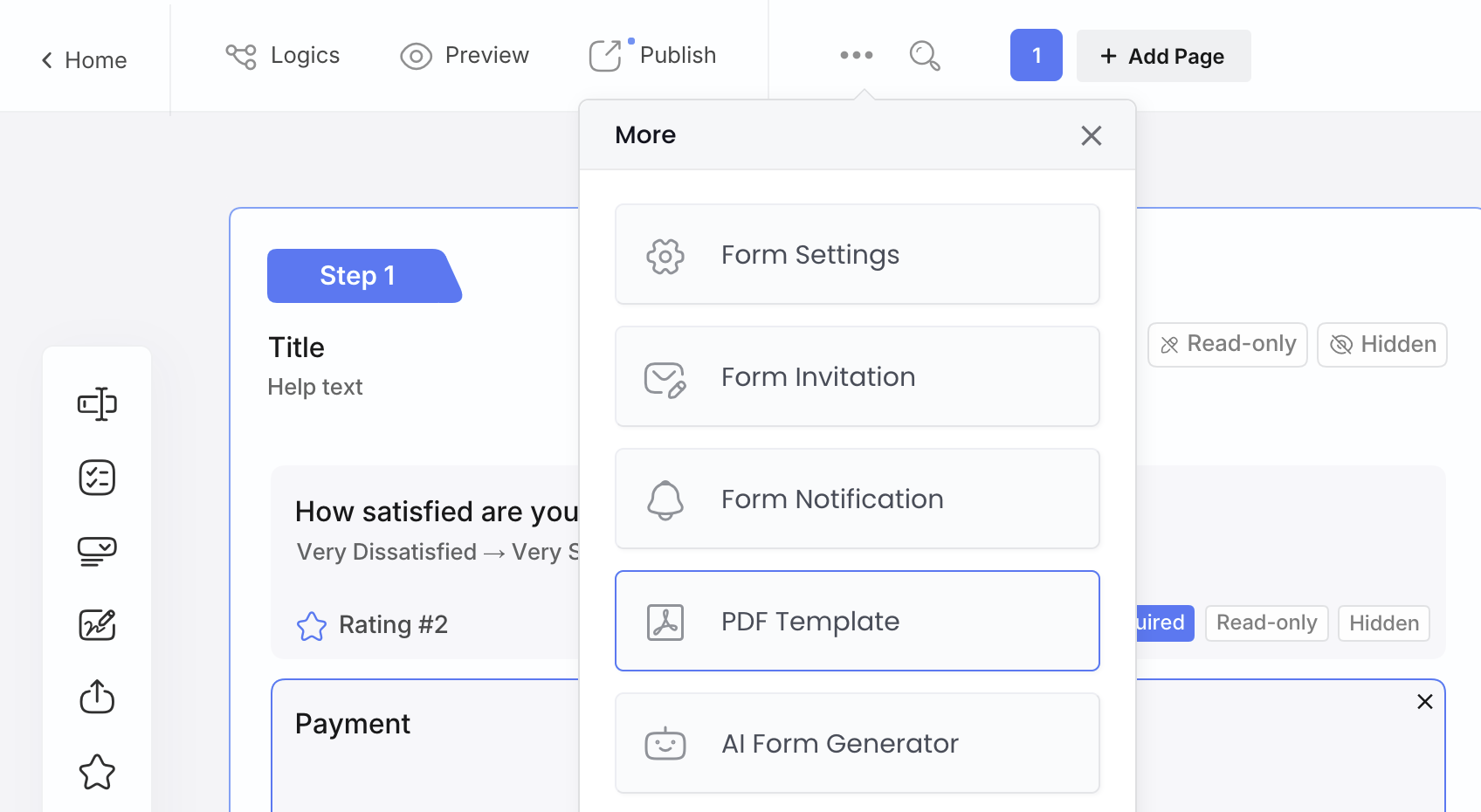
The post-intake document generation problem. Once a client submits their intake form, many firms need to immediately produce a follow-up document—a case summary, a client onboarding letter, or a fee notice—pre-filled with what was just collected. PDF Templates let you design a PDF output format directly inside your web form: add static text, dynamic variables pulled from the submission (client name, contact details, matter type, date of submission), and control layout details like margins and headers. When the form is submitted, the PDF is generated from that template. No pre-existing PDF file needed, no copy-pasting. Find it at Form Editor → More (⋯) → PDF Template.
The “they never got our form” problem. Form Notifications sends a branded confirmation to the client immediately on submission—what happens next, when they’ll hear back, what to bring to the consultation. This eliminates most “did you receive my form?” follow-up calls and sets a professional tone before anyone on your team has spoken to them.
The access problem. Embed the form directly on your website’s contact or practice area pages. Prospective clients referred by a colleague at 9pm can start the intake process immediately. For clients on mobile—who may be in a stressful situation and filling this out on their phone—a Conversational layout presents one question at a time and tends to have meaningfully higher completion rates.
Start from the Legal Client Intake Form template and customize from there, or browse the broader PlatoForms legal forms library.
Pro Tip — High-volume intake (legal aid, multi-location firms): If your firm handles a large number of repeat clients or needs to send intake forms to a known list of people—say, existing clients whose information needs updating—Bulk Pre-fill lets you upload a CSV and generate hundreds of pre-populated form invitations at once. Each client receives a link to a form already filled with their name, contact details, and any other known fields. They only need to complete the missing information and sign.
Before You Publish: A Checklist
Run through this before your intake form goes live.
Content
- Opposing party fields are present and clearly labeled
- Practice area dropdown triggers the right conditional sections
- Disclaimer is accurate and explicitly states no attorney-client relationship is formed
- Confidentiality notice is included
- Signature field is required before submission
Process
- Conflict check fields route automatically to the right person at your firm
- Client receives an automatic confirmation email with next steps
- Submission triggers a notification to whoever schedules consultations
- Completed submissions are stored somewhere accessible (not just in an email inbox)
Usability
- Someone outside your team has tested the form on a mobile device
- Legal jargon has been replaced with plain language where possible
- Required fields are limited to what’s actually needed for screening
- The form can be completed in under ten minutes

FAQ
What should be included in a client intake form?
For a law firm, a client intake form should include contact and identity details, a description of the legal issue with key dates, the opposing party’s name for a conflict check, billing expectations, and a disclaimer with a signature acknowledging that no attorney-client relationship is formed yet. See the full field-by-field breakdown above.
How do I create a client intake form?
For a law firm, start from the four jobs the form needs to do: screen the case, run a conflict check, prepare the attorney, and set expectations. Build fields around those jobs instead of just contact info, add conditional logic so each practice area only sees its relevant section, and route the opposing-party fields straight to whoever checks for conflicts. If you already have a PDF or Word intake form, convert it instead of starting from scratch — or begin from a legal intake template.
What is a legal intake form?
A legal intake form (also called a client intake form) is the first form a prospective client submits to a law firm. It collects their contact and case details so the firm can screen the case, check for conflicts of interest, and decide whether to schedule a consultation.
What questions should I ask on a new client intake form?
For a law firm, ask at minimum: contact and identity details, a description of the legal issue, key dates like the date of the incident (for statute-of-limitations screening), and — the field most forms forget — the opposing party’s name, so the firm can run a conflict check before scheduling anything.
What is the purpose of a client intake form?
For a law firm, it has four jobs: screen whether the case fits your firm, run a conflict check before anyone invests time in the relationship, prepare the attorney with the key facts before the consultation, and set the client’s expectations about confidentiality and the attorney-client relationship.
One Last Thing
A client intake form is also a first impression. Clients who are considering your firm are often in stressful situations—they’re dealing with an accident, a separation, an immigration issue, or an estate. The form they interact with before they’ve spoken to anyone sets the tone.
A form that’s clear, asks sensible questions, and tells them exactly what happens next communicates something important: that your firm is organized and takes their situation seriously. A form that’s confusing, asks for things it doesn’t explain, or goes silent after submission communicates the opposite.
The technology is easy. The discipline to keep it simple, well-maintained, and client-centered is what separates intake forms that work from intake forms that collect dust.
Looking for more legal form templates? PlatoForms also has templates for NDA agreements, attorney timesheets, and subpoena records forms.