










Find trending topics and quick answers here
Hi, how can we help?
Search by task, feature, or problem - not just a single keyword.
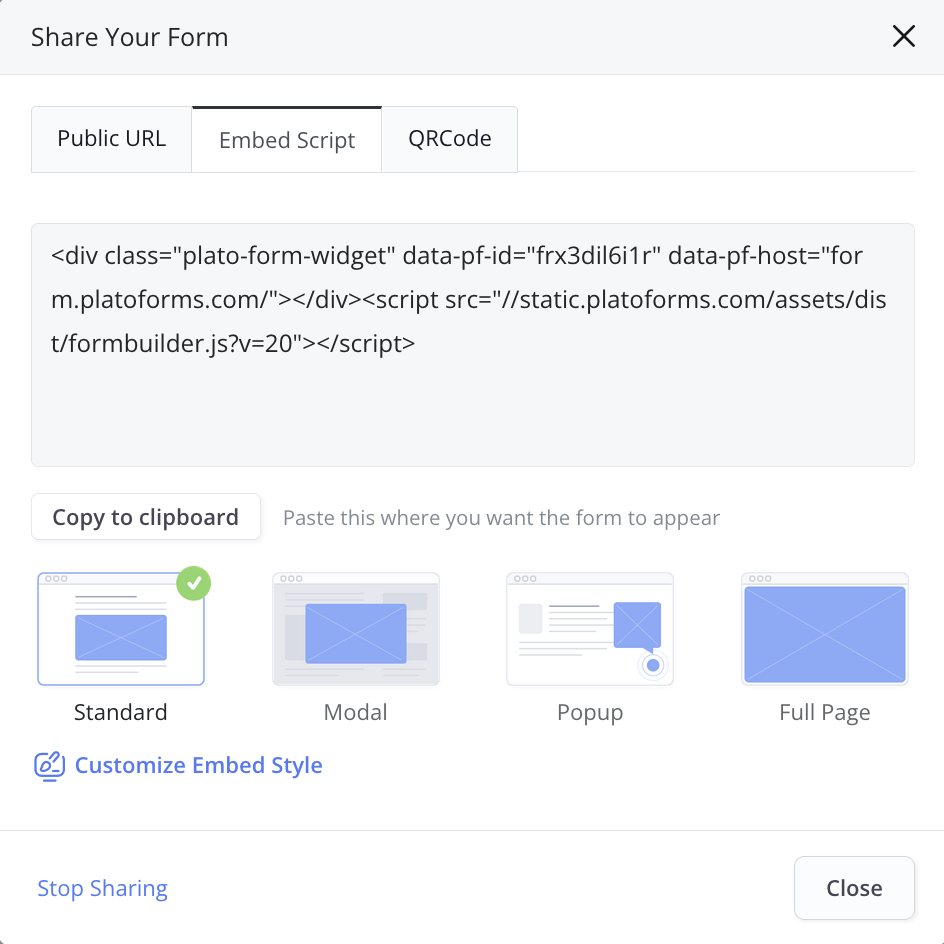
What’s the difference between the four embed script options?

Question
What’s the difference between the four embed script options? Which embed script option should I use for my website?
Answer
When embedding your form, PlatoForms offers four modes to match different use cases. Here’s a quick breakdown to help you choose the right one:
1. Standard embed
What it does: Places the form directly on your webpage.
Best for: Contact forms, registration forms, or any form that needs to be fully visible on the page.
Example: A “Contact Us” section on a homepage.
2. Modal embed

What it does: Opens the form in a popup window when users click a button.
Best for: Actions like “Get a Quote” or “Sign Up” that require minimal space on the main page.
Customizable: Adjust the popup’s width and the button text.
Example: A “Subscribe Now” button that triggers a signup form.
3. Popup embed

What it does: Displays the form as a floating button on the page. Clicking the button opens a small form window.
Best for: Feedback forms, subscription forms, or forms that should be accessible but not intrusive.
Customizable: Adjust the button’s size, style, and the form’s corner radius.
Example: A floating “Feedback” button on the side of a webpage.
4. Full-page embed
What it does: The form covers the whole page, at least the height of the browser window. Use it on a page that holds nothing but the form.
Best for: Surveys, detailed questionnaires, or standalone forms that require the user’s full attention.
Example: A “Customer Satisfaction Survey” that spans the full browser window.
Pro tip: Survey vs Questionnaire: What’s the Difference and When to Use Each?
How do I choose?
- Use Standard embed if the form is central to your page’s purpose.
- Opt for Modal embed or Popup embed to save space while keeping the form easily accessible.
- Go with Full-page embed for forms that need undivided attention or extra space.
Modal and Popup can be previewed in Customize Embed Style before you add them to your site. Standard and Full Page have no preview there; they show the form as it appears on your page.
Video
Take a look at our showcase video: