


Most form builders look similar from the outside. A drag-and-drop editor, a publish button, email notifications on submission. Nothing in that interface tells you whether the data is encrypted, who can access it, or where it goes after collection.
Security failures in form builders are rarely visible before they become a problem. They appear in breach notifications, compliance audits, or requests from users who want to know what happened to their data.
The warning signs, however, are mostly visible in advance — in documentation, in feature sets, and in the answers to specific questions. This article covers seven of them.
This article is for informational purposes only and does not constitute legal advice. Consult a qualified data protection professional for guidance specific to your organization.
On this page
Sign 1: No Data Processing Agreement available
A Data Processing Agreement (DPA) is a legally binding contract between the organization collecting data (the controller) and the platform processing it (the processor). Where GDPR applies and a controller uses a third-party processor, Article 28 requires a compliant Data Processing Agreement before the processor handles personal data on the controller’s behalf.
The contract must define, at minimum: the subject matter and duration of processing, the type of data and categories of individuals involved, the controller’s instructions to the processor, security obligations, sub-processor disclosure, procedures for handling data subject rights requests, breach notification timelines, and data deletion or return on contract termination.
This is not a checkbox. Article 28(3) specifies each of these elements explicitly. A privacy policy is not a DPA. Terms of service are not a DPA. A DPA is a separate, bilateral instrument signed by both parties.
The sign: The form builder’s website has no downloadable DPA. Searching for “DPA” or “Data Processing Agreement” returns nothing, or redirects to a general privacy policy.
What this means in practice: Without a signed DPA, using the platform to collect personal data from individuals in the EU creates legal exposure for your organization — not the platform. Under GDPR, the controller (you) bears primary accountability for ensuring an Article 28-compliant agreement is in place. Failing to have an Article 28-compliant processing agreement in place is itself a compliance issue, regardless of whether a personal data breach occurs.
Similar accountability principles exist under other privacy frameworks. CCPA/CPRA, Brazil’s LGPD, and Canada’s PIPEDA all expect organizations to use appropriate contractual safeguards when engaging third-party service providers, although the legal mechanisms differ from GDPR Article 28.
What to look for: A publicly available, downloadable DPA that can be signed without requiring enterprise negotiation. For organizations under GDPR, the DPA should also address sub-processors — the third parties the form builder itself relies on for infrastructure, storage, or processing. A vendor’s trust center is usually the right place to find this documentation. For a full GDPR implementation checklist, see GDPR Compliance for Online Forms: A Practical Checklist.
Sign 2: Third-party scripts run on form pages without disclosure
When a user opens your form, they may be sharing their data with more than just you.
Most web applications — including form builders — load third-party JavaScript for analytics, advertising, session recording, error monitoring, and A/B testing. Some of these scripts have access to form field values as users type. This means a name, email address, or phone number can leave the user’s device before they have clicked “Submit.”
This is documented behavior. A 2022 study by researchers at Radboud University, KU Leuven, and the University of Lausanne — titled “Leaky Forms: A Study of Email and Password Exfiltration Before Form Submission” — found that 1,844 websites in a sample of 100,000 collected user email addresses before form submission via third-party tracking scripts, without user consent. The data was exfiltrated silently, before any submission event occurred.
The mechanism is straightforward: analytics and marketing scripts attach event listeners to input fields and transmit the content to remote collection endpoints. The form builder itself may not intend this behavior — but if third-party scripts are loaded on the same page, the data flows to them regardless.
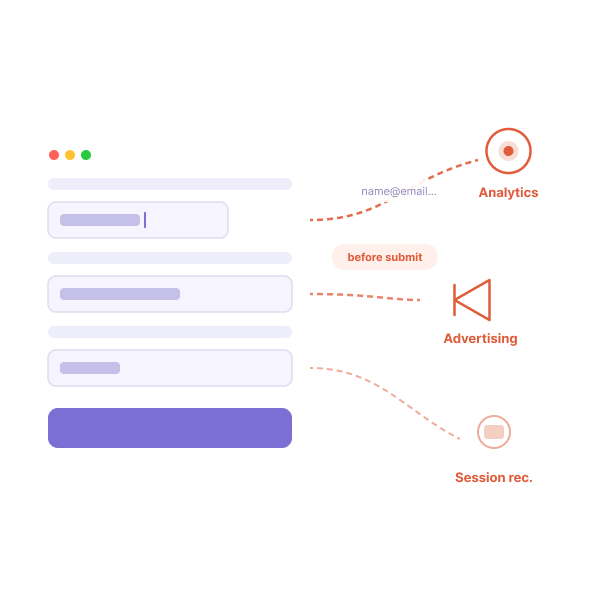
The sign: The form builder does not document which third-party scripts run on published form pages. Their privacy policy describes their own data collection, not the collection behavior of scripts running on your forms.
What this means in practice: If your form loads a third-party analytics pixel or session recording tool, the data your users type may be transmitted to that third party without consent. This affects your privacy policy accuracy, your GDPR compliance (lawful basis for processing), and in healthcare contexts, potentially your HIPAA obligations.
What to look for: Explicit documentation of the scripts loaded on published form pages. A platform handling sensitive data should be able to state, precisely, which services receive data from form submissions and in what form. Forms served on isolated, first-party domains without advertising or analytics scripts are the strongest solution.
Sign 3: Encryption claims are vague or absent

“Your data is secure” is a marketing statement. It does not describe a technical control. Two specific claims matter for form data:
Encryption in transit means that data is encrypted as it travels between the user’s browser and the server. The current standard is TLS 1.2 or higher. This is broadly standard across the web — but it should be stated explicitly, with the protocol version.
Encryption at rest means that stored data — form submissions sitting in a database — is encrypted. The current standard for sensitive data is AES-256. This is where platforms differ. Some encrypt submission data at rest; many do not. A platform can have excellent in-transit encryption while storing your data in plaintext.
The distinction matters because the threat models are different. In-transit encryption protects against interception during transmission. At-rest encryption protects against unauthorized access to stored data — which is the relevant threat in most breach scenarios. According to IBM’s 2025 Cost of a Data Breach Report, the average breach takes 158 days to identify and 83 days to contain — a total lifecycle of 241 days, the lowest in nine years, according to IBM Security. During that window, stored data is the primary exposure.
OWASP’s Top 10 (2025) lists “Cryptographic Failures” as A04 — one of the most critical web application security risks — specifically including “data stored in cleartext” as a primary failure mode.
The sign: The platform’s security documentation uses phrases like “we use industry-standard security” without specifying the encryption algorithm, protocol version, or scope of coverage. No mention of AES-256 or TLS 1.2+.
What this means in practice: Vague encryption claims provide no verifiable assurance. For regulated data — healthcare, financial, legal — encryption at rest is frequently a compliance requirement, not a preference. HIPAA’s Security Rule (45 CFR § 164.312) specifically addresses encryption as an “addressable” safeguard, meaning covered entities must either implement it or document why an equivalent alternative provides the same protection.
What to look for: A clear, technical statement: “Submission data is encrypted at rest using AES-256 and in transit using TLS 1.2+.” If this cannot be found in public documentation — typically in a vendor’s trust center or security page — ask directly. A platform handling sensitive data should answer without ambiguity. For a full breakdown of what the security stack should look like, see Data Security for Online Forms: What Every Business Should Know.
Sign 4: No configurable data retention
How long does the platform store your submission data? If the answer is “indefinitely, unless you manually delete it,” that is a problem.
GDPR’s storage limitation principle (Article 5(1)(e)) requires that personal data is “kept in a form which permits identification of data subjects for no longer than is necessary for the purposes for which the personal data are processed.” Storing form submissions forever — even from years ago — is almost never compliant with this requirement.
There is also a practical risk: the larger the data set held by a platform, the more valuable it becomes as a breach target. Form submissions from three years ago, still on a server, are still at risk. Automated deletion reduces that exposure.
Different workflows have different legitimate retention needs:
| Form type | Typical retention consideration |
|---|---|
| Contact and inquiry forms | Duration of active follow-up |
| Lead generation forms | Active sales cycle |
| Event registration | Event date plus any required record-keeping period |
| Healthcare intake | Duration required by applicable regulation (HIPAA mandates 6 years for covered records) |
| Employment applications | Varies by jurisdiction and governed by local employment law — consult your DPO or legal counsel before setting a retention period |
The sign: The platform stores submissions indefinitely by default. There are no settings to configure an automatic deletion schedule. The only option is manual deletion.
What this means in practice: Compliance with data retention requirements depends on human action. Automated policies do not. An organization that relies on staff to manually delete old form submissions will eventually miss a deletion cycle — particularly during staff transitions or high-volume periods.
What to look for: Configurable retention periods at the account or form level. The range should accommodate both short retention (for high-privacy workflows) and extended retention (for compliance-required record-keeping). Options like “delete immediately after export to cloud storage” represent best practice for privacy-critical workflows.
Sign 5: No audit log for submission access
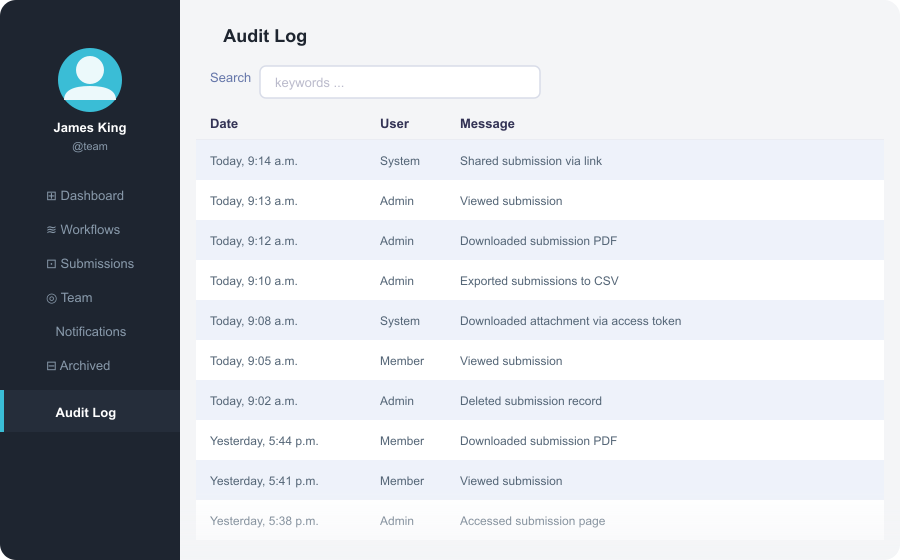
When a submission is opened, who opened it? When? Did anyone export it? Was it shared via a link? Was it deleted, and by whom?
In the absence of an audit log, none of these questions can be answered. This creates a significant accountability gap — one that becomes visible in regulatory audits, data subject access requests, or internal investigations.
HIPAA’s Security Rule explicitly addresses this. The audit controls standard (45 CFR § 164.312(b)) requires that covered entities “implement hardware, software, and/or procedural mechanisms that record and examine activity in information systems that contain or use electronic protected health information.” Logging who viewed a submission, and when, is a direct implementation of this requirement.
Beyond healthcare: GDPR Article 5(2) establishes the accountability principle — controllers must be able to “demonstrate compliance” with data protection principles. An audit log is a foundational component of that demonstration. Without it, “we didn’t access that data” is a claim you cannot verify.
OWASP’s Top 10 (2025) includes “Security Logging and Alerting Failures” (A09) as a critical web application risk — specifically: “Auditable events, such as logins, failed logins, and high-value transactions, are not logged.”
The sign: The platform has no activity log. Administrators can view submissions but cannot see access history, export history, or sharing activity.
What this means in practice: You cannot answer questions about who accessed specific submissions. If a data subject exercises their right of access under GDPR Article 15, they may request information about the recipients or categories of recipients with whom their personal data has been shared — a question an audit log helps answer. While Article 15 does not require controllers to maintain audit logs, such logs can significantly assist in demonstrating compliance and responding accurately to access requests.
What to look for: A team-level audit log accessible to administrators, recording at minimum: submission access events, export events, sharing link creation, and deletion events. Logs should be retained for a period consistent with your compliance requirements.
Sign 6: No BAA available for healthcare use cases

In the United States, any organization that handles Protected Health Information (PHI) on behalf of a covered entity — including a form builder processing patient intake forms — is legally a Business Associate under HIPAA (45 CFR § 160.103).
Before any PHI flows through a third-party tool, a signed Business Associate Agreement (BAA) must be in place. The BAA is not merely a formality: it establishes the Business Associate’s obligations regarding PHI protection, breach notification timelines, and permissible data uses. Without it, the covered entity bears liability for HIPAA violations arising from the Business Associate’s handling of PHI — regardless of the platform’s actual security controls.
OCR has consistently enforced this requirement. Settlements have been reached against healthcare organizations for using unauthorized third-party tools to process PHI, even in the absence of a breach. The violation is the missing agreement, not the breach.
For the specific technical safeguards HIPAA requires — which a form builder must implement to validly sign a BAA — see what HIPAA actually requires from online form tools.
The sign: The platform offers no BAA, or offers one only at enterprise pricing tiers inaccessible to most healthcare organizations. Small clinics, independent therapists, and healthcare startups are left collecting PHI without a compliant processing relationship.
What this means in practice: Using a form builder without a BAA to collect patient data — intake forms, consent forms, appointment requests, insurance details linked to health information — is a HIPAA violation. It is not a gray area.
What to look for: A BAA available on a mid-market plan, signed automatically (or with minimal friction) when HIPAA mode is enabled. The signed BAA should be delivered to the account administrator as a document they can retain and produce in an audit.
Sign 7: Individual submissions cannot be deleted on request
GDPR Article 17 establishes the right to erasure. When a data subject requests deletion of their personal data, the controller must comply without undue delay and in any event within one month — subject to limited exceptions (legal obligation, public interest, etc.). The request applies to the specific individual’s data, not to bulk archives.
This creates a technical requirement: you must be able to identify a specific individual’s submission and delete it cleanly. Many platforms make this difficult. Bulk deletion is often available; targeted search and deletion by respondent is not.
The same issue affects proactive compliance. If your retention policy specifies deletion after 90 days, you need the platform to enforce that at the record level — not just provide an “erase all” button that clears everything.
The sign: The submission interface has no search by respondent identifier (email, name). Deletion is bulk-only. There is no way to identify all submissions from a specific individual across multiple forms.
What this means in practice: When a user submits a deletion request — which GDPR gives them the right to do — fulfilling it becomes a manual, error-prone process. If submissions span multiple forms or time periods, finding and deleting all relevant records becomes operationally difficult.
What to look for: Submission search by field value, including email address, name, or any identifying field. Individual record deletion from the submission interface. For organizations under GDPR, the ability to run a cross-form query by respondent is valuable.
A checklist
Before publishing any form that collects sensitive data:
- A downloadable, signable DPA is available from the platform
- The platform documents which third-party scripts run on published form pages
- Encryption at rest (AES-256) and in transit (TLS 1.2+) are explicitly stated
- Data retention is configurable, with automatic deletion options
- An audit log records submission access and export events
- If collecting PHI, a signed BAA is in place before any data is collected
- Individual submissions can be found and deleted by respondent
References
- European Parliament and Council, GDPR Article 28 — Processor obligations and DPA requirements, gdpr-info.eu/art-28-gdpr/
- European Parliament and Council, GDPR Article 15 — Right of access by the data subject, gdpr-info.eu/art-15-gdpr/
- European Parliament and Council, GDPR Article 17 — Right to erasure, gdpr-info.eu/art-17-gdpr/
- HHS Office for Civil Rights, 45 CFR § 160.103 — Definitions (Business Associate), ecfr.gov
- HHS Office for Civil Rights, 45 CFR § 164.312 — Technical safeguards, ecfr.gov
- HHS Office for Civil Rights, Business Associate Contracts, hhs.gov
- Acar, G. et al., Leaky Forms: A Study of Email and Password Exfiltration Before Form Submission, Radboud University / KU Leuven / University of Lausanne, presented at USENIX Security 2023
- OWASP, OWASP Top 10 2025, owasp.org/Top10 — A04 Cryptographic Failures; A09 Security Logging and Alerting Failures
- IBM Security, Cost of a Data Breach Report 2025, ibm.com/reports/data-breach — average breach lifecycle 241 days (158 to identify, 83 to contain)
Related reading: GDPR Compliance for Online Forms: A Practical Checklist · HIPAA-Compliant Online Forms: A 2026 Guide · Data Security for Online Forms: What Every Business Should Know


