Google Forms handles most things just fine. It’s free, straightforward, and if your goal is collecting responses and dumping them into a spreadsheet, it’s hard to beat.
But there are a handful of things it doesn’t do—and when you hit one of those gaps, the workarounds tend to be more effort than they’re worth. Third-party add-ons, Apps Script, manual exports. Sometimes that’s fine. Sometimes you just want the thing to work.
This is a roundup of nine features that Google Forms doesn’t have natively, and where you can find them if you need them. They’re ordered roughly by how commonly people go looking for them.
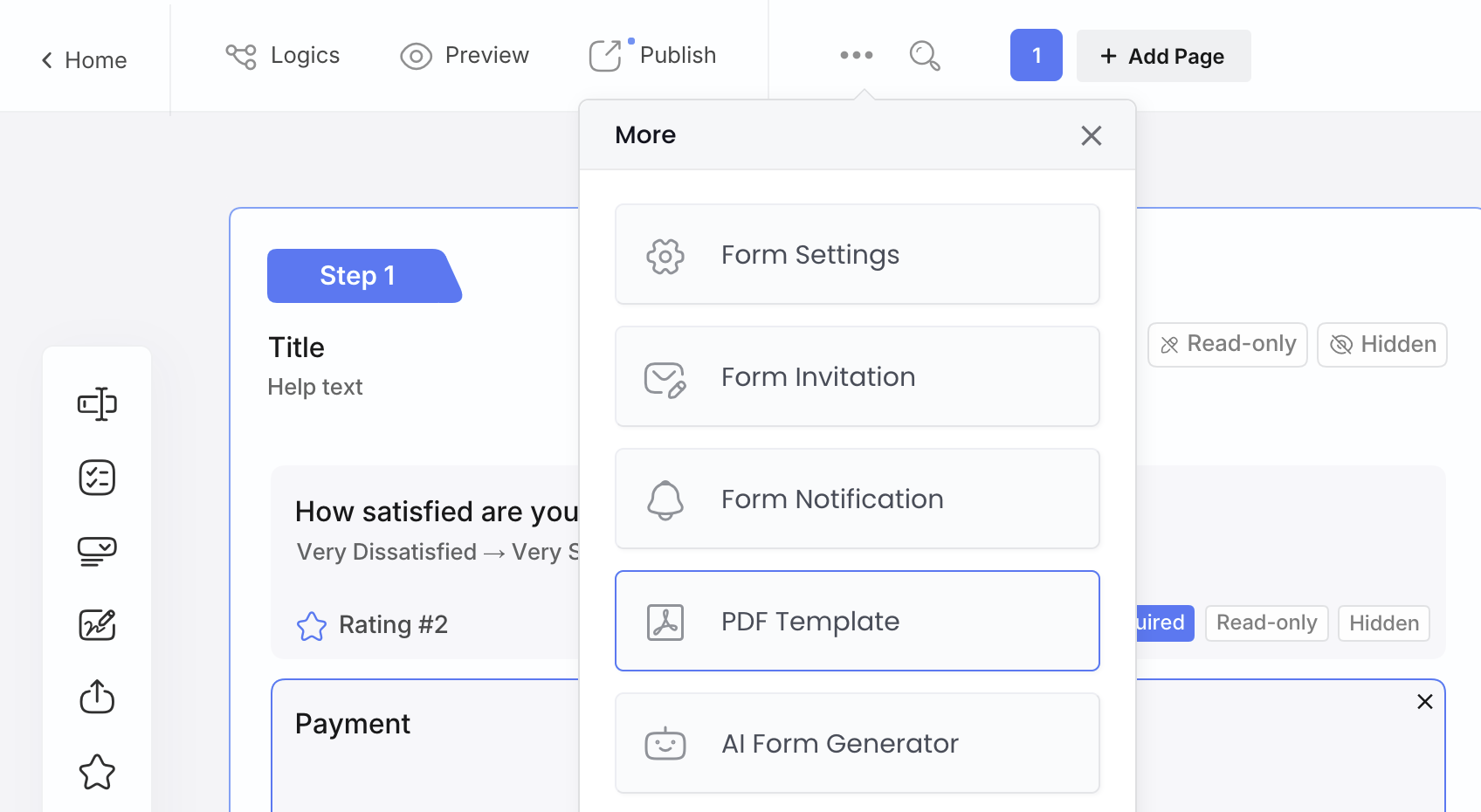
1. Generating a PDF When Someone Submits a Form
If you’ve ever needed to turn a form submission into a formatted document—an invoice, a confirmation, a signed record—Google Forms doesn’t have a built-in way to do it. The usual routes are printing individual responses manually, using an add-on like Form Publisher or Autocrat connected to a Google Sheets template, or writing an Apps Script. All of those work, but they’re a bit of a production.
PlatoForms approaches this two ways. If you already have a PDF—a contract, a waiver, an application form—you can convert it into an online fillable form that generates a completed copy on submission, in the same layout as the original.
No original PDF? No problem. Our PDF Templates let you design the output directly inside the form builder. You define the layout—incorporating text, formatting, and dynamic variables—and every submission generates a formatted PDF automatically. You get total control over headers, margins, and timezones, ensuring the final file looks exactly as intended. Since updates apply to published forms instantly, you can refine your layout without ever needing to re-send a link or re-publish your form.
📍 Find it in the form editor → More (⋯) → PDF Template
2. Converting a PDF Form You Already Have Into an Online Form
If you have a PDF form that’s been doing its job for years, rebuilding it from scratch in any form tool is a slog. Google Forms doesn’t offer a native way to import PDF structures, meaning you’re stuck manually copying questions one by one.
PlatoForms streamlines this by using AI-powered field recognition. When you read an existing PDF, our AI handles the field mapping for you—automatically detecting text boxes, checkboxes, and dates while understanding labels to ensure each field is correctly named. It even handles complex elements like tables and multi-page layouts with high accuracy, requiring zero coding to get started. Once the AI handles the heavy lifting, you can layer on advanced features like conditional logic or e-signatures.
There’s also a Clone Form option for existing PDF forms. Compatible fields—names, numbers, dropdowns—carry over automatically to a web form version, and you get a preview of the transfer before you commit. The original file remains untouched throughout the process.
📍 Find Clone Form at: Dashboard → Form Menu (gear icon) → Clone Form → Convert to Web Form
3. Editing a PDF Without Sending It to an Online Tool
Not strictly a form feature, but it comes up enough to be worth mentioning. There are dozens of online PDF editors, and most of them upload your file to a server to process it. For contracts, IDs, or anything sensitive, that’s a reasonable thing to be uncomfortable with.
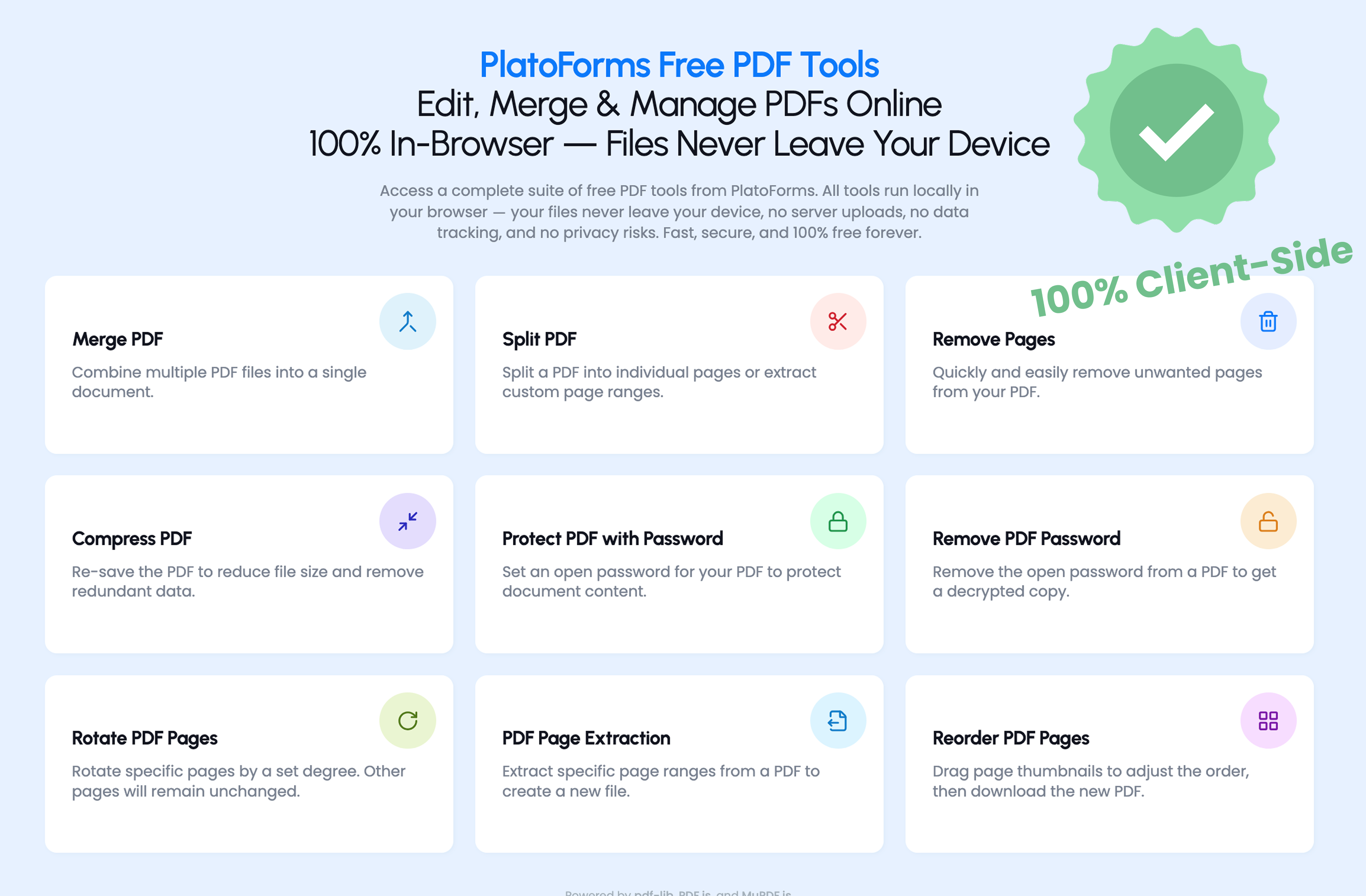
The PlatoForms PDF Toolbox runs entirely in your browser. The file never leaves your device—processing happens locally. It handles merging, compressing, rearranging pages, and converting to image. Nothing fancy, but it’s useful when you need it and want to avoid the upload.
Find it at: PlatoForms Free PDF Tools
4. Starting from a Template (2,000+ Options, One Click to Edit)
Google Forms has less than 20 built-in templates. They cover the basics—event registration, contact information, a few others—but if you’re looking for something specific, you’re usually building from scratch.
PlatoForms has a template library of 2,000+ form and document templates covering a wide range of industries and use cases: legal intake forms, waiver forms, auto repair estimates, construction inspections, healthcare consent, HR onboarding, and a lot more. Each form template opens directly in the form builder with all the fields pre-configured—you’re editing rather than starting from nothing.
Every form template also switches between Classic layout (all fields on one page) and Conversational layout (one question at a time, better for mobile) with a single click. No rebuilding required.
Worth browsing if you’ve been building similar forms repeatedly from scratch, or if you want to see what a well-structured version of your form type looks like before you start.
5. Importing an Existing Google Form Directly
If you already have Google Forms set up and don’t want to rebuild everything from scratch, PlatoForms now has a direct import. Connect your Google account via OAuth (read-only access), paste the edit URL of your Google Form, and it opens in the PlatoForms editor—usually in less than 30 seconds—with questions mapped to fields, sections converted to pages, and question types preserved.
Find it at: the Google Forms import page

What you can do once it’s imported is where things open up—conditional logic, PDF generation, e-signatures, Stripe, PayPal, and Square payment integration, conversational layout, advanced branding. The import just gets your existing structure in; what you build on top of it is up to you.
If you don’t have an existing Google Form to import from, the AI Form Generator is the equivalent starting point—describe what you need and it builds the field structure.
6. Adding a Countdown Timer to a Form
Google Forms doesn’t have a built-in timer. If you need one—for an exam, an application deadline, a time-limited survey—the options are third-party add-ons like ExtendedForms or Form Timer, each of which requires installation and setup.
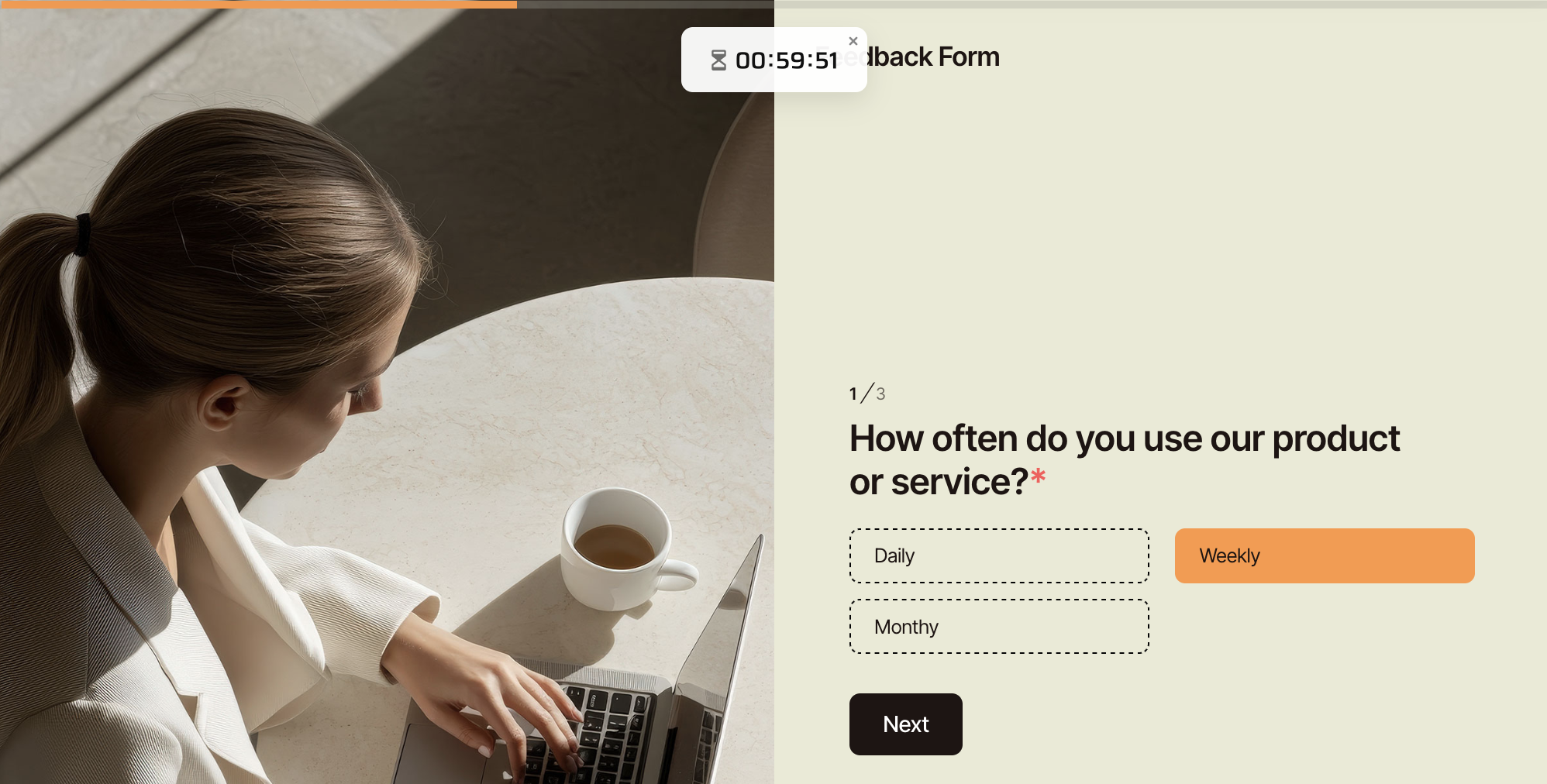
PlatoForms has a Countdown field that you add directly to any form. You can set it to start when the form opens or use a fixed shared deadline. Choose whether the timer shows as a visible countdown, a clock, a reminder only, or stays hidden. You can send a reminder before time runs out and customise the message when it does.
It doesn’t collect any input—it just controls timing.
7. Auto-Filling Address Fields from Google Maps
In Google Forms, address fields are plain text. Whatever someone types is what you get, including typos and inconsistent formatting.
Address Autocomplete adds Google Maps suggestions as someone types an address. When they pick one, the street, city, state, and postal code fields populate automatically from the verified address. It works on existing Address fields—one click to enable, no reconfiguration needed.
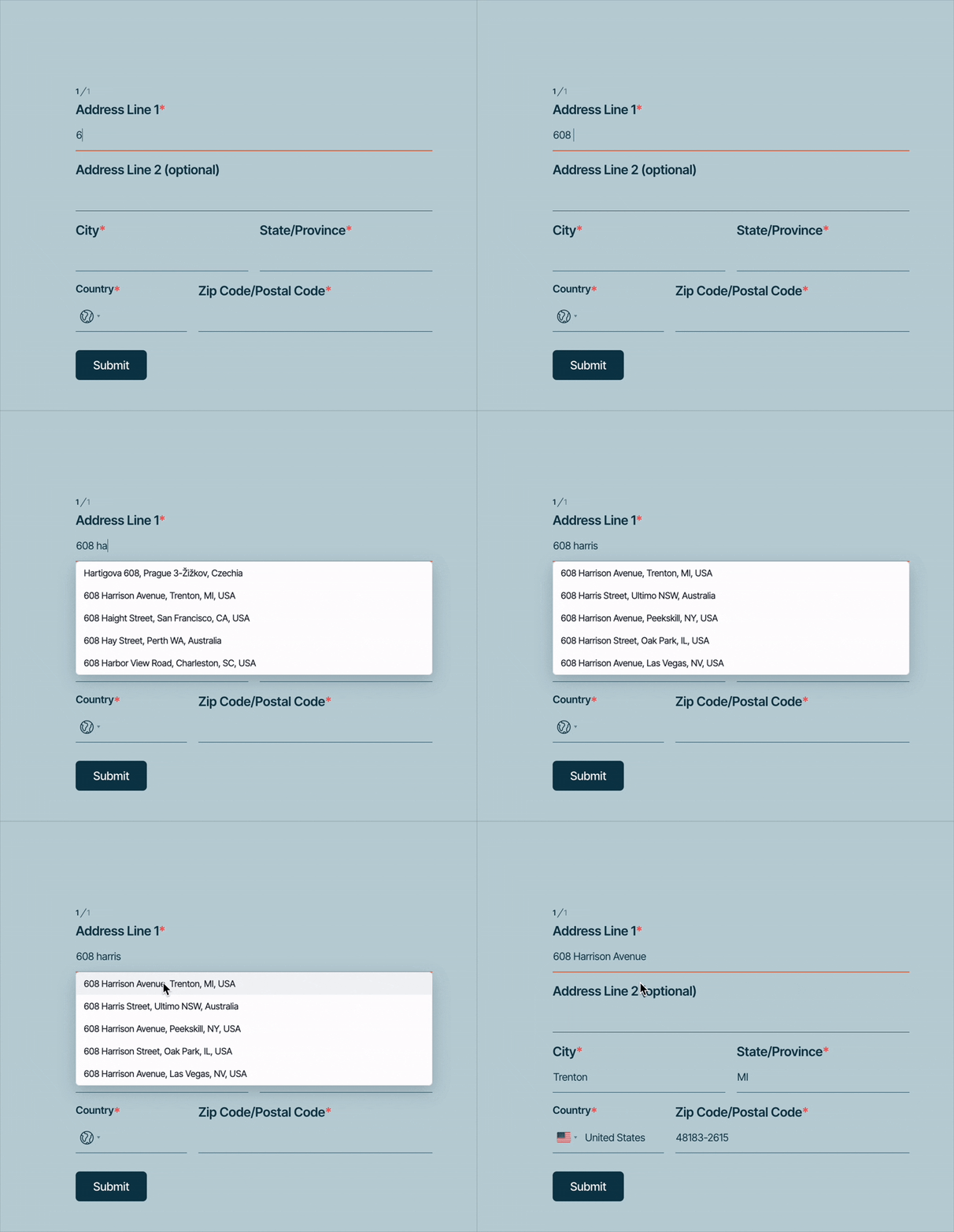
Useful for anything where a wrong address causes a real problem downstream: deliveries, bookings, registrations.
8. Downloading Multiple Submission PDFs at Once
In Google Forms, if you need the PDF of a specific submission, you open it and download it. One at a time.
PlatoForms has batch actions in the submissions view. Select multiple entries and download all their PDFs in one click, or delete them all at once. Straightforward, but if you’re processing fifty signed waivers before an event, the difference is noticeable.
9. Hiding Irrelevant Fields in a Generated PDF
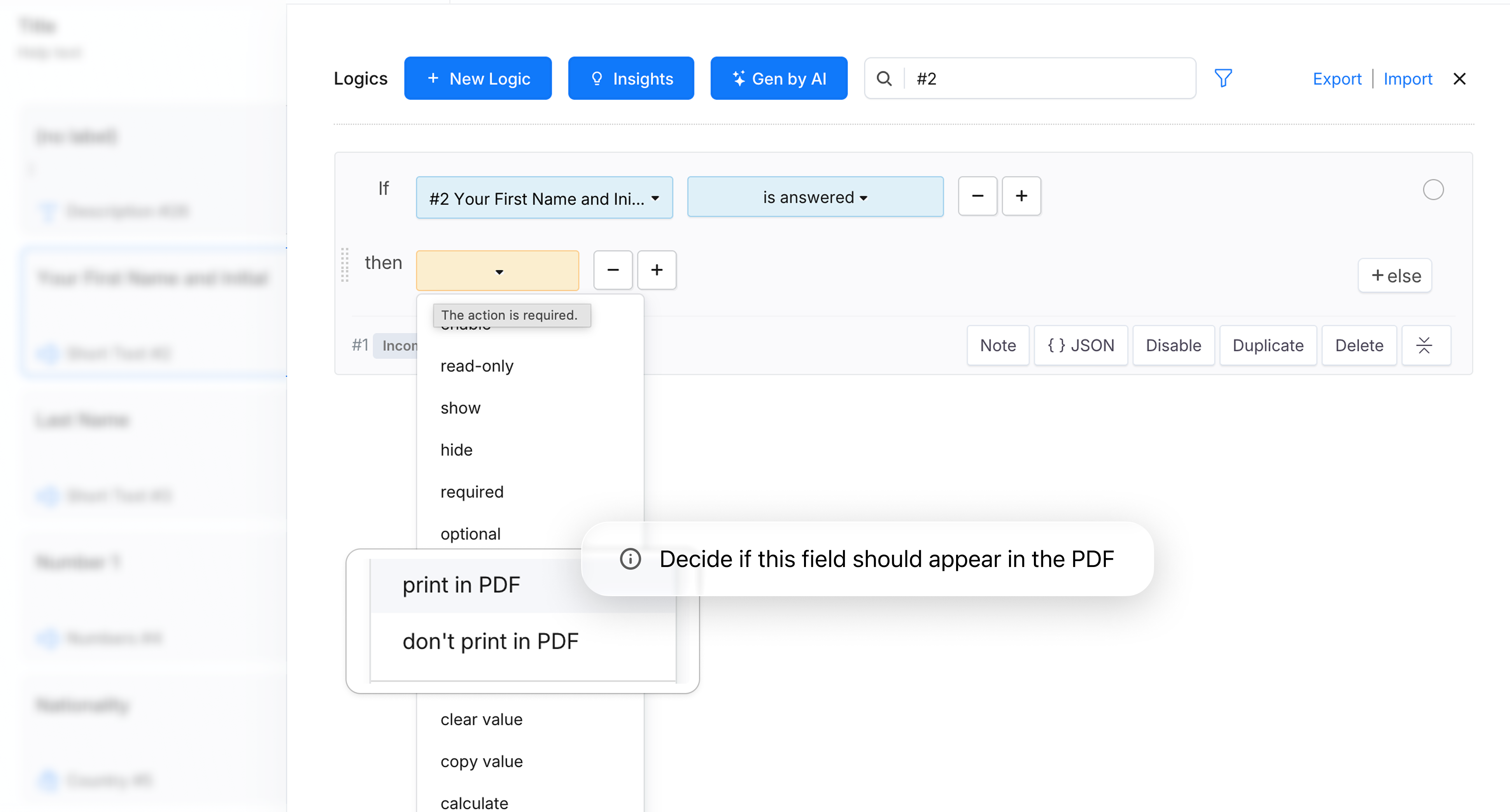
This one is fairly specific, but if you build forms that generate PDFs and your form has conditional sections, you’ve probably run into it: the PDF comes out with blank fields or sections that don’t apply to the person who submitted.
PlatoForms’ Logics panel lets you set rules for which fields appear in the generated PDF based on what was submitted. If someone answered “No” to a question, the follow-up fields for that question don’t show up in their document at all. You can write the rule yourself or describe it in plain English and let Gen by AI generate it.
Find it at: Form Builder → Logics panel
10. Designing a Document From Scratch — Contracts, Letters, Certificates
Google Forms is built around data collection, not document design. If you need to produce a branded contract, an offer letter, or a certificate — something that looks like an actual document rather than a form — you’re working outside what Google Forms does.
PDF Document Creator takes a different starting point: describe what you need in plain language (“a freelance service agreement with payment terms and a signature block”), and the AI Assistant builds a complete, styled document on a canvas — section headers, body text, form fields, and layout all included. You can then apply a theme, adjust the design, and either export it as a PDF or convert it into a fillable online form without rebuilding anything.
This is separate from PDF Templates (feature #1 above), which define the output format for a form submission. PDF Document Creator is for when you need to design the document itself — before there’s a PDF to upload or a form to fill.
A Few Notes on Setup
None of these require a complex implementation. Most are a toggle or a field type—the kind of thing you can try in a few minutes and decide whether it’s actually useful for your situation.
If you’re already using PlatoForms, features #3, #6, #8, and #10 (PDF Toolbox, Countdown, Batch Actions, and PDF Document Creator) are the ones most likely to be new to you. And if you haven’t browsed the template library recently, it’s worth a look—it’s grown significantly and covers a lot of specific use cases that are faster to start from than building from scratch. They don’t get as much attention as the AI or routing features, but they’re worth knowing about.
If you’re coming from Google Forms and want to bring something over, the AI Form Generator can recreate most forms from a plain-language description, and there’s a 2,000+ template library if you’d rather start from something close to what you need. The free plan covers enough to try everything here without committing to anything.