











A vendor submits a registration form but forgets the insurance certificate. A client uploads the wrong ID. A certificate is approved today but will expire in six months.
Collecting the file is only part of the job. Your team also needs to know what is missing, who should act next, and whether a document will need replacing later.
The right document collection software depends on the work you need to handle. Some tools focus on chasing client documents, while others manage onboarding or expiration dates. Some connect document requests to forms, approvals, and other business processes.
This guide compares PlatoForms, Content Snare, Clustdoc, Expiration Reminder, and FileInvite using their published capabilities and pricing—not a hands-on benchmark or an invented feature score.
On this page
What to look for in document collection software
Before comparing prices, map a request your team handles regularly: who fills out the initial information, which documents are required, who reviews them, and what happens after approval.
| Capability | Questions to ask |
|---|---|
| Document checklist | Can you name each required document and give upload instructions? |
| Recipient experience | Can the recipient upload from a phone, without a complicated sign-up? |
| Automatic reminders | Do reminders stop when documents arrive? What happens after a rejected upload? |
| File review | Can a reviewer accept, reject, or request a replacement? |
| Form and data collection | Can you collect the application details and supporting files in one process? |
| Document renewals | Can an accepted document trigger a replacement request before it expires? |
| Other business tools | Do you also need e-signatures, approval workflows, completed PDFs, payments, or integrations? |
| Pricing model | Are you paying per month, active request, application, document, or loan? |
Important: an upload deadline, an automatic reminder for missing files, and a document-expiration reminder are three different things. Don’t assume a platform supports all three because it advertises “reminders.”

Example reminder settings: remind recipients after 1, 3, and 7 days while files are missing, then stop when all requested documents arrive or the Documents link expires. Reminders do not extend the link. This is a missing-file reminder, rather than an expiry-based renewal.
Document collection software comparison
| Software | Best for | Core approach | Published starting price |
|---|---|---|---|
| PlatoForms | Teams needing forms, e-signatures, document requests, and renewals together | Forms and e-signatures → document checklist → reminders and review → renewal | Free for document requests; renewals require Silver ($30/month billed annually) or the free trial |
| Content Snare | Firms repeatedly collecting client information and files | Dedicated client request → responses and uploads → reminders and approval | $35/month, billed annually |
| Clustdoc | Organizations with multi-step client onboarding | Client checklist → forms, documents, tasks, signatures, approvals | $190/month Pro plan (USD display) |
| Expiration Reminder | Teams tracking certificates, licenses, and expiry dates | Track expiry item → reminder → updated evidence | $44/month equivalent, billed $528/year |
| FileInvite | Commercial lenders managing borrower documents | Loan-related request → borrower portal → review and tracking | $9,900/year standard lending plans |
A quick way to narrow the shortlist
- Need a form and its supporting documents to stay together? Start with PlatoForms.
- Mostly chase clients for information and uploads? Look closely at Content Snare.
- Need an end-to-end onboarding portal with multiple stages? Evaluate Clustdoc.
- Mainly track which certificates are about to expire? Consider Expiration Reminder.
- Process complex commercial loans with many participants? Explore FileInvite.
Five document collection tools compared
1. PlatoForms: document requests plus the forms and workflows around them
PlatoForms Document Requests connects supporting-document collection to an online form submission. Instead of sending a separate file request after receiving an application, you can configure a checklist on the form itself.
For example, a vendor completes a registration form with business and contact details. After submission, the vendor receives a private link to provide a business registration certificate and proof of insurance. Your team can track missing items, review uploads, and request replacements when necessary.
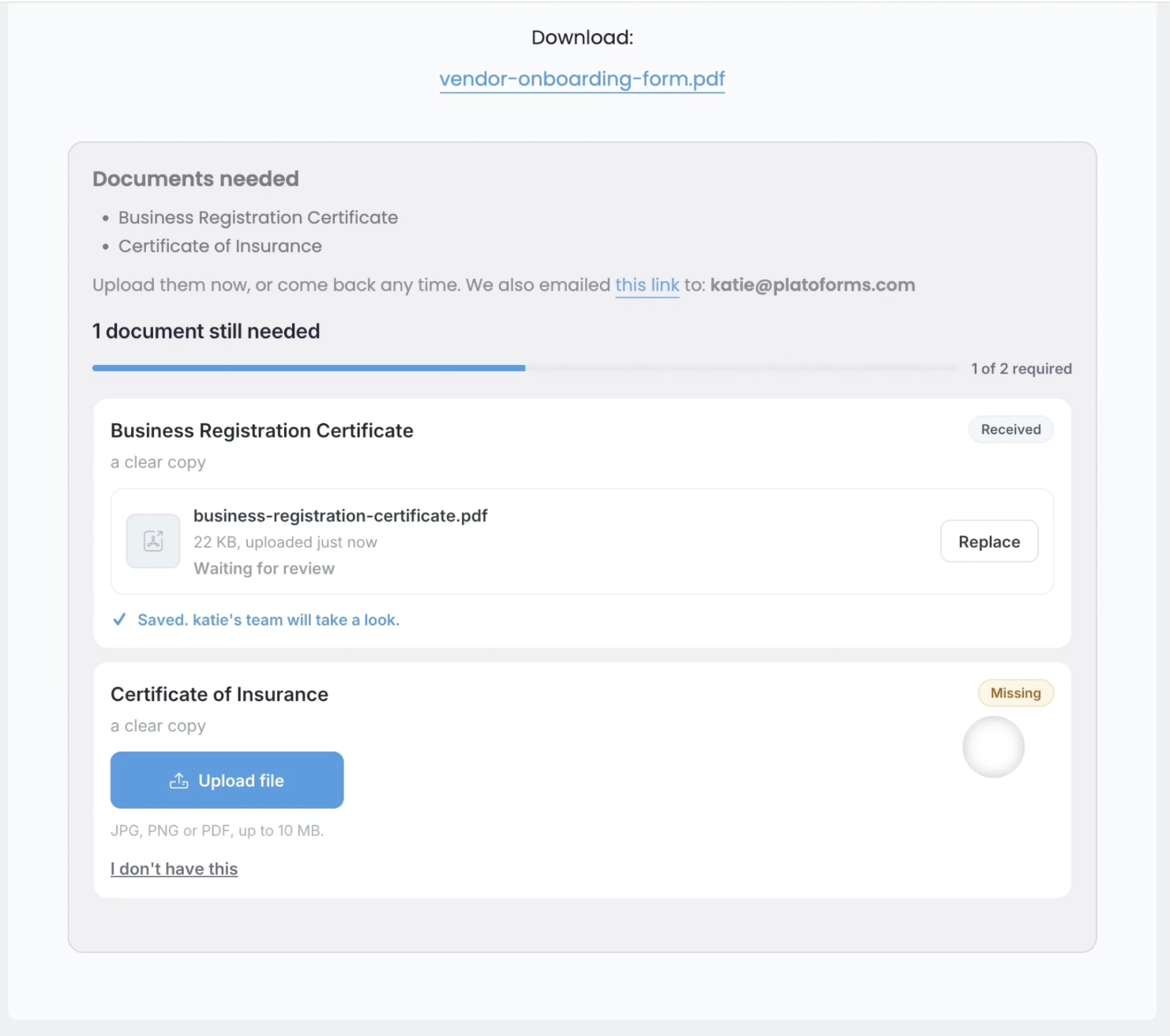
What it does well
- Structured checklists: name each document, add instructions, choose permitted file types, and mark items required or optional.
- Automatic follow-up: remind people about missing documents and request another upload when a file is rejected.
- Review and tracking: accept or reject files, keep documents connected to the submission, and view documents grouped by person.
- Renewals: on Silver and above, and during the free trial, track document expiry and request updated files; form renewals can also send a prefilled previous submission for review.
- More than document collection: build online forms from PDFs, use conditional logic, collect e-signatures, run approval workflows, sync files to cloud drives, and connect to other apps. Availability varies by plan.
Once the vendor uploads both documents, your team can see which files have been accepted and which still need review, alongside the request’s activity history.
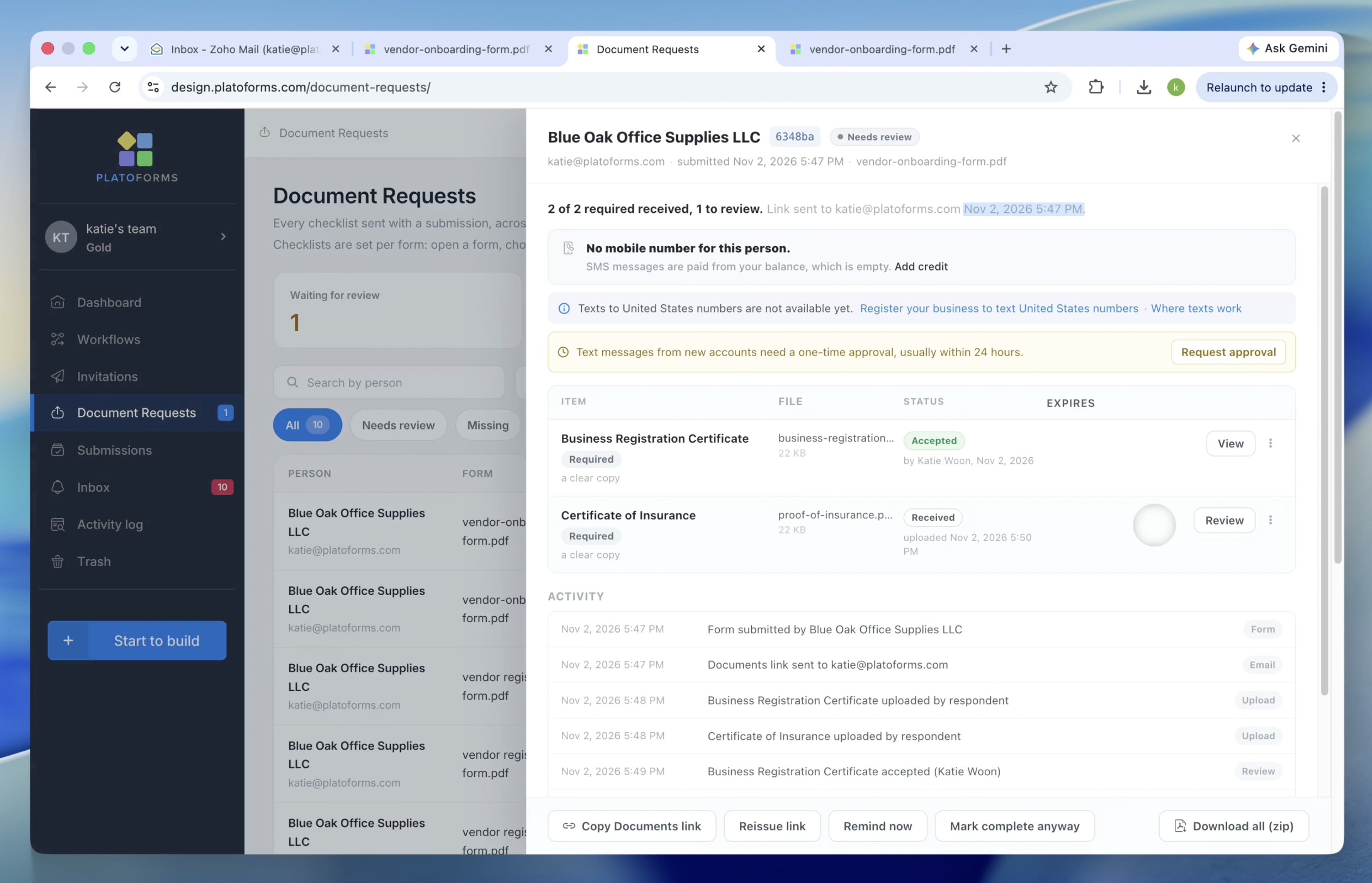
PlatoForms keeps forms, supporting documents, signed PDFs, approvals, and automated handoffs in one system. A small business can start by collecting two supporting documents, then add the other steps when needed instead of buying a separate tool for each one.
Pricing and limits: Free includes 3 document requests/month. Bronze is $10/month billed annually, with 50 document requests/month, e-signatures, workflows, cloud-drive sync, and integrations. Silver is $30/month billed annually, with 200 document requests/month and form and document renewals. During the free trial, teams have Bronze’s 50-request allowance and can use Renewals. See PlatoForms pricing for other limits, including live forms, submissions, and storage.
Trade-off: PlatoForms document requests are associated with form submissions. If your team needs only ad hoc file requests without a form-led process, a dedicated request platform may feel more direct. Outside the free trial, renewal functionality is not included in Free or Bronze.
Best fit: vendor registration, employee or client intake, recurring compliance documents, and businesses that want to reuse one platform for forms, files, signatures, and workflows.
Learn more in the document requests guide and checklist setup guide.
2. Content Snare: dedicated client information and file requests
Content Snare is built around collecting answers and uploads from clients. Teams create reusable requests with questions, file-upload areas, and instructions, then send clients a link. Automatic reminders help move unfinished requests forward.
What it does well
- Drag-and-drop request builder with questions and file uploads.
- Reusable templates for recurring client work.
- Client portal and saved progress.
- Unlimited reminders under published plans.
- Approval and rejection of submitted information.
Pricing and limits: Basic starts at $35/month billed annually, with 20 active requests, 2 users, and 20 GB storage. An active request is not the same as a monthly request allowance: completed or archived requests free up active capacity. See Content Snare pricing.
Trade-off: Content Snare is well suited to the information-request process. If your primary requirement is document-expiry-driven renewals, PDF-to-form conversion, or a wider form-and-approval workflow, evaluate those separately rather than assuming they are part of the core request tool.
Best fit: accounting firms, agencies, consultants, and service providers that repeatedly chase clients for answers and attachments.
3. Clustdoc: document collection within client onboarding
Clustdoc places document collection inside a larger onboarding process. A client-facing checklist can combine forms, files, tasks, signatures, approvals, and communication, while the internal team tracks progress.
What it does well
- Multi-step onboarding checklists and client portals.
- Intake forms and document requests.
- Internal tasks, approvals, and team collaboration.
- E-signatures, reminders, and workflow stages.
- A structured experience for regulated or complex onboarding processes.
Pricing and limits: The published Pro plan starts at $190/month on its USD pricing display, with 3 user seats, 50 new applications/month, and 25 GB storage. Clustdoc marks certain e-signature and reminder usage as limited, so check the allowance and proposal. See Clustdoc pricing.
Trade-off: Clustdoc can make sense when the entire onboarding lifecycle needs coordination. For a team that mainly wants to collect a few documents after a form and send reminders, the wider implementation and higher entry price may be unnecessary.
Best fit: legal, financial, staffing, and other teams with onboarding processes involving several participants or stages.
4. Expiration Reminder: keeping certificates and records current
Expiration Reminder approaches the problem from the other end: after a certificate, license, policy, or other record exists, when will it expire, and who needs to act before then?
What it does well
- Track expiration dates for documents and other items.
- Send automatic email reminders and manage supporting evidence.
- Provide reporting and mobile access.
- Support employee self-service; higher plans add more onboarding and compliance features.
Pricing and limits: Starter is $44/month equivalent when billed annually ($528/year), or $49/month on monthly billing, with 150 expiration items. See Expiration Reminder pricing.
Trade-off: This is a specialist choice when expiration tracking is the main job. If you also need to collect initial application details, generate completed PDFs, obtain signatures, and request supporting files after submission, compare the cost and complexity of adding those processes separately.
Best fit: HR, operations, vendor compliance, and teams responsible for many recurring certificates or licenses.
5. FileInvite: borrower document collection for commercial lending
FileInvite specializes in document-heavy lending processes. Lenders can request records from borrowers and other participants, track outstanding items, review uploads, and work through a persistent borrower portal.
What it does well
- Secure borrower portal and document request tracking.
- Automated reminders and approve/reject review.
- PDF form filling and digital signing.
- Document organization, audit trails, and cloud-storage connections.
- Lending-specific workflows and enterprise integration options.
Pricing and limits: Standard commercial-lending plans start at $9,900/year for lenders processing up to 100 typical commercial loans annually. Enterprise pricing is quoted separately. See FileInvite pricing.
Trade-off: FileInvite offers depth for complex lending. For general-purpose vendor onboarding, registration, or client intake, its industry focus and annual entry price may exceed what the team needs.
Best fit: commercial lenders and financial institutions collecting substantial documentation across multiple loan participants.
Which tool offers the best value?
Compare more than the subscription price. A standalone document collector may handle uploads well but still leave your team paying for separate services for applications, e-signatures, PDF generation, approval routing, and follow-up.
For a process that starts with a form, compare these PlatoForms plans:
| PlatoForms plan | Published annual-billing price | Document requests | Other relevant capabilities |
|---|---|---|---|
| Free | $0 | 3/month | PDF-to-form conversion, online forms, conditional logic, branded free form |
| Bronze | $10/month ($120/year) | 50/month | E-signatures, workflows, cloud-drive sync, integrations |
| Silver | $30/month ($360/year) | 200/month | Bronze features plus document and form renewals; higher usage limits |
You can start with document requests, then add signatures, approvals, or renewals without moving the form and its files to another product. For example, a vendor intake process might use a PDF-based registration form, conditional questions, a supporting-document checklist, team review, and later renewal reminders. A different team could use the same subscription for e-signatures or approval workflows.
A specialist product may still fit better when document collection is the whole workflow. Content Snare has a dedicated client-request experience; Clustdoc supports more elaborate onboarding; Expiration Reminder is purpose-built for tracking expiry items; and FileInvite focuses on complex lending. Choose based on whether you need that specialization or want forms, files, signatures, and approvals in one product.
Also compare the right units: PlatoForms publishes requests per month, Content Snare publishes concurrent active requests, Clustdoc publishes new applications per month, Expiration Reminder publishes expiration items, and FileInvite prices around annual lending volume. The numbers cannot be compared as equivalent capacity.
How to choose the right software
Run one realistic test before committing. Ask for three documents: one correct, one missing, and one incorrect. If renewals matter, include a certificate with an expiry date.
- Check the recipient experience. Can someone understand the checklist and upload from a phone without help?
- Test the missing-file reminder. Does the system clearly show what is outstanding, and does follow-up stop when the requirement is satisfied?
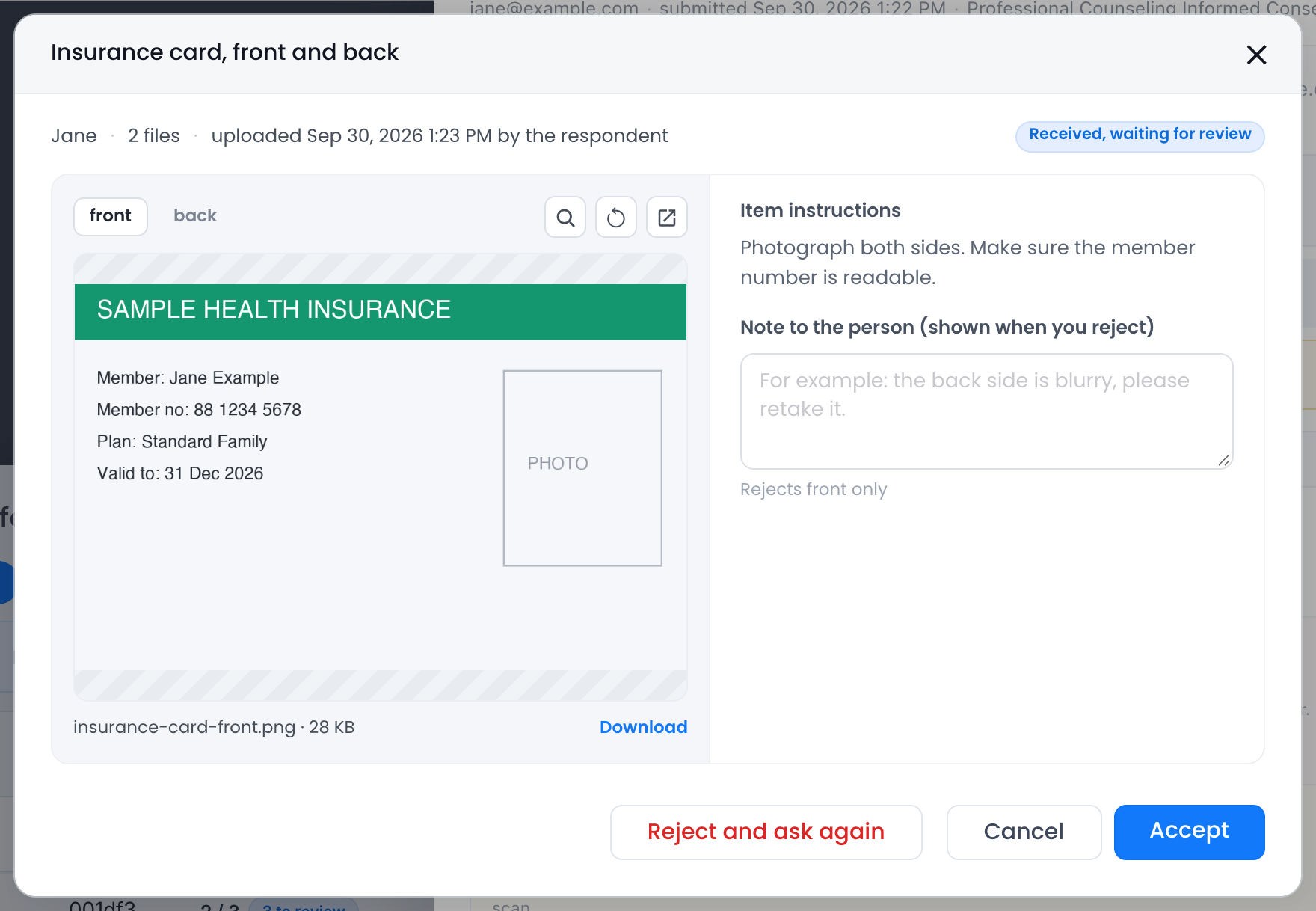
- Reject one upload. Can your reviewer explain the issue and request a replacement without starting a separate email thread?
- Look at what happens next. Are documents linked to the application, client, or person? Can your team retrieve them later?
- Test the renewal scenario. Does the system distinguish an expired document from an unfinished initial request?
- Calculate total workflow cost. Include the cost of any separate form builder, e-signature tool, workflow service, or integration that you would otherwise need.
For the rejection test, check whether the reviewer can inspect the file and explain what needs fixing in the same place.
If your team already uses PDFs as applications or agreements, test whether the software preserves that workflow rather than forcing you to rebuild every document from scratch.
Frequently asked questions
What is the best document collection software?
Choose based on the work your team needs to do. PlatoForms fits teams that collect supporting documents after form submissions and manage renewals. Content Snare focuses on collecting client information, Clustdoc on onboarding workflows, Expiration Reminder on expiry tracking, and FileInvite on lending documentation.
What is the difference between document collection and document management software?
Document collection software focuses on requesting files from people, tracking missing items, and reviewing what arrives. Document management software focuses more on storing, organizing, retrieving, and controlling documents. Some platforms cover parts of both.
Can document collection software send automatic reminders?
Yes, but check what triggers the reminder. A reminder to finish an open request is different from a reminder to replace an accepted certificate before its expiration date. For PlatoForms, document and form renewals are available on Silver and above, and during the free trial.
Can clients upload documents without creating an account?
Some tools support private upload links or guest portals. In PlatoForms, a recipient can upload the requested files through a private Documents link without creating a PlatoForms account.
Does PlatoForms include free document requests?
Yes. PlatoForms Free includes three document requests per month. Bronze includes 50 per month, while Silver includes 200 per month and renewal functionality. Check the pricing page for other plan limits.
How is PlatoForms different from a standalone file request tool?
PlatoForms connects document requests to form submissions and can also handle PDF-to-online-form conversion, conditional logic, e-signatures, workflows, payments, and integrations. That makes it useful when collecting documents is one step in a larger business process rather than a separate task.
Collect documents without adding another disconnected process
Start with one real workflow—vendor registration, employee onboarding, client intake, or recurring compliance paperwork. List the documents you need, who reviews them, and whether they will expire.
If supporting documents follow an application or form submission, you may not need a separate file-request product plus another form builder and workflow tool. With PlatoForms, you can connect those steps and add more capabilities as your needs grow.
Explore PlatoForms Document Requests, follow the setup guide, or compare plans to get started.