
Send text messages (SMS)
Tabs
PlatoForms can send a text message (SMS) wherever it sends an email for a form: submission notifications, invitations, document requests and renewals, and workflow tasks. You turn it on with the SMS switch in each of those settings.
Two separate services
Your texts are sent by one of two services. They are independent: each has its own setup, its own cost, and its own rules.
| PlatoForms SMS | Your own Twilio | |
|---|---|---|
| Setup | None | Connect your Twilio account once |
| Sender | A PlatoForms sender | Your Twilio number or sender ID |
| Countries | The countries listed on the PlatoForms SMS tab | Any country your Twilio account can text |
| US and Canadian numbers | Limited. See Texting US and Canadian numbers | Whatever your Twilio account is registered for |
| Cost | Each text from your PlatoForms credit balance | Billed by Twilio to you. No PlatoForms credit is used |
| Message text | Fixed by PlatoForms | You write it |
Where both are available, each SMS section lets you choose which service sends its texts, so one form can use your Twilio while another stays on PlatoForms SMS.
Which one do I need?
- You don’t have a Twilio account. Use PlatoForms SMS. There is nothing to set up: turn on SMS where you want it and keep some credit in your credit balance.
- You don’t have a Twilio account and you text US or Canadian numbers. Use PlatoForms SMS and, if your business is registered in the US or Canada, register it for US texting. This is part of PlatoForms SMS.
- You have a Twilio account, or you want to write your own message text, or you text a country PlatoForms SMS doesn’t cover. Connect your own Twilio.
Where to set it up
Both services are on the Text messaging page, one tab each. To open it:
- Go to Plan and Billing, open Credit balance, and click Text messaging settings next to SMS messages, or
- Open any form’s Manage Form, click Integrations, and click Connect on the Twilio card. This opens the Your own Twilio tab.

Text messaging requires a paid plan. The Text messaging page is for the team owner or a member with billing access. If you don’t see it, the feature isn’t turned on for your team yet: contact us.
Texting US and Canadian numbers
US carriers only accept business texts from a registered sender, and only to people who agreed to receive them. PlatoForms’ own US sender counts a number as agreed when the person typed it into your form themselves. For PlatoForms SMS this means:
- Numbers that people enter themselves on your form can be texted by PlatoForms’ own US sender, where it is available. For example, the notification sent to the mobile number someone typed into your form.
- Numbers that you type cannot be texted by PlatoForms’ own sender, because the person did not enter them on your form: an invitation, a fixed number in a notification, a mobile number you add to a document request. For teams in the US or Canada, an invitation’s SMS setting shows a warning for this reason.
- Once your own business is registered, PlatoForms SMS texts US and Canadian numbers from your own number, including the numbers you type.
The PlatoForms SMS tab shows, under United States and Canada, what applies to your team today.
None of this applies to Your own Twilio. What your Twilio account can send to the US depends on its own registration, which you manage in the Twilio console. Registering your business in PlatoForms does not change your Twilio account, and connecting Twilio does not need a registration here.
Register your business for US texting
Registering is part of PlatoForms SMS. You fill in one form; PlatoForms registers your business with the US carriers’ registry (known as A2P 10DLC) and gives you your own US or Canadian number. You don’t need a Twilio account or a carrier account.
Register when you want PlatoForms SMS to text US or Canadian numbers that you type, such as invitations, or when PlatoForms SMS can’t text those countries at all yet.
Before you start
You need:
- A business registered in the United States or Canada, with its EIN (US) or 9-digit BN (Canada). A business registered elsewhere can’t register here; use your own Twilio to text US numbers.
- The legal business name exactly as on your EIN letter. The registry compares it with the IRS record, and a mismatch is the most common reason for a rejection.
- A website that opens and clearly belongs to the business.
- The business address (not a PO box).
- An authorized representative: name, position, title, email and phone.
- Enough credit in your credit balance for the setup fee. The page shows the current fees.
Register
-
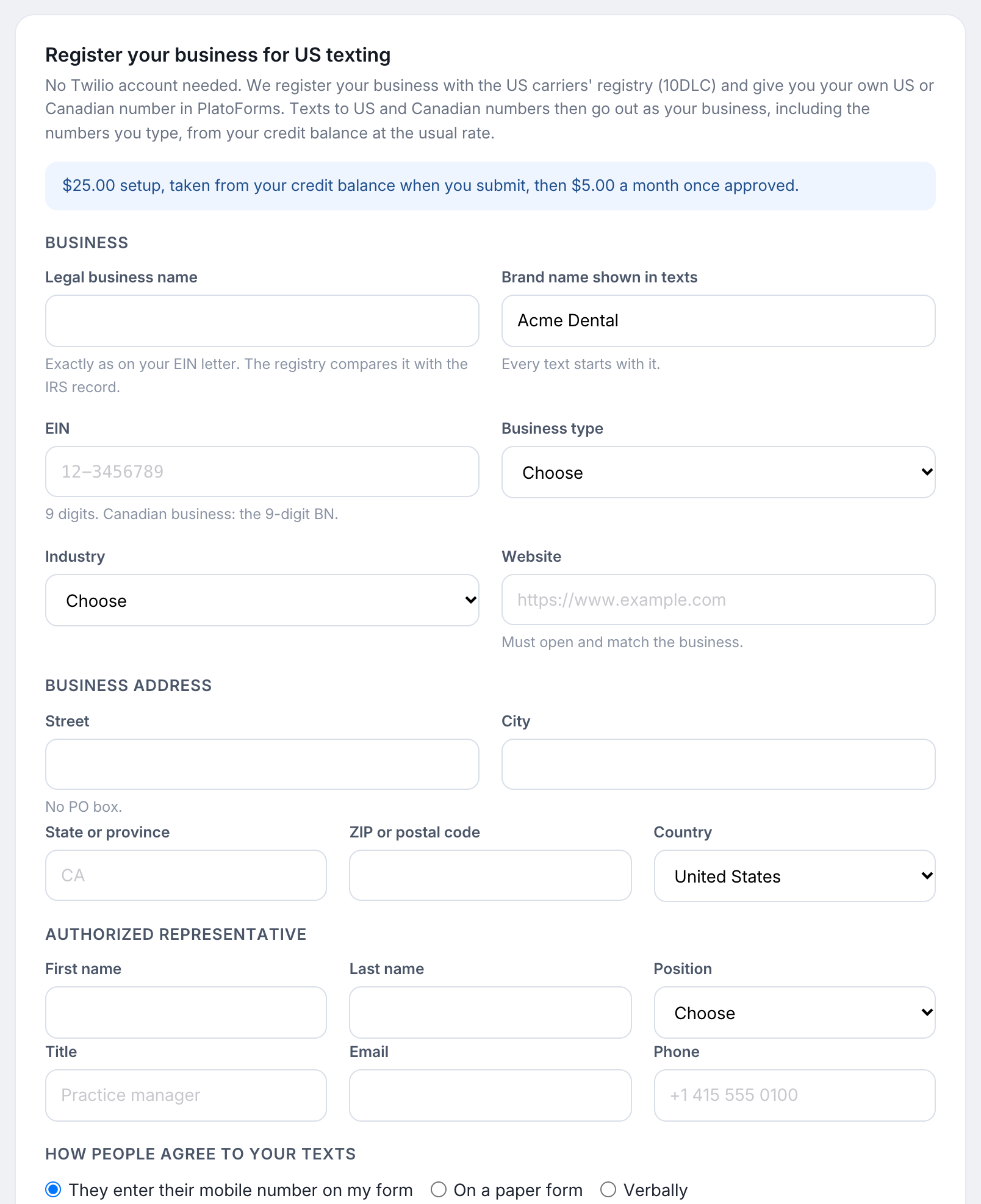
Open the Text messaging page. On the PlatoForms SMS tab, go to Register your business for US texting.
-
Fill in the Business, Business address and Authorized representative sections.
-
Under How people agree to your texts, choose how you collect consent. If people enter their mobile number on one of your forms, paste that form’s address: the registry opens it to check. A published PlatoForms form with a phone field shows the consent line under the field.
-
Tick the confirmation and click Register. The setup fee is taken from your credit balance.
What happens next
The page shows the progress: Business profile, Messaging profile, Brand registration, Messaging service, Campaign vetting, Your number.
| Status | What it means |
|---|---|
| In review | Submitted. The registry reviews every campaign by hand, which currently takes about two weeks. We email you when it is approved. |
| Needs a fix | The registry refused something. The reason is shown on the page. Correct the details and click Fix and resubmit. A resubmission fee applies, because the registry charges again. |
| Registered | Approved. Your number is shown on the page and is in use. |
| Paused | The monthly fee could not be taken from your credit balance. Add credit to resume. After 30 days unpaid, the number is released. |
After approval
- PlatoForms SMS texts US and Canadian numbers from your own number, including numbers you type yourself.
- Nothing changes in your forms: SMS sections set to PlatoForms SMS now send those texts from your number.
- Every text starts with your brand name. The wording is fixed, because the registry approved your registration for that wording.
- Each text is paid from your credit balance, and the monthly fee is taken from it too.
To stop, click Give up the number. Fees already paid are not refunded.
Use your own Twilio
If you have a Twilio account, connect it once on the Your own Twilio tab and choose Your own Twilio in the SMS sections you want. Twilio bills you directly, and you write the message text. The full steps are in Integrate with Twilio.