
Renewals
Tabs
Some forms are only good for a while: an annual consent, a yearly registration, a lease, a certification. Renewal gives each submission an expiry date and, before it arrives, sends the person a prefilled copy of their last submission to check and submit again. Documents with their own expiry date, such as an insurance card, are renewed on their own dates.
Renewals are on Silver and above. On other plans the section can be set up and the Renewals page fills with expiry dates, but no renewal email goes out.
Turn it on
Open the form, choose Manage, then Renewal, and turn on This form must be renewed. The blue summary under the switch restates the whole rule in one sentence as you change the settings.
Applies to decides whether only new submissions get an expiry date, or every submission already received as well. With All submissions, the section says how many are already inside the renewal window and will be contacted after you save, how many are not due yet, how many have already expired and are left alone, and how many have no date.
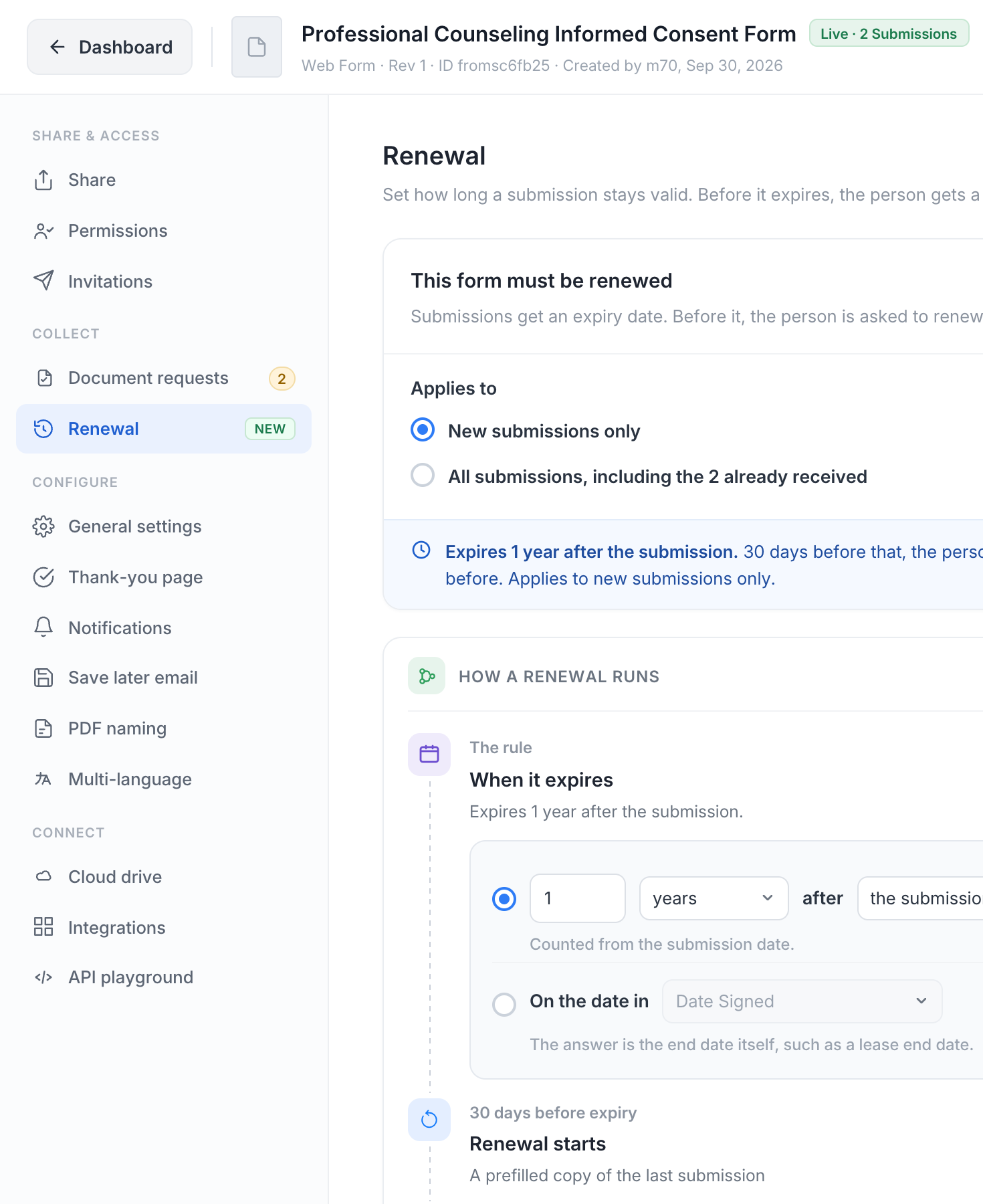
The rule
- A period after the submission: for example 12 months after the submission date, or 6 months after the date in a Date field of the form such as a training date. Any period from 1 to 120 months.
- On the date in a field: the answer itself is the end date, such as a lease end date. A submission with no answer in that field is listed as Needs a date instead of expiring silently.
A renewal produces a new submission, which gets its own expiry by the same rule, so the cycle repeats until you turn Renewal off or mark a row Not needed.
The section warns when your team’s data retention deletes submissions before the renewal date. A submission that has been deleted cannot be renewed. Retention always wins; change it if the renewal window needs to be longer.
Timing
- Start renewal 14, 30 or 60 days before expiry. When the period itself is shorter than that, the lead time shrinks to fit inside it.
- Reminders before expiry: 7 days and 1 day by default; add or remove days. Reminders stop as soon as the renewal is submitted.
How the person renews
- Email the form to the same person. With Fill in their last answers on, they get a prefilled copy, change what is out of date and submit; files are never copied. Off, they get the form blank. Fields to lock lists the answers they cannot change in the copy, such as a name or an ID number.
- Email the Documents link only. No form to fill in. Use it when only the files go out of date. The form needs a checklist for this.
- Just flag it. Nothing is emailed. The row appears on the Submissions page and in Renewals, and your team decides what to do.
Also renew documents on their own expiry dates adds the checklist items that carry an expiry date. Each one gets its own renewal email on its own date, carrying the Documents link.
The renewal email goes to the same people as the Documents link (see Who gets the link). Click Customize to write your own subject and body; document renewals use the built-in text.
What happens
- On submit, the submission gets its expiry date.
- At the start of the lead time, the renewal email goes out: “Time to renew: form”, with the Renew now link, or “Time to renew your item” with the Documents link.
- Reminders follow on the days you set while nothing has come back.
- When the person submits the copy, the new submission is linked to the old one, the old one is marked superseded and its PDF is kept. A new upload on an expiring document renews it as soon as the file is in; the new copy is good for the full period counted from the old expiry date, not from the day it was uploaded early.
- After the date with nothing back, the row turns red. An expired document goes back to Missing on the Documents link, and the reminders for it start again. The team is emailed.
When a form and its documents both expire
A form that renews every 6 months can carry a document that expires after 3 months and another after a year. Each runs on its own clock:
- The 3-month document is asked for first, through the Documents link. The other files stay accepted.
- When the form itself renews, the new submission inherits every accepted document that is still valid, so the person is asked only for what expired or was never given. If nothing is missing, the new request is complete at once and no upload email goes out.
- The old submission’s document renewals close when the form is renewed; the inherited files carry their expiry dates into the new submission and are renewed from there.
The Renewals page
The Renewals tab of Document Requests lists every submission and document with an expiry date, overdue first, then soonest. Six tiles filter the table: Due now, Scheduled, next 90 days, Sent and waiting, Expired, no renewal, Renewed this month and Needs a date.
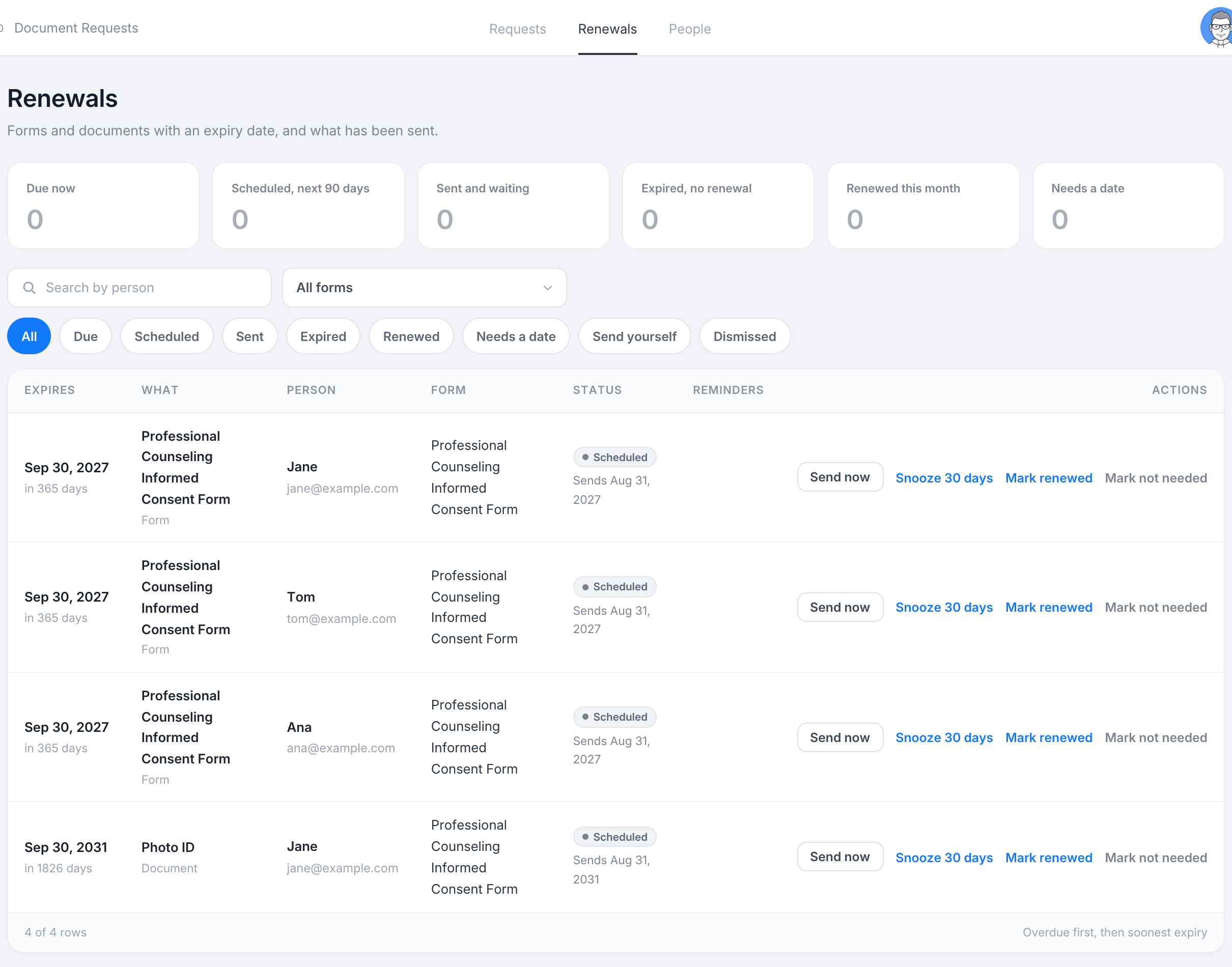
Each row says whether it is a form or a document, who it belongs to, the expiry date and what has been sent. Open a row for the chain: the old submission, the renewal sent, and the new submission when it arrives. The actions:
- Send now sends the renewal email before its scheduled day. Remind sends it again.
- Snooze 30 days moves the due date.
- Mark renewed records a renewal done elsewhere, for example on paper, with the date and a note. No new submission is created. When the rule is a period after the submission, the next cycle counts from that day.
- Mark not needed closes the row. Nothing is sent to the person.
A row with no email address is marked Send yourself: copy the link and send it your own way.