


Google Forms has no signature question type, so you can’t add a signature field to a Google Form on its own. To collect signatures, install a third-party add-on, use eSignature in Google Docs or Drive to get a document signed, or import the form into a form builder with a Signature field, such as PlatoForms.
What we’ll cover:
Does Google Forms have a signature field?
No. Google Forms lets you choose from these question types: short answer, paragraph, multiple choice, checkboxes, dropdown, file upload, linear scale, rating, grids, date and time. None of them captures a signature.

Google and Google Forms are trademarks of Google LLC.
A common workaround is a short answer question for the person’s typed name plus a required checkbox such as “I agree”. That records agreement, but Google Forms does not provide a dedicated signature field or any signing evidence beyond the form response.
Three ways to collect signatures
| Google Forms add-on | Google Docs or Drive eSignature | Import into PlatoForms | |
|---|---|---|---|
| What gets signed | Your Google Form, through the add-on’s own signing step | A Google Doc or a PDF in Drive | Your form, as a PlatoForms web form |
| Keeps your Google Form | Yes | No, you send a document instead | Copies its questions, sections and supported question types into a new form |
| Good for | Staying in Google Forms | Getting a document signed, including by several people | Forms that need a signature field, a PDF of each submission or a signature certificate |
| What to check | What the add-on can access, where signatures are stored, and its price | Only some Workspace plans include it, and an admin may need to turn it on | Signature fields need a paid plan; the 15-day trial includes them |
Add a signature with an add-on
The Google Workspace Marketplace has third-party add-ons that add a signature step to Google Forms. They are made by other companies, not Google, and each one works differently. Before you install one, check:
- what access it asks for in your Google account,
- where the signatures are stored and how you get them back,
- whether it needs a paid plan once you collect more responses.
Use Google Docs or Drive eSignature
If you need a document signed rather than a form filled in, Google has its own tool. With eSignature, you add signature fields to a Google Doc, or to a PDF stored in Google Drive, and send signature requests from there, including to several signers.
It works on documents, not in Google Forms, and it is only included in some Google Workspace plans, such as Business Standard and Business Plus. Your administrator may also need to turn it on.
Import the form into PlatoForms and add a Signature field
If you want to keep the form you built and add a real signature field, import it into PlatoForms:
-
Import the form. Open the Google Forms import page, click Connect Google Account, and paste the form’s edit URL, the one that ends in
/edit. Your questions, sections and supported question types come across, and your original Google Form is not changed. Importing is free. -
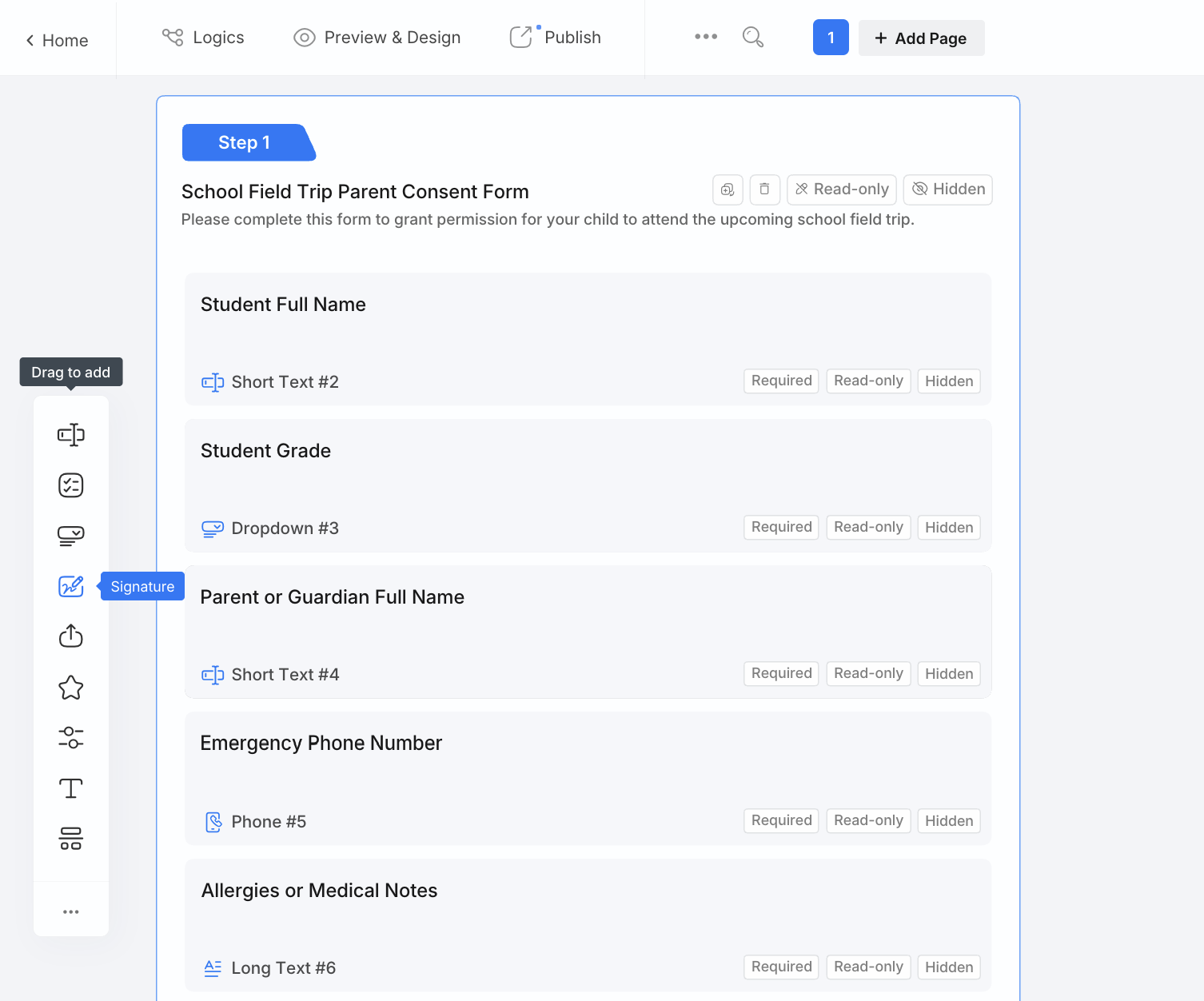
Add a Signature field. In the form builder, drag Signature from the field list to where people should sign. They can draw, type or upload their signature.
-
Publish and send it. Share the form by link, or send it by invitation with Tracking Invitation and Signature Certificate on, if you want a signature certificate for each signing.



Here is a field trip consent form built in Google Forms, after importing it into PlatoForms and adding a Signature field under the consent question:

Existing responses stay in Google Forms and Google Sheets; the import copies the form, not its answers. Signature fields and signature certificates need a paid plan, and every new account starts with a 15-day free trial with access to all features.
Need the signature on a PDF, or several people to sign the same document? See how to send a PDF for signature.
FAQ
Can I use Google Forms to collect signatures?
Not with Google Forms alone. Its question types include short answer, paragraph, multiple choice, checkboxes, dropdown, file upload, scales, grids, date and time, but no signature. To collect signatures, add a third-party add-on from the Google Workspace Marketplace, or import the form into a form builder with a Signature field, such as PlatoForms.
How do I add a signature into a Google Form?
Install a signature add-on for Google Forms from the Google Workspace Marketplace and follow its setup, or import the form into PlatoForms, which brings over your questions, sections and supported question types, and add a Signature field there. A typed name with a checkbox records agreement, but it is not a signature field.
Can I fill out a Google Form without being signed in?
Usually, yes. A published form with General access set to Anyone with the link can be filled in without signing in. Respondents must sign in to a Google account if the form is restricted to an organization or specific people, Limit to 1 response is turned on, or the form has a File upload question.


