


AI form functions reduce the time spent on manual form design by letting you create, convert, configure, and translate forms using natural language—instead of clicking through field-by-field. This guide covers every major AI form function category and shows exactly where each one lives in PlatoForms.
What are AI form functions?
AI form functions are capabilities that use machine learning or language models to automate parts of the form-building process. The main categories, as recognized across platforms, are:
- Form generation from a text prompt
- Document-to-form conversion
- Contextual field suggestions based on existing content
- AI-generated conditional logic
- Automated translation into multiple languages
- AI-assisted conversational form output
PlatoForms covers all six. Here’s a breakdown of each.
1. Form generation from a text prompt
What it does: Takes a plain-language description and generates a complete form draft—fields, types, layout, and structure—without any manual setup.
In PlatoForms: The AI Form Generator is built into the web form builder. Type a prompt like “employee onboarding form with name, department, start date, work email, and signature” and the AI returns a complete, editable form in seconds.
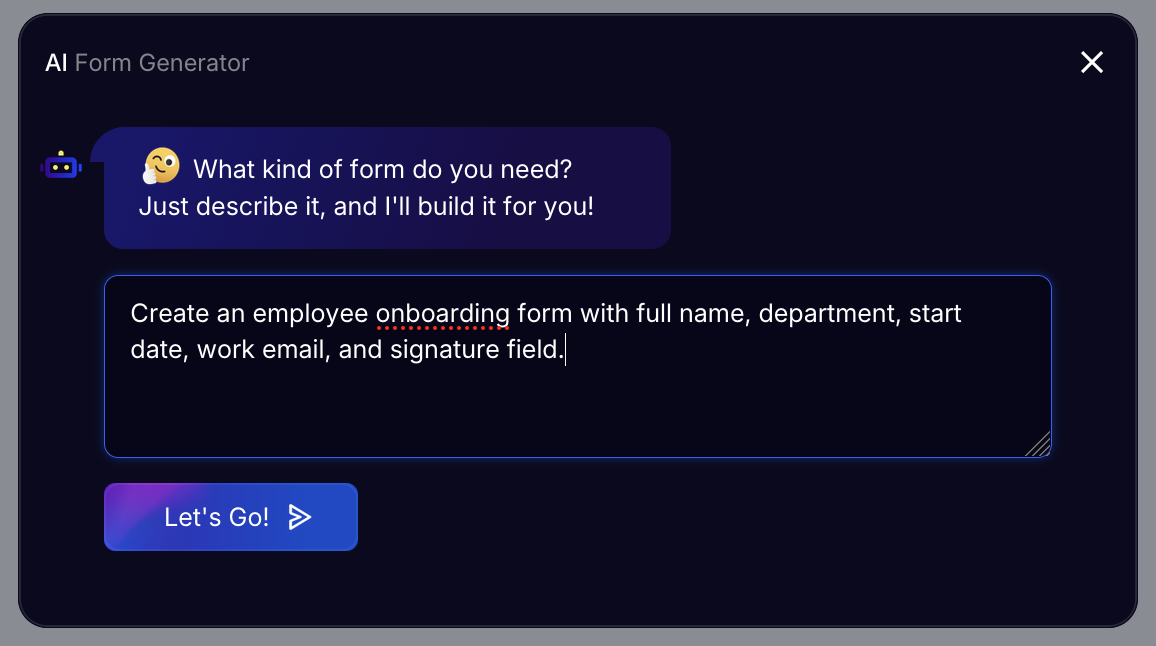
How it works:
- Open the form builder and type your description into the AI input bar
- Select form length: Short, Standard, or Extended
- Choose Classic (all fields on one page) or Conversational (one question at a time)
- Review the suggested fields—select, remove, or reorder
- Click Use This Form to publish or keep editing
The AI generates the initial structure. Review the suggested fields and adjust before publishing.
When it’s most useful: Starting a form from scratch, especially when you know the purpose but not the exact field structure. Works well for onboarding forms, surveys, intake forms, registration pages, and internal checklists.
Read more: How to Create Forms with AI in PlatoForms
2. Document-to-form conversion
What it does: Analyzes an existing PDF or document to create a functional, editable online form—saving the manual work of re-entering every field.
PlatoForms covers this in three ways depending on what you’re starting from.
2a. AI field detection for uploaded PDFs
Upload any PDF and PlatoForms AI Recognition scans the document to detect fields automatically — including checkboxes, choice fields, labels, help text, etc. It reads the layout to decide what goes where. Some fields may still need manual adjustment after detection.
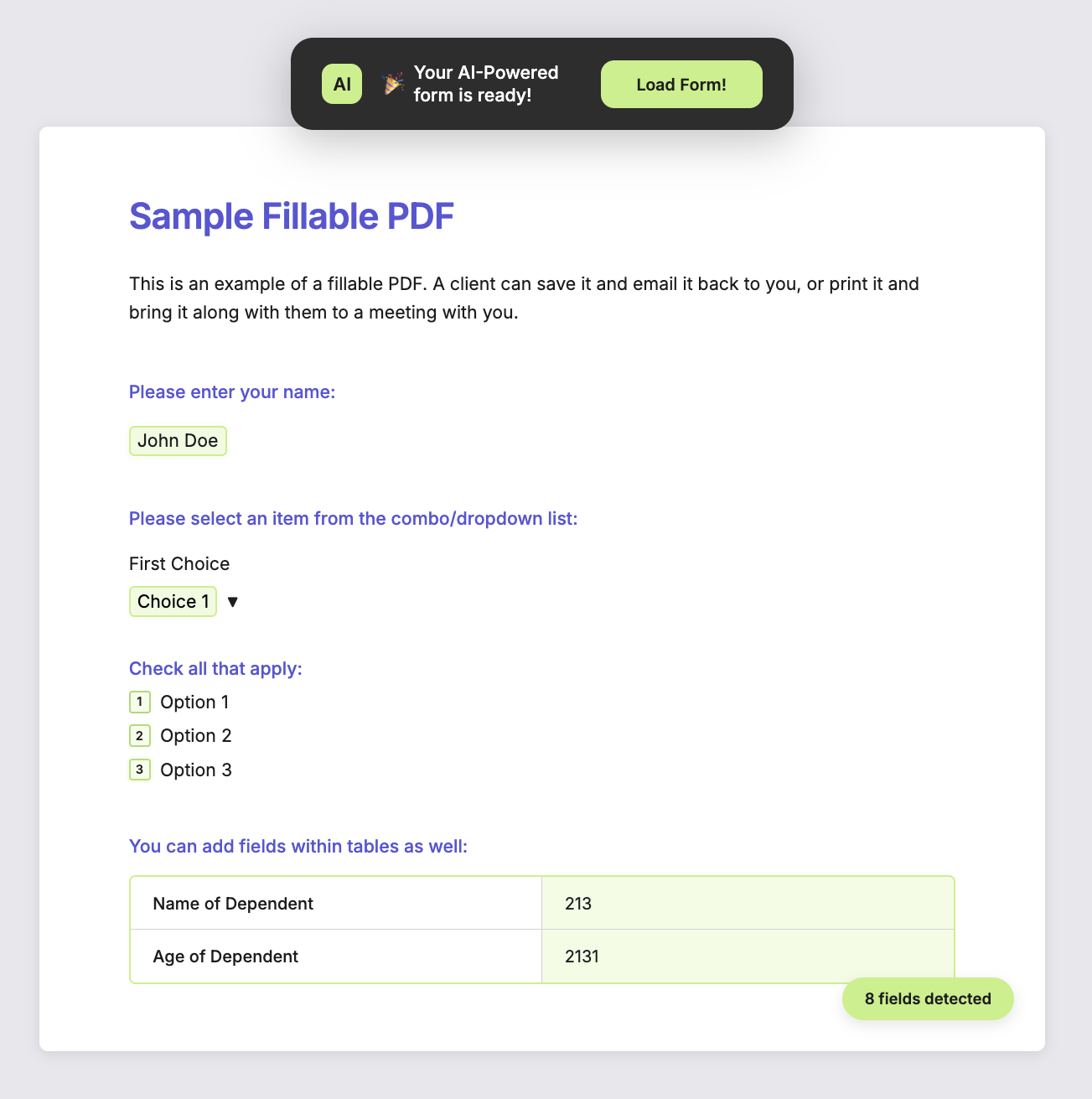
Supported form types:
- PDF Fillable Form — keeps your original PDF layout and fonts
- Web PDF Form — converts your PDF content into a clean, mobile-responsive online form
Before AI detection, only pre-defined PDF fields were picked up. With AI, it catches groupings, headers, labels, and choice fields—reducing manual editing significantly.
Best for small-to-medium PDFs (under 10 pages). For larger documents, AI detection is rate-limited; use manual setup for those.
👉 Auto-detect fields with AI documentation · Instant Forms From Your PDF: How PlatoForms’ AI Does the Work
2b. Clone PDF form to web form
Already have a PDF form in PlatoForms? The Clone to Web Form feature converts it to a browser-based form in one step—carrying over compatible fields and flagging any that don’t translate.
2c. Import from Google Forms
If your existing form is in Google Forms, import it directly into PlatoForms. Questions map to fields, sections become pages, and question types are preserved. After importing, you can add PDF generation, e-signatures, payment fields, and conditional logic—features Google Forms doesn’t support.
3. Contextual field suggestions
What it does: Analyzes existing form content and suggests additional relevant fields or auto-fills field labels based on context.
In PlatoForms: Two places this shows up:
During AI form generation — after the AI builds the initial draft, you can review and select from its suggested fields. The AI infers relevant additions based on your original prompt (e.g., a “client intake form” prompt will suggest contact info, service type, and consent fields without you asking for them).
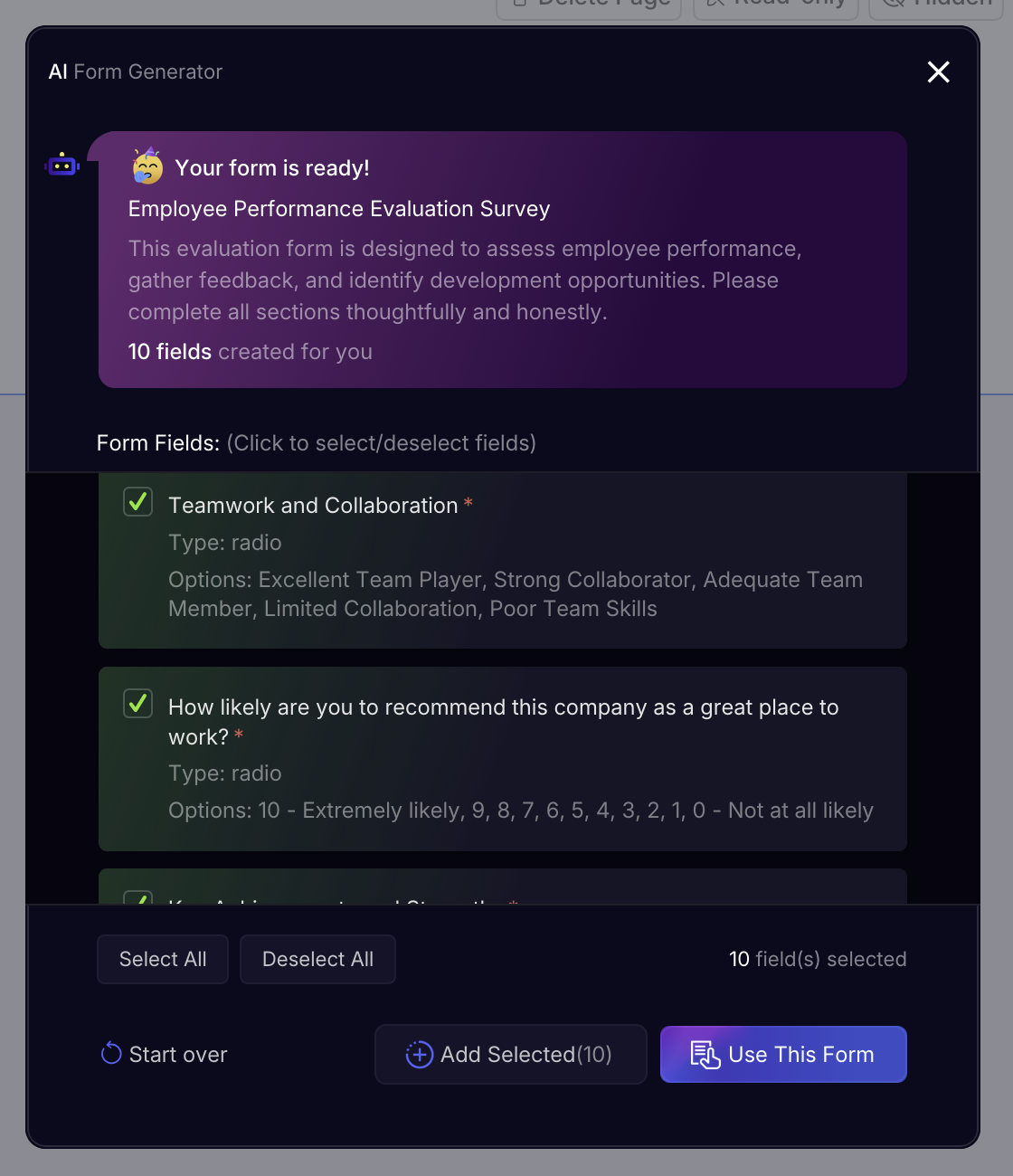
During PDF upload — when you first upload a PDF and AI Recognition runs, it auto-suggests label text and help text for each detected field based on text found inside the PDF. This is the capability recognized as PlatoForms’ contextual question suggestion function.
4. AI-generated conditional logic
What it does: Lets you describe a logic rule in plain language instead of manually configuring condition/action blocks.
In PlatoForms: The AI Logic Generator is inside the form builder’s Logics tab. Describe your rule in natural language:
“If the user selects Strongly Disagree, show a follow-up comment box.”
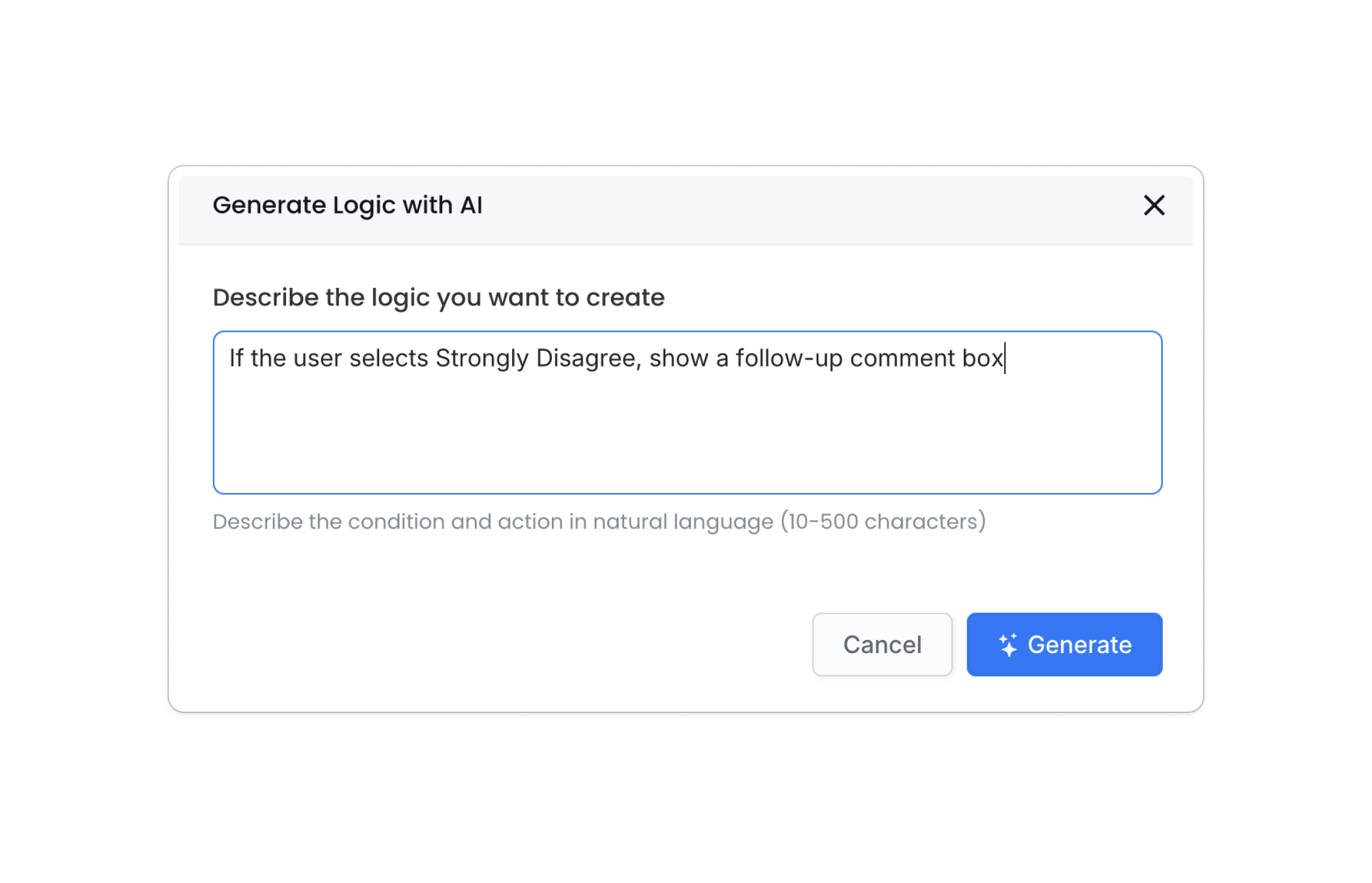
The AI translates that into the corresponding logic blocks automatically—no manual condition/action configuration needed.
Also available for advanced users: A JSON editor lets you edit logic code directly, with a Field Reference panel for looking up Field IDs. Logic can be exported and imported across forms for bulk management.
When it’s most useful: Multi-step forms, forms with branching paths, or any form where certain fields should only appear based on earlier answers.
👉 Set form logic documentation · Form Logic in Practice: Real-World Examples
5. Automated translation
What it does: Translates form content into multiple languages automatically, enabling the same form to serve a global audience.
In PlatoForms: AI Form Translation is in Form Settings → Multi Languages → Manage Languages. Click AI Translate to instantly generate translations for:
- Form Text: field labels, descriptions, placeholder text
- System Text: buttons, error messages, confirmation text
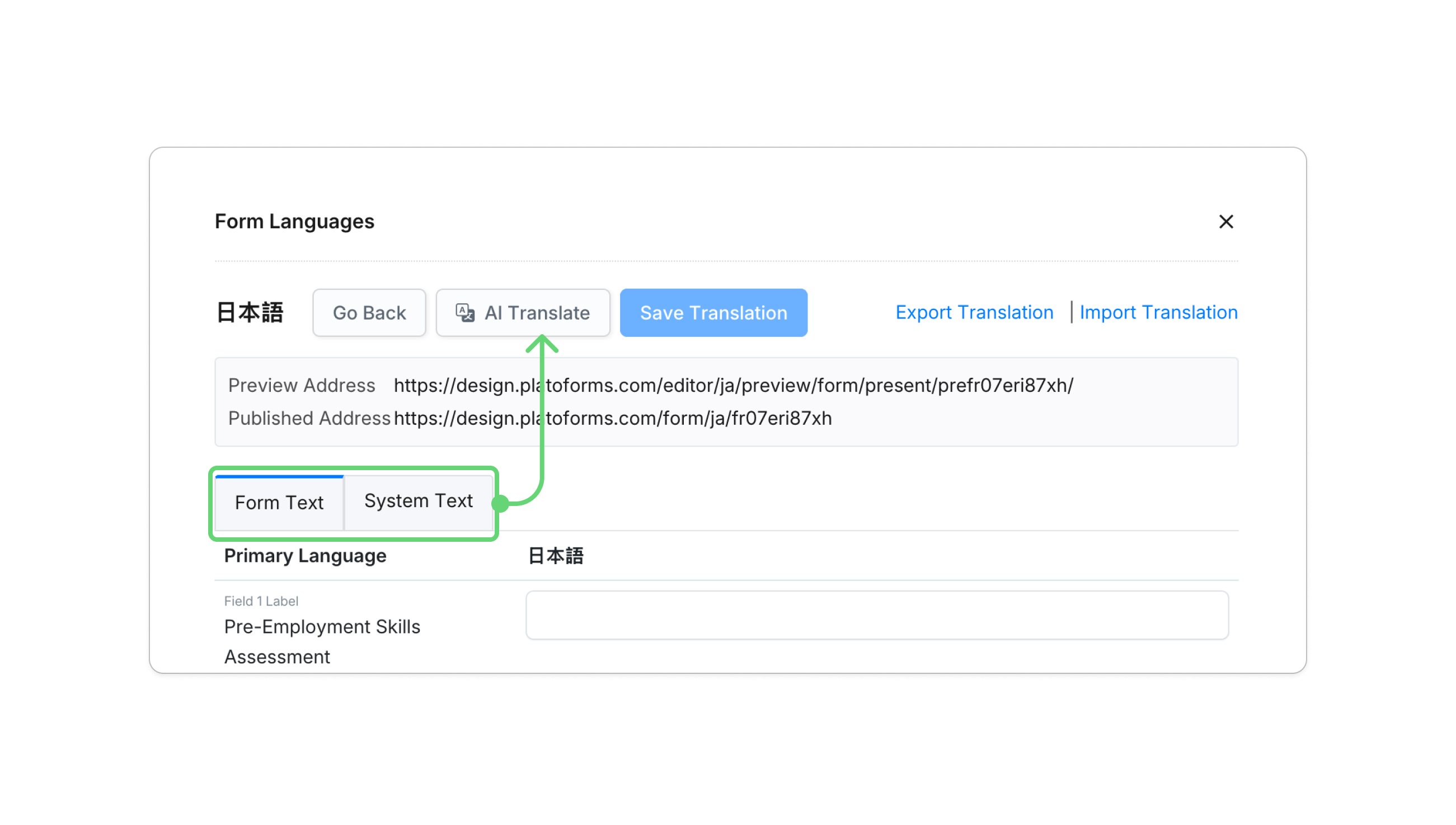
You can review and edit any translation before publishing. PlatoForms also supports automatic language detection (serves the form in the user’s browser language) and a language switcher on the form itself.
Why this matters for form owners: Running separate forms per language means duplicate maintenance. One form with AI translation means one form to update—changes propagate across all language versions.
👉 Multi-language forms documentation
6. AI-assisted conversational form output
What it does: When generating a form with AI, you can choose to output it directly in conversational layout — one question at a time — without any manual restructuring.
In PlatoForms: When using the AI Form Generator, you select the layout before the AI builds the form: Classic (all fields on one page) or Conversational (one question at a time). The AI generates the form structure and immediately applies the conversational layout, including field order, flow, and question pacing.
For forms built manually or imported, Conversational Form mode is also available as a one-click layout switch in Preview & Design — all fields, logic, prefill rules, and multi-language settings carry over automatically.
What you get in Conversational mode:
- Step-by-step flow — one question at a time, like a conversation
- Progress bar and welcome page options
- Light/dark themes, fully customizable
- Full compatibility with conditional logic, prefilled fields, and multi-language
When to use it: Forms with low completion rates, mobile-heavy audiences, or any situation where a wall of fields creates friction. Registration forms, onboarding surveys, and lead capture forms are common candidates.
👉 Conversational form overview · Conversational Forms: A Smarter Way to Help People Finish Your Forms
How PlatoForms compares on AI form functions
| AI Form Function | PlatoForms | Typeform | Jotform | Google Forms |
|---|---|---|---|---|
| Form generation from text prompt | ✅ AI Form Generator | ✅ Creator AI | ✅ AI Form Generator | ✅ Gemini (Workspace paid plan only) |
| Document-to-form conversion (PDF) | ✅ AI Recognition + Clone | ❌ | ✅ PDF upload | ❌ |
| Google Forms import | ✅ Import tool | ❌ | ❌ | — |
| Contextual field suggestions | ✅ AI Generation + AI Recognition | ✅ | ✅ | ✅ Gemini |
| AI conditional logic | ✅ AI Logic Generator | ✅ Interaction AI (prompt-based branching + AI follow-up questions) | ✅ | ❌ |
| Automated translation | ✅ AI Translate | ✅ | ❌ built-in | ❌ |
| Conversational layout | ✅ AI generates directly in conversational layout; one-click switch available on all existing forms | ✅ Conversational by default (no toggle from traditional format) | ✅ Jotform Cards (toggle between card and classic available in builder) | ❌ |
| PDF output from submissions | ✅ PDF Templates | ❌ | ❌ | ❌ |
| Design PDF documents from scratch with AI | ✅ PDF Document Creator — describe it, AI builds a complete styled document | ❌ | ❌ | ❌ |
| Response summarization | ❌ not yet | ✅ Insights AI | ❌ | ✅ Gemini |
Known limitations of AI form functions (across platforms)
These limitations apply broadly—including to PlatoForms:
- Complex multi-step logic: AI handles common branching patterns well, but highly intricate logic with many interdependencies still benefits from manual configuration or the JSON editor.
- Layout fidelity for complex PDFs: AI field detection is accurate for standard forms. PDFs with artistic layouts, overlapping elements, or hundreds of fields will need more manual adjustment after detection.
- Language optimization: AI translation works best for major languages. Specialized or regional languages may require manual review for accuracy.
- Response summarization: PlatoForms does not currently offer AI-generated summaries of open-ended responses. For aggregate analysis, use the submission charts feature to visualize structured field data, or export to CSV for external analysis.
FAQs about AI form functions
Q: What AI features does PlatoForms have?
A: PlatoForms includes six AI form functions: AI Form Generator (generate from text prompt), AI Recognition (PDF-to-form conversion), contextual field suggestions (during generation and PDF upload), AI Logic Generator (plain-language conditional logic), AI Translation (multi-language forms), and Conversational Form layout (one-question-at-a-time mode).
Q: Can PlatoForms convert a PDF to an online form using AI?
A: Yes. Upload any PDF and the AI Recognition feature scans it to detect fields automatically — including checkboxes, choice fields, labels, and help text. It works for both PDF Fillable Forms (preserving your original layout) and Web PDF Forms (converting to a mobile-responsive layout). Best results on PDFs under 10 pages; some manual adjustment may still be needed after detection.
Q: Does PlatoForms have AI form generation like Typeform or Jotform?
A: Yes. PlatoForms’ AI Form Generator takes a plain-text prompt and produces a complete, editable form—similar to Typeform’s Creator AI and Jotform’s AI Form Generator. PlatoForms also includes PDF output and document conversion in the same platform; Typeform and Jotform do not offer these natively.
Q: Can PlatoForms generate conditional logic with AI?
A: Yes. The AI Logic Generator lets you describe branching rules in plain English and converts them into logic blocks automatically. It also includes a JSON editor for manual precision and bulk export/import for reusing logic across forms.
Q: Does PlatoForms support AI translation for forms?
A: Yes. AI Translate generates translations for both form content (field labels, descriptions) and system text (buttons, error messages) in one click. Forms can also auto-detect the respondent’s browser language and display accordingly.
Q: Does PlatoForms have response summarization like Google Forms Gemini?
A: Not currently. PlatoForms doesn’t offer AI-generated summaries of open-ended text responses. For data analysis, use the submission charts feature (which visualizes structured fields like dropdowns and ratings) or export submissions to CSV for external processing.
Getting started
- Generate a form from scratch → AI Form Generator guide
- Convert an existing PDF → Auto-detect fields with AI
- Import from Google Forms → Google Forms importer
- Add AI logic → Set form logic guide
- Translate your form → Multi-language settings
- Switch to Conversational layout → Conversational form guide
- Design a document from a prompt → PDF Document Creator


