


When you are a freelancer, consultant, or small local business owner, the conventional advice is always the same: “You need to build an e-commerce website.” You are told to buy a domain, set up Shopify or WooCommerce, configure complex payment gateways, design a digital storefront, and maintain monthly hosting fees.
But what if you do not sell physical products? What if you sell consulting hours, graphic design packages, event registrations, custom cakes, or therapy sessions?
For service-based businesses and independent creators, building a full website just to collect money is often overkill. It creates unnecessary overhead, delays your launch, and forces you to manage software instead of serving your clients. The truth is, you can sell services online without a website securely, professionally, and beautifully. All you need is a smart way to collect client information, secure a legal agreement, and process the payment in one seamless step.
In this comprehensive guide, we will show you how to use PlatoForms to create a lightweight service intake and payment workflow using our native PayPal integration and AI-powered form building tools.
In this blog, we’ll cover:
- The problem with traditional e-commerce for service businesses
- Why PayPal payment forms are the perfect alternative
- 6 Ways to build your payment form (From AI to PDFs)
- Setting up dynamic pricing for your services
- Enhancing the client experience (Conversational forms & E-signatures)
- The complete automated workflow
The problem with traditional e-commerce for service businesses
If you are a graphic designer selling a branding package, or a therapist booking consultation sessions, your sales process does not look like a traditional retail checkout. You do not have a “shopping cart.”
Instead, your workflow usually involves gathering specific client requirements through an intake form, agreeing on terms and conditions via a contract or waiver, and finally collecting the fee. When you try to force this workflow into a standard website builder, it breaks down. You end up emailing a PDF contract, waiting for the client to print, sign, and scan it back, and then separately sending a payment link or an invoice.
This disjointed process creates immense friction. Clients forget to pay, emails get lost in spam folders, and you spend hours chasing down signatures and funds. You need an online payment form that handles the data collection, the legal agreement, and the payment all in one unified, professional interface.
Why PayPal payment forms are the perfect alternative
To accept PayPal payments without a website, you need a tool that bridges the gap between your service agreements and the payment processor. This is where PlatoForms comes in.
PlatoForms is an advanced, AI-powered form automation platform. Recently, PlatoForms introduced a powerful PayPal Payment widget, allowing you to embed PayPal’s smart button suite directly into your form.
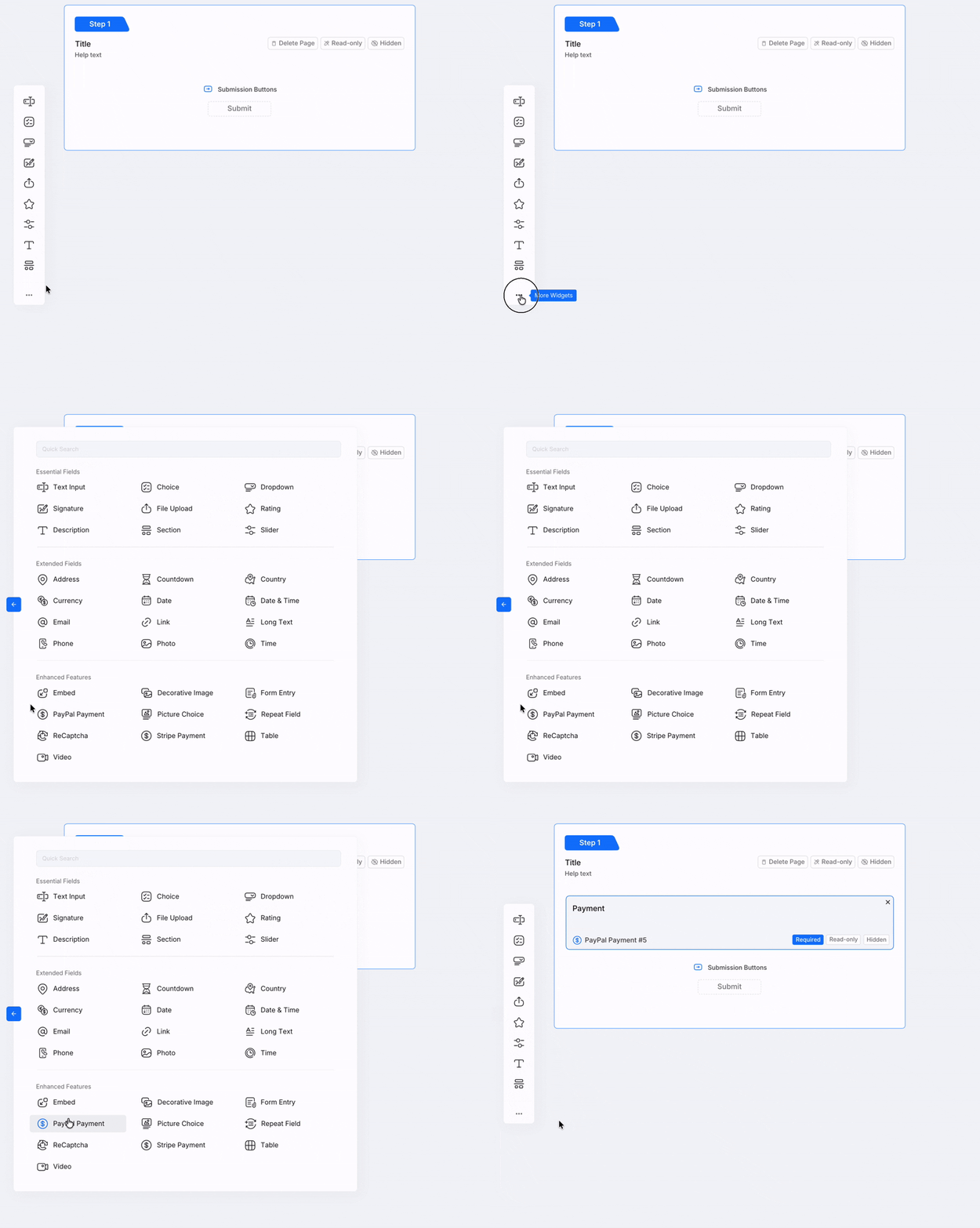
Here is why this lightweight approach beats building a website:
-
Zero hosting or coding required: You do not need to manage servers, update plugins, or write a single line of code. You can even use your own Custom Domain (like
forms.yourbusiness.com) — available on the Bronze plan at $10/month. -
High conversion rates: According to an Ipsos study commissioned by PayPal across select markets, 59% of PayPal users surveyed reported abandoning a purchase because PayPal was not available as a payment option. By offering a PayPal payment form, you give clients a trusted, familiar way to pay.
-
Multiple payment options in one click: The PlatoForms PayPal widget automatically displays options for PayPal, direct Credit/Debit Card payments, and “Pay Later” installments, depending on factors such as buyer location, merchant eligibility, currency, and PayPal availability.
-
Automated record keeping: When a client pays, PlatoForms automatically generates a completed, perfectly formatted PDF receipt or contract, and emails it directly to both of you.
| Traditional website (Shopify / WooCommerce) | PlatoForms payment form | |
|---|---|---|
| Setup time | Days to weeks | Minutes to hours |
| Additional setup | Often required | Minimal |
| Monthly hosting fees | $20–$100+ | Included in plan |
| Client intake workflow | May require apps or additional setup | Built in |
| Payment processing | Requires gateway configuration | PayPal, Stripe, Square — built in |
| E-signature collection | Typically requires an app or integration | Built in |
| PDF generation after payment | Requires add-on | Built in |
| Test before launch | Varies by platform | PayPal Sandbox / Stripe Test Mode |
| Best for | Physical product stores | Service-based businesses, freelancers |
Shopify and WooCommerce feature availability and pricing vary by plan and region. Comparison based on default configurations as of 2026.
6 Ways to build your payment form
Whether you are starting from scratch or already have a stack of business documents, PlatoForms offers multiple ways to create your perfect order form.
1. Upload your existing PDF (AI Detection)
If you already use a PDF for your business—like a client onboarding questionnaire or a service menu—simply upload it to PlatoForms. Our AI Recognition feature scans the document and automatically detects fields, checkboxes, choice fields, and labels. It converts your static PDF into a mobile-friendly web form while preserving your original design for the final output.
2. Generate with AI (Text Prompt)
Do not have a form yet? Let AI do the heavy lifting. Open the AI Form Generator and type a prompt like: “I need a graphic design service order form that collects client name, email, project scope, deadline, and a package selection.” The AI will generate a complete, editable form in seconds, complete with appropriate field types and layout.
3. Choose a pre-built Template
If you want a proven layout, browse the PlatoForms Template Library. We offer hundreds of free, customizable templates including dedicated Payment Forms and Order Forms. Just select a template, add your logo, and attach your PayPal account.
4. Build from scratch (Web Form Builder)
For ultimate control, use our intuitive drag-and-drop Web Form builder. You can construct your form field by field, applying your brand colors, custom fonts, and custom CSS to match your business identity perfectly.
5. Import from Google Forms or Canva
If you previously built a form in Google Forms but realized you cannot take payments through it, you can use our Google Form Import tool to bring it into PlatoForms instantly. Alternatively, if you have a design in Canva, the PlatoForms Canva App lets you use that design as the visual layer for your form — AI field recognition then maps the fields automatically, so the final output matches your original Canva layout.
6. Create Documents with AI (PDF Document Creator)
With the PDF Document Creator, you can generate fully formatted PDF documents entirely through AI prompts, templates, or preset styles — then convert them into online forms. Whether you need a service agreement, an invoice template, or a branded intake document, the Document Creator lets you design it and make it fillable in one workflow.

Setting up dynamic pricing for your services
One of the biggest challenges when you sell services online without a website is handling variable pricing. If you offer a “Basic Consultation” for $100 and a “Premium Strategy Session” for $250, you cannot use a simple, fixed-price button.
PlatoForms solves this elegantly with Dynamic Pricing. The amount charged at checkout updates in real-time based on what the client selects on the form.
How to set it up:
- Add a Short Text field to your form, label it
pricing, and set it to Hidden on Form. - In your PayPal widget properties, set the Payment Amount Field to this hidden
pricingfield. - Use PlatoForms’ intuitive AI Logic Generator to define the rules. You can simply type: “If Service Package is Premium, set pricing field to 250”, and the AI will build the logic blocks for you.
You can even include the {{pricing}} variable in the PayPal widget’s label, so the client clearly sees the total amount update as they make their selections. This transparency builds trust and prevents checkout abandonment.
Video tutorial for your reference ⬇️
Enhancing the client experience
A payment form should not feel like a tax document. PlatoForms includes several features to make your checkout experience feel premium and professional.
Conversational Forms
Long forms cause form fatigue. With one click, you can switch your standard form into a Conversational Form. This presents questions one at a time in a sleek, chat-style interface. You can add a custom welcome page, a progress bar, and allow clients to focus entirely on the current question before moving to the payment step.
E-Signatures with Signature Certificates
If your service requires a contract or waiver, you can collect an e-signature right before payment. When you send the form through a tracked invitation with the certificate turned on, PlatoForms also adds a signature certificate that records the signing time, IP address and a SHA-256 fingerprint of the signed PDF, so later changes to the file can be detected. A form shared as a public link, such as in your Instagram bio, still collects the signature, but without a certificate.
Enterprise-Grade Security
Handling client data and payments demands trust. PlatoForms is built on a comprehensive security infrastructure that includes AES-256 encryption at rest, TLS 1.2+ encryption in transit, and regular third-party penetration testing. The platform is hosted on AWS, which maintains SOC 2 Type II and ISO 27001 certifications. For healthcare professionals, HIPAA compliance is available on Silver and Gold plans. These controls help protect sensitive client data throughout the form submission process.
Multi-Language Support
Selling to an international audience? Use the AI Translate feature to instantly translate your entire form—including system buttons and error messages—into multiple languages. The form will automatically detect the user’s browser language and serve the correct version.
The complete automated workflow
Once you hit publish, you have a fully functional sales engine without ever buying a domain name. Here is what the experience looks like for your client:
- The Click: You share your PlatoForms link on your Instagram bio, in a cold email, or via a WhatsApp message.
- The Intake: The client opens the link on their phone. They experience a smooth, conversational flow, filling out your required questions and signing your terms of service electronically.
- The Payment: At the bottom of the form, they see the exact price based on their selections. They click the PayPal button and pay securely using their PayPal balance, credit card, or Pay Later options.
- The Delivery: Once the payment is confirmed and the form is submitted, PlatoForms generates a PDF containing all their answers and their signature. Through Smart Email Notifications, a copy is instantly emailed to you (so you can start the work) and to the client (for their receipt and records).

- The Storage & Sync: Every completed submission and its generated PDF can be automatically saved to your Cloud Drive — including Google Drive, Dropbox, and OneDrive — so your records are always organized without any manual file management. Need to push data further into your existing tools? PlatoForms integrates with Zapier, Make, and more, allowing you to automatically create a Trello card for each new order, add a row to your accounting spreadsheet, or send a Slack notification to your team the instant a payment comes through.
Before you share your link with the world, remember to test your flow. PlatoForms provides a dedicated PayPal (Sandbox) connection slot. You can use a free PayPal Developer test account to run mock transactions and ensure your dynamic pricing and PDF generation work perfectly before a real client ever sees it.
Frequently asked questions
Can I accept PayPal payments without a website?
Yes. PlatoForms lets you embed a PayPal payment widget directly inside a form. You share a link — no domain, no hosting, no storefront required.
Can I create a PayPal payment form?
Yes. You can add a PayPal Payment field to any form in PlatoForms and connect it to your PayPal merchant account. The widget supports PayPal, credit/debit cards, and Pay Later options where available.
Do I need a business website to accept PayPal?
No. PayPal requires a merchant account, but not a website. A PlatoForms link gives you a shareable URL that handles intake, signature, and payment in one step.
Can clients pay by card without a PayPal account?
Yes. The PayPal widget includes a “Debit or Credit Card” option that lets buyers pay directly without logging into a PayPal account.
How do I collect a signature and payment in one form?
Add a Signature field before the PayPal Payment field in your form. The client signs first, then pays — all in one submission flow. PlatoForms generates a PDF with both the signature and the confirmed payment.
Start selling today
You do not need to be a web developer or hire an agency to run a professional digital business. By combining the powerful AI and document automation capabilities of PlatoForms with the global trust of PayPal, you can create a frictionless, secure checkout experience in an afternoon.
If your clients prefer to pay through Square — or if you already use Square for in-person transactions — PlatoForms also supports Square natively. You can embed a Square Payment field directly in your form or use Square Checkout to redirect to Square’s hosted payment page. Both work alongside the same form logic and dynamic pricing described above.
Stop losing clients to complicated onboarding processes and delayed invoices. Sign up for free today, build your perfect form, and start getting paid for your services immediately.


