


Quick answer
Jotform and PlatoForms both support online form building, PDF conversion, and approval workflows. Jotform combines a broad form builder with Smart PDF Forms and approval tools. With PlatoForms, you can turn an existing PDF into an original-layout online form or a responsive web form that fills the PDF, create a new web form, or design a downloadable fillable PDF. For online collection, add signatures, staff review steps, and automatic delivery of completed PDFs to cloud storage. When several documents need the same information, Master Forms lets users enter those details once.
Best for
| Tool | Best for |
|---|---|
| Jotform | Building online forms with configurable approvals and using Smart PDF Forms to populate existing PDFs |
| PlatoForms | Turning existing PDFs into original-layout or responsive online forms, building new web forms, and designing fillable PDFs; adding signing, review steps, and shared answers across documents as needed |
Pricing and Included Features
| Plan | Annual billing | Month-to-month | Included access, features, and limits |
|---|---|---|---|
| Jotform Starter | $0 | $0 | 1 account user; 5 forms and 100 submissions/month; no HIPAA-enabled features |
| Jotform Bronze | $408/year ($34/month equivalent) | $39/month | 1 account user; 25 forms and 1,000 submissions/month; removes branding; no HIPAA-enabled features |
| Jotform Gold | $1,188/year ($99/month equivalent) | $129/month | 1 account user; 100 forms and 10,000 submissions/month; HIPAA available with activation and BAA |
| Jotform Enterprise | Custom quote | Custom quote | Multiuser administration and organization-specific limits; confirm HIPAA setup and BAA coverage |
| PlatoForms Free | $0 for the team | $0 for the team | Up to 2 team members; 1 published form and 100 submissions/month; AI field recognition, form generation, and signature fields; no HIPAA team activation |
| PlatoForms Bronze | $120/year total ($10/month equivalent for the team) | $12/month total | Up to 5 team members; 2 published forms and 1,000 submissions/month; Workflow, signature certificates, and cloud integration; no HIPAA team activation |
| PlatoForms Silver | $360/year total ($30/month equivalent for the team) | $36/month total | Up to 20 team members; 20 published forms and 10,000 submissions/month; Bronze features plus HIPAA team activation and BAA available |
Prices checked September 16, 2026, in USD, before taxes and promotions. Annual equivalents require annual billing. PlatoForms prices cover the included team members, with shared form and submission allowances. Jotform’s standard plans are individual accounts; people filling out or approving forms are different from account users. For PHI collection, compare Jotform Gold or Enterprise with PlatoForms Silver or Gold with each vendor’s activation and BAA requirements. See the PlatoForms HIPAA team setup guide.
Feature comparison
| Task | Jotform | PlatoForms |
|---|---|---|
| AI assistance | AI creates and edits forms and generates conditional rules from prompts | AI field detection, form/logic generation, translation, Voice Filling, and Insights Q&A/summaries |
| Use an existing PDF | Smart PDF Forms map responses back to the original PDF | PDF layout or responsive intake mapped to original PDFs; online signing with optional signature certificates |
| Design a new PDF document | PDF Editor designs documents using form data | PDF Document Creator designs documents from a blank canvas, AI prompt, or template |
| Approval routing | Jotform Approvals / Workflows | Sequential participant forms with configured reminders |
| Record handling | Inbox, Tables, PDF downloads, and PDF email attachments | Submission dashboard, PDF/CSV downloads, PDF email attachments, and respondent downloads |
| Cloud filing | Configured PDF delivery to Google Drive, Dropbox, OneDrive, or Box | Configured PDF delivery to Google Drive, Dropbox, OneDrive, or Box |
| Map answers into PDFs | Smart PDF maps responses to the source PDF; PDF Editor creates output documents from form data | Master Forms map shared answers to several linked PDFs |
| HIPAA availability | Gold or Enterprise; activate HIPAA and arrange BAA | Silver or Gold; enable team HIPAA and receive BAA |
For PlatoForms, online signing requires a paid plan. To generate a signature certificate, enable it for the signature field and the invitation before sending.
Jotform pros
- Build web forms from a broad template library and configure approval flows.
- Convert existing PDFs with Smart PDF Forms and map answers into the original document layout.
- Send submission PDFs to Google Drive through its integration.
Jotform scope and plan considerations
- Standard subscriptions are individual accounts. Enterprise provides multiuser account administration; participating in an approval is a different role.
- HIPAA-enabled collection requires Gold or Enterprise and the applicable activation and BAA setup.
- Smart PDF imports allow up to 25 pages on Starter, Bronze, and Silver, or 50 on Gold and Enterprise.
PlatoForms pros
- Convert an existing PDF into an original-layout online form or a responsive web form that fills the PDF, with AI-assisted field detection.
- Build new web forms from templates or AI prompts, or design and edit documents in PDF Document Creator for static or fillable PDF export.
- Collect online signatures and manage submission records with PDF and CSV exports.
- Reuse shared answers across linked PDFs with Master Forms.
- Connect participant review through Workflow and automatically save generated PDFs through cloud-drive integration.
PlatoForms scope and plan considerations
- Online completion requires an internet connection. Downloadable fillable PDFs from Document Creator can be completed in a compatible PDF viewer.
- Plans have published-form, submission, storage, and team-member allowances. Online signing, Workflow, and cloud-drive integration require a paid plan.
- Document Creator edits its own designs; adding fields to an uploaded PDF does not rewrite its original text.
For either product, review generated fields and PDF output, and configure participant steps and delivery destinations before publishing.
Choose Jotform if
You need a broad web-form builder with Smart PDF output and configurable approvals, or those tools already fit your team’s process. Compare the account access and plan allowances needed to manage the forms together.
Choose PlatoForms if
You want to turn existing PDFs into online forms, build new web forms, or design downloadable fillable documents. For online collection, add signatures and staff review as needed. Master Forms reuses answers when several PDFs need the same details; Workflow connects participant steps, and cloud-drive integration saves generated PDFs to your chosen folder. These features can support a single form or a larger process. Jotform also offers approvals and PDF delivery, so compare the setup and completed output for the same sample form.
How do you move a PDF contract or intake packet online without rebuilding the documents your team already uses? With PlatoForms, you turn those PDFs into online forms and receive completed copies in their original layouts. For a packet, one shared set of answers can fill several PDFs, so clients enter the same details once.
For teams considering a Jotform alternative, that is the starting point: keeping familiar paperwork while reducing the work needed to complete it. The next consideration is what it takes to run that process with your team, from access and approval steps to security requirements and subscription costs. This guide examines how PlatoForms addresses those needs, beginning with how each platform handles your existing PDFs.
How Each Platform Uses Your Existing PDF
Jotform Smart PDF Forms
Jotform does not require every PDF workflow to start from a blank web form. Smart PDF Forms converts an existing PDF into an online form and maps submitted answers into the original PDF layout. Its PDF Editor also lets you design output documents from form data. PlatoForms has a document-design route too: PDF Document Creator supports a blank canvas, AI prompts, templates, and static or fillable PDF export.
For a strict document layout, test a representative file on both platforms. Inspect long answers, checkboxes, signatures, and page breaks rather than assuming either conversion is perfect.
PlatoForms’ Approach: The PDF is the Source of Truth
PlatoForms can use an existing PDF as the output layout, which is useful for legal, healthcare, and finance teams working with approved paperwork. It also supports new web forms and document designs when no source PDF exists.
With PlatoForms, you upload your existing PDF, and the platform’s AI automatically detects text boxes, checkboxes, dropdowns, signatures, and dates. It then layers interactive fields directly on top of your document. The original PDF layout, branding, and structure are preserved as the output layout. Review the detected fields and their mappings before publishing, then inspect a completed PDF with realistic answers.
Both products can work with an existing PDF. PlatoForms deserves a closer look when the same intake must populate several linked documents through Master Forms.
What Should a Jotform Alternative Preserve?
Both Jotform and PlatoForms can preserve the original PDF layout. When considering a switch, compare how shared answers reach several documents, how staff review submissions, and how completed records are delivered. For HIPAA-enabled intake, PlatoForms Silver also offers a lower subscription entry cost than Jotform Gold, with up to 20 team members included. The pricing section below compares the rates and allowances.
Take one existing form and list the dependencies before trying a Jotform alternative:
| Existing dependency | Check in the replacement |
|---|---|
| Original PDF output | Field placement, long answers, checkboxes, and signature positions |
| Approval workflow | Who receives each step and what happens when a correction is needed |
| Connected service | Whether the specific connection exists and passes the fields you need |
| Staff access | Account membership, permissions, and plan cost for the people using it |
| HIPAA-enabled collection | Eligible plan, activation and BAA requirements, and total subscription cost for the staff who need access |
| Historical submissions | How you will retain and retrieve earlier records |
Keep the old form available while testing a sample submission in the new setup. A successful PDF preview does not prove that notifications, approvals, and filing are ready. If Jotform already handles those dependencies well, compare the practical benefit of switching against the work of rebuilding them.
Jotform Pricing: Plan Costs and Team Access
For this comparison, Jotform pricing needs to cover the forms you publish and the responses you expect, plus any required HIPAA configuration. Compare those allowances with the finished workflow, not just the price per month. An approver receiving a request and a colleague who needs account access are also different roles; list both before choosing the account setup.
The opening table separates entry pricing from HIPAA availability. Jotform Bronze includes more forms than PlatoForms Bronze, so the lower sticker price alone does not establish the better value. Compare live forms, monthly responses, storage, and the people who need account access.
Jotform’s standard plans are individual subscriptions. That does not mean every person approving a submission needs an Enterprise seat: approver participation differs from a multiuser organization administering forms. Confirm the access model your staff require.
For HIPAA-enabled collection, PlatoForms Silver costs $360/year for up to 20 team members, compared with $1,188/year for Jotform Gold’s individual account—a difference of $828, or about 70%. Gold includes more forms, so this compares entry prices rather than identical allowances. For shared account administration, compare Silver with a Jotform Enterprise quote. Both require the applicable HIPAA activation and BAA setup before collecting PHI.
Compare AI Form Building and Response Analysis
Jotform AI can create and edit forms and build conditional rules from prompts. These overlap with PlatoForms’ AI form-building tools. Compare the generated form and PDF output using the same sample, rather than treating AI as exclusive to either platform.
For respondents using the published form, PlatoForms’ Voice Filling maps spoken answers to fields for the respondent to review and submit. After collection, AI in Insights helps teams ask questions about reports, summarize results, and classify text responses. Staff still review the record and make any required approval decision. The AI feature guide explains feature scope, including translation and connected AI assistants; access, credits, and data handling depend on the feature.
Five PDF Workflow Details to Compare
Beyond pricing, compare how each tool handles the actual documents and handoffs.
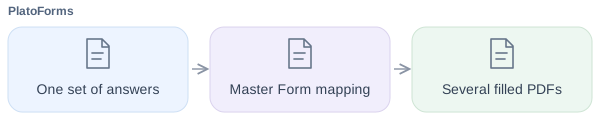
1. Master Forms (One Form → Multiple PDFs)
An employee onboarding packet may repeat a name, address, and contact details across an information sheet, equipment request, and benefits questionnaire. Compare how each product maps those shared answers while keeping document-specific questions and signing steps separate.
With Master Forms, configure one online form and map its fields to the linked PDFs. A submission populates those mappings; it does not automatically determine which signatures or consent each document requires. Configure delivery of the generated PDFs to HR, with a ZIP attachment when needed. For Jotform, test the corresponding PDF Editor, Smart PDF, or Sign setup with the same packet.
2. Built-in Multi-Step PDF Workflows
For Employee → Manager → HR routing, Jotform offers Approvals and Workflows. These can track decisions and feedback; check how each step affects the final PDF.
PlatoForms integrates this directly into the document lifecycle with its Workflow feature. Each participant completes a form configured for their step. To carry a completed PDF forward, use the same PDF template and enable Combine data across steps. Configure signature certificates separately when required.

3. Pre-Filled Editable Invitations
Jotform also supports prefilled forms and email invitations, including CSV or Excel data imported through Jotform Tables. Both products can reuse known information; compare the import, recipient tracking, and field permissions your process needs.
Starting from scratch wastes time when the data is already known. PlatoForms allows you to pre-fill forms with known information before sending them out. You can hide fields or mark pre-filled information as read-only to control what recipients see and edit. Hidden fields are not a substitute for restricting access to sensitive data. Furthermore, you can track the status of each invitation in real-time, from delivery to submission, without needing recipients to create an account.
You can also bulk pre-fill invitations via CSV, making it even faster to send personalized forms at scale.
Use submission management to review completed responses alongside invitation tracking.
4. One-Click Conversational Mode
Both products offer a one-question-at-a-time layout. Jotform lets you switch between Classic and Card layouts on an existing form; rebuilding from scratch is not required. Its guide notes that some fields are unavailable in one layout or the other.
PlatoForms supports Conversational Mode for web forms and Web PDF Forms. PDF Fillable Forms use the Classic layout. Review the supported form’s fields, logic, integrations, and signature flow before publishing.
Both products can send completed PDFs by email and let respondents download a copy. Jotform documents this in its Smart PDF features; PlatoForms provides PDF notification attachments and a download-after-submission setting.
5. Document-Centric Cloud Storage (and Payments)
Jotform also documents automatic PDF delivery to Google Drive, Dropbox, Box, and OneDrive. Cloud filing is a shared capability; compare the chosen PDF output, folder configuration, and account restrictions in both products.
Jotform can send submission PDFs to Google Drive. PlatoForms also supports automatic document delivery. It features native connectors for Google Drive, Dropbox, OneDrive, and Box. After you configure the relevant form, submitted PDFs can be sent to the selected cloud folder. Test the final workflow step and review the destination’s access controls.
Beyond storage, PlatoForms supports native payment collection via Stripe, PayPal, and Square, allowing users to pay directly within your forms. Stripe and PayPal support embedded payment fields. Available card, wallet, and Pay Later options depend on the provider, account, buyer’s region, and device; authentication may involve a separate provider flow. Square is also available, either as an embedded field or via Square Checkout, which redirects to a Square-hosted page and sends a receipt automatically.
Customer Examples and Form Maintenance
PlatoForms’ customer stories describe healthcare, legal, education, and nonprofit uses. These are individual customer accounts, not controlled comparisons with Jotform. Use them to identify a similar process, then test your own forms and staff handoffs.
For ongoing administration, compare how each platform handles updates to published forms, invitation tracking, exports, and embedding. PlatoForms supports custom-domain email, bulk prefilled invitations, and submission reports. Check the relevant plan and configuration for the features your team will use.
Embed options determine how the form appears on your site. Conditional confirmations and redirects can send applicants to different next-step pages based on their answers. These presentation features complement the document and response-management comparison above.

Security, Privacy, and Data Management
Account access, storage, and HIPAA eligibility affect how each platform handles sensitive documents.
Security and Plan Scope
Review Jotform’s security documentation and the PlatoForms Trust Center against your requirements. Certifications, privacy commitments, and HIPAA-enabled configurations have different scopes; a longer list is not evidence that one tool provides stronger protection for every process.
PlatoForms supports two-factor authentication and HIPAA team activation. Check notifications, staff permissions, and each connected service before collecting sensitive information.
Its retention settings depend on account configuration, including restrictions for HIPAA-enabled teams. An optional signature certificate supports integrity checks; it is not a blanket guarantee of legal enforceability.
Real-World Scenarios: Making the Choice
Scenario A: The Healthcare Clinic
Needs: Secure patient intake forms, HIPAA compliance on a tight budget, and the ability to have three front-desk staff members manage submissions.
Compare shared administration on equivalent terms. Three staff members managing patient submissions need more than approval participation. Request a Jotform Enterprise quote for that shared access; Gold is an individual account. PlatoForms Silver includes 20 team members at $30/month billed annually ($360/year), with HIPAA team activation and a BAA required. Configure each staff member’s permissions and include connected services in the review.
Scenario B: The Law Firm or HR Department
Needs: To digitize strict government forms (like I-9s or court filings) without altering a single pixel of the layout, and the ability to populate multiple contracts from one client interview.
Consider PlatoForms. Both platforms can retain an existing PDF layout; compare a real packet before choosing. PlatoForms’ existing-PDF output and Master Forms are relevant capabilities to test with those documents.
Scenario C: The Insurance or Financial Services Firm
Needs: Multi-step approval workflows for policy applications, configurable data retention for regulatory compliance, and e-signatures with integrity checks with audit certificates.
Consider PlatoForms. The firm needs a single document to flow through underwriter → manager → compliance officer, each completing their own section. PlatoForms’ Workflow feature handles this natively. Its configurable data retention policy and signature certificates with SHA256 checksums can support the organization’s record-review process when configured correctly.

Scenario D: The Marketing Agency
Needs: Quick lead generation surveys, event registration forms, direct native sync to HubSpot, and a massive variety of visual themes.
Compare templates and the required CRM connection. Jotform’s template and integration catalog makes it an option for these campaigns. PlatoForms also builds new web forms with templates and conditional logic. Test the specific HubSpot connection, field mapping, and branding controls your agency needs before choosing.
Conclusion
PlatoForms is a practical Jotform alternative for teams that need to turn familiar paperwork into an online collection and review process. Keep an existing PDF’s layout or offer responsive questions that populate the PDF, reuse shared answers across several documents with Master Forms, and collect signatures and staff approvals. Completed records can be downloaded as PDFs and CSV data, with generated PDFs delivered to a selected folder through Cloud Drive integration. Teams can also build new web forms or create documents in PDF Document Creator.
Jotform also supports existing-PDF output, approvals, and cloud delivery. The choice depends on how well each setup handles your complete packet, the connections you need, and the colleagues who manage it. PlatoForms brings PDF mapping, participant steps, and included team access together for that work.
For HIPAA-enabled intake, PlatoForms also offers a lower entry price. Silver costs $360/year total for up to 20 team members, compared with $1,188/year for Jotform Gold’s individual account—a saving of $828, or about 70%. Monthly billing is $36 versus $129. Gold includes more forms, while Jotform multiuser administration requires an Enterprise quote. Complete HIPAA team activation and obtain the BAA before collecting PHI.
If Silver’s 20 published forms and 10,000 monthly submissions fit your workload, PlatoForms offers an affordable way to manage PDF intake and staff review with your team. Start with one representative packet to confirm the patient or client experience, required integrations, and completed records before replacing existing forms.
Frequently asked questions
When should I consider PlatoForms as a Jotform alternative?
PlatoForms supports existing PDFs, new web forms, and new document designs. Turn a PDF into an online form with its original layout or responsive questions, collect signatures, and use Workflow for participant review. Master Forms reuses shared answers across linked PDFs. Jotform also supports PDF output and approvals; compare the filling experience, document output, team access, and integrations your process needs.
Does PlatoForms offer AI form building as well as PDF conversion?
Yes. AI can detect fields in uploaded PDFs, generate web forms, suggest conditional rules, and translate form content. PDF Document Creator also supports AI-assisted document design and editing, with static or fillable PDF export and conversion to an online form. Review the generated fields, wording, and layout before publishing. Jotform also offers AI form-building tools.
Can PlatoForms automatically save completed PDFs to cloud storage?
Yes. Connect the form to Google Drive, Dropbox, OneDrive, or Box and select a destination folder. The integration automatically saves PDFs generated from submissions. Master Forms is optional when several PDFs need shared answers; it is not required for a single form’s cloud delivery. For Workflow, configure delivery on the form that produces the required completed document.
Is PlatoForms a lower-cost option than Jotform for HIPAA-enabled forms?
Yes, at the listed entry-plan prices. PlatoForms Silver costs $36/month or $360/year and includes up to 20 team members. Jotform Gold costs $129/month or $1,188/year for an individual account. Silver is $828 less per year, about 70% lower, while Gold includes more forms. For multiuser administration, compare Silver with a Jotform Enterprise quote. Both require the applicable HIPAA activation and BAA setup before collecting PHI.
Try PlatoForms with Your Own Form
Turn an existing PDF into an online form, or create a new form for your team.
Create your free PlatoForms account →


