
December 10, 2023
Exciting update: Insights across online PDF forms
Unlock the power of Insights, once confined to web PDF forms, now seamlessly extended to online PDF forms.
Key Features:
-
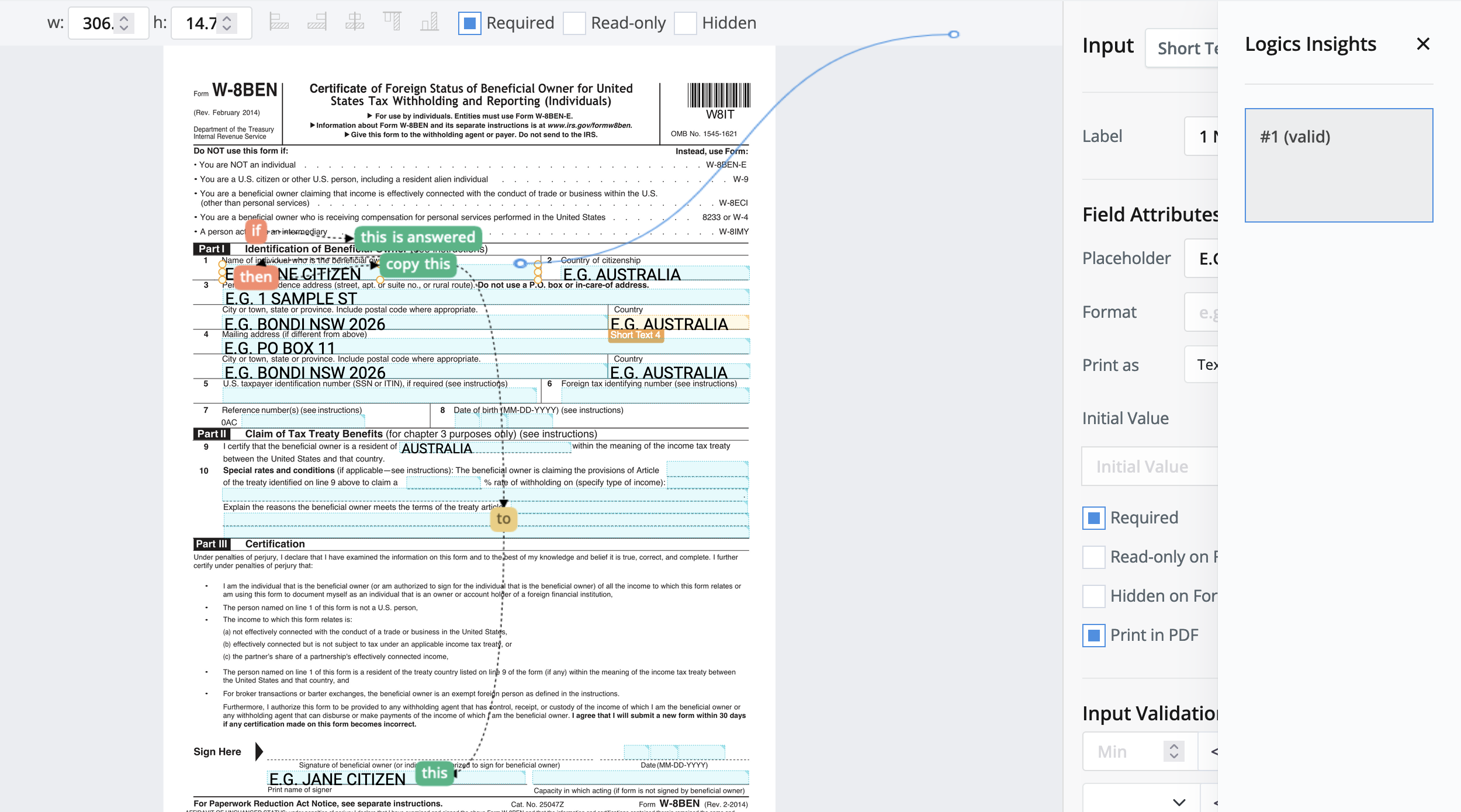
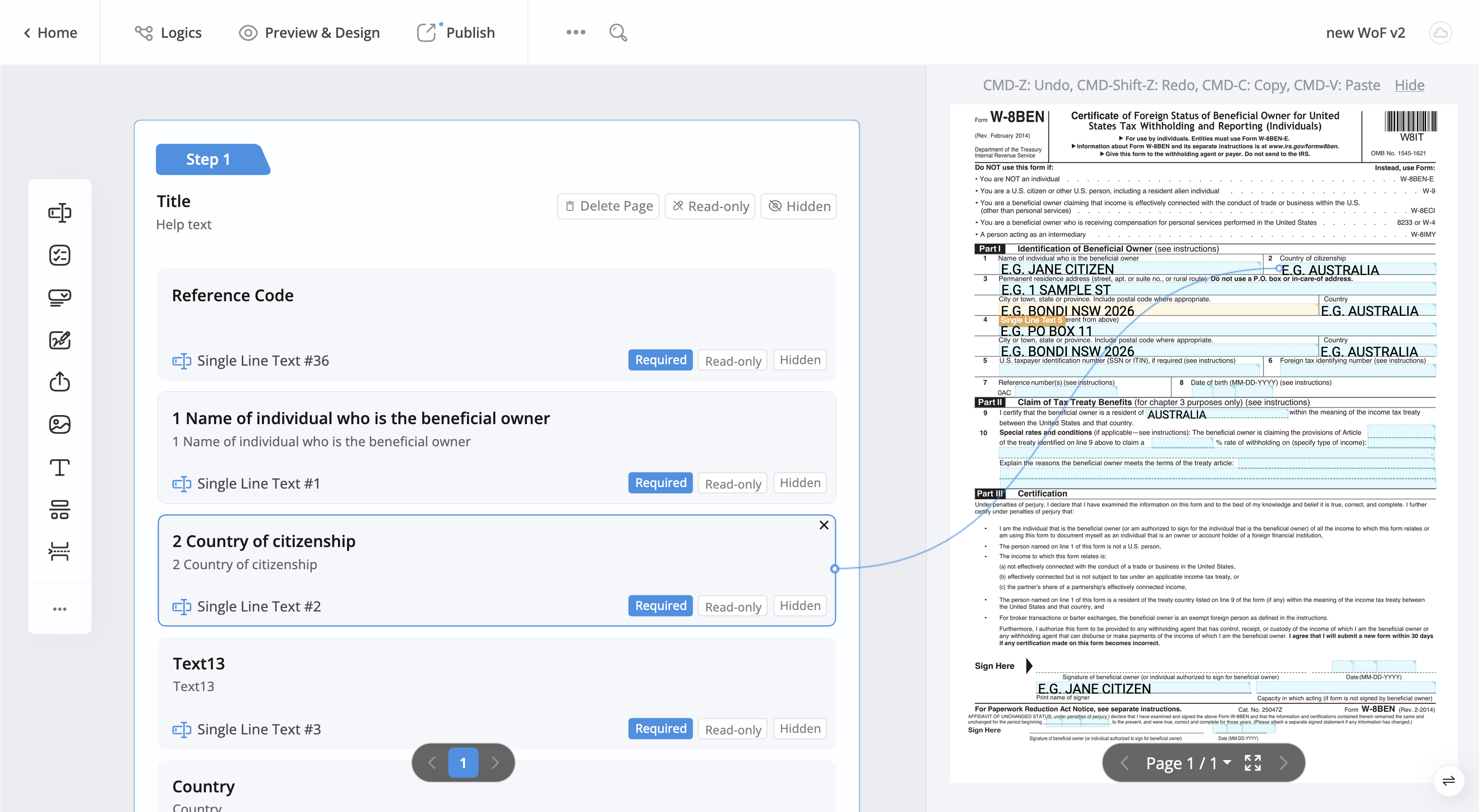
Visual Logic Representation: Accessible in the Logics Panel, visually depict logical relationships between fields.
-
Intuitive Insights Display: Click on Insights to reveal visual annotations and dashed lines above the form, providing an intuitive guide to field relationships.
-
Enhanced Clarity and Guidance: Easily manage logic flow with clear annotations, simplifying navigation through complex structures.
Upgrade your online PDF forms with this enhanced Insights functionality for a more streamlined form-building experience and improved logic visualization!
December 9, 2023
Enhanced Table Field
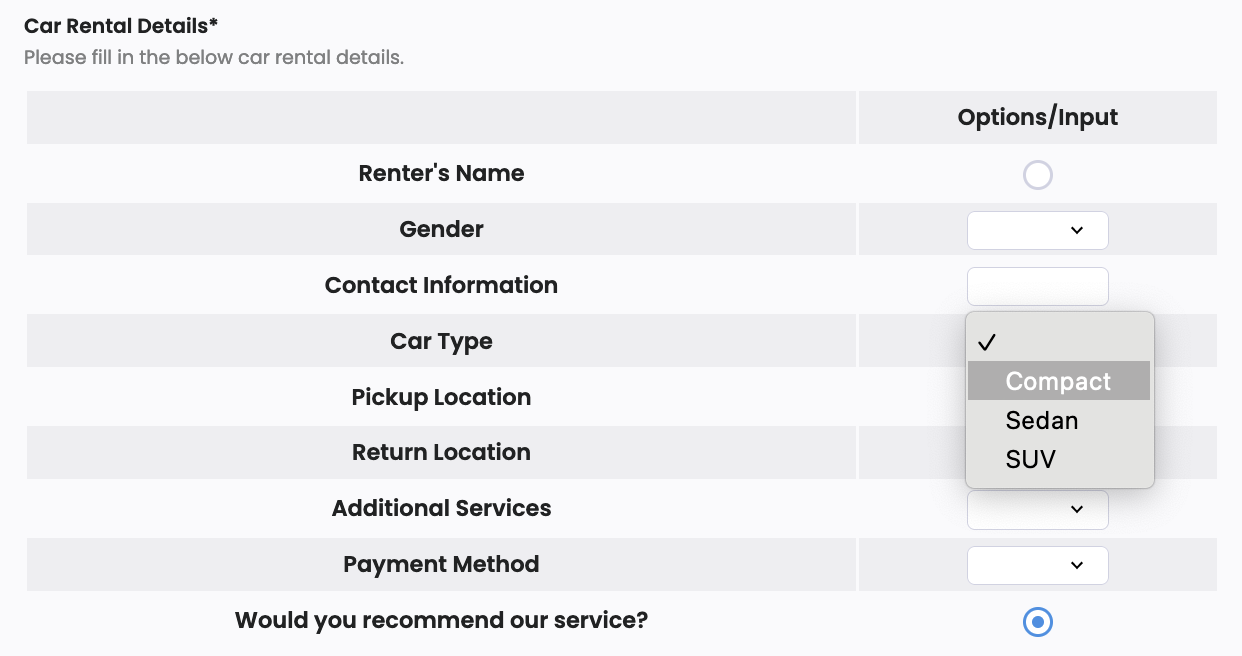
Introducing our enhanced Table field, now more flexible than ever! Easily input, compare, and organize information, perfect for dynamic surveys, product selections, and detailed data entry.
Key Features:
-
Easy to Add: Add the Table field from the Toolbar and adjust properties for clarity.
-
Adjustable Table Size and Order: Modify table size and rearrange cells effortlessly to fit your needs.
-
Customize Cells: Choose from four cell types or personalize specific cells for adaptability.
-
Dropdown and Single Choice: Configure Dropdown options and group Single Choice cells easily for richer data.
-
Text Input Options: Customize Text Input cells with text or numbers, making your form more versatile.
Upgrade to experience unparalleled flexibility in form creation! For more details, check our user documentation here.
November 18, 2023
Upgrade your forms with human being verify 🤖🚫
Introducing ReCaptcha, our latest feature! Boost security and trust by ensuring submissions are from real humans.
Why ReCaptcha Rocks:
- 🌐 Elevates online form security.
- 🤖 Keeps bots and spammers at bay.
- 🚀 Boosts reliability and user trust.
How to Add ReCaptcha:
- 🔧 Go to our easy-peasy form builder.
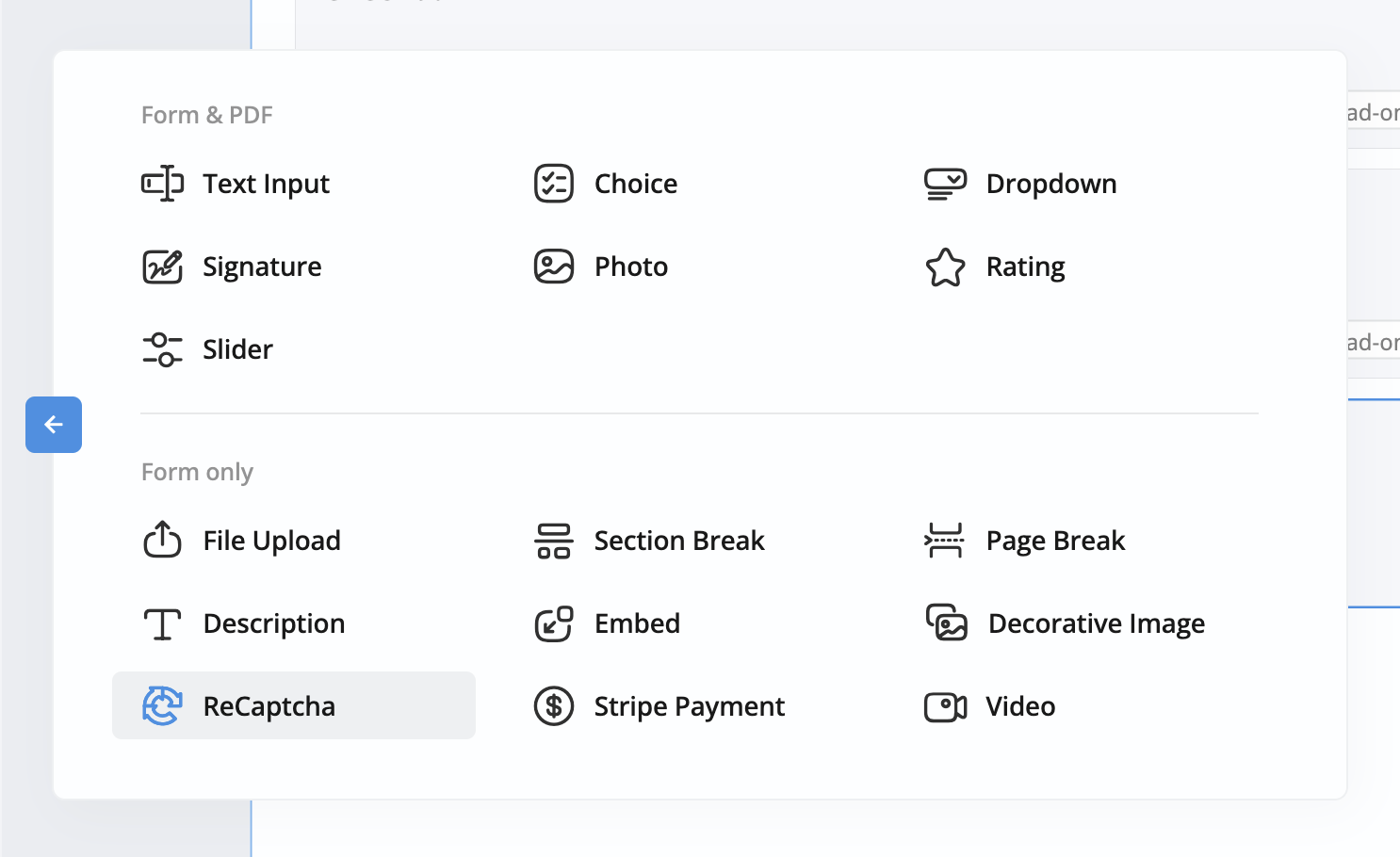
- 🧩 Simply add the ReCaptcha field to your form.
Why Choose Us:
- 🌟 We’re on a mission to enhance your experience!
- 🔄 Continuously bringing you top-notch features.
Upgrade now and stay ahead in the digital game! 🚀🔒
November 17, 2023
Incorporate static text with dynamic field answers
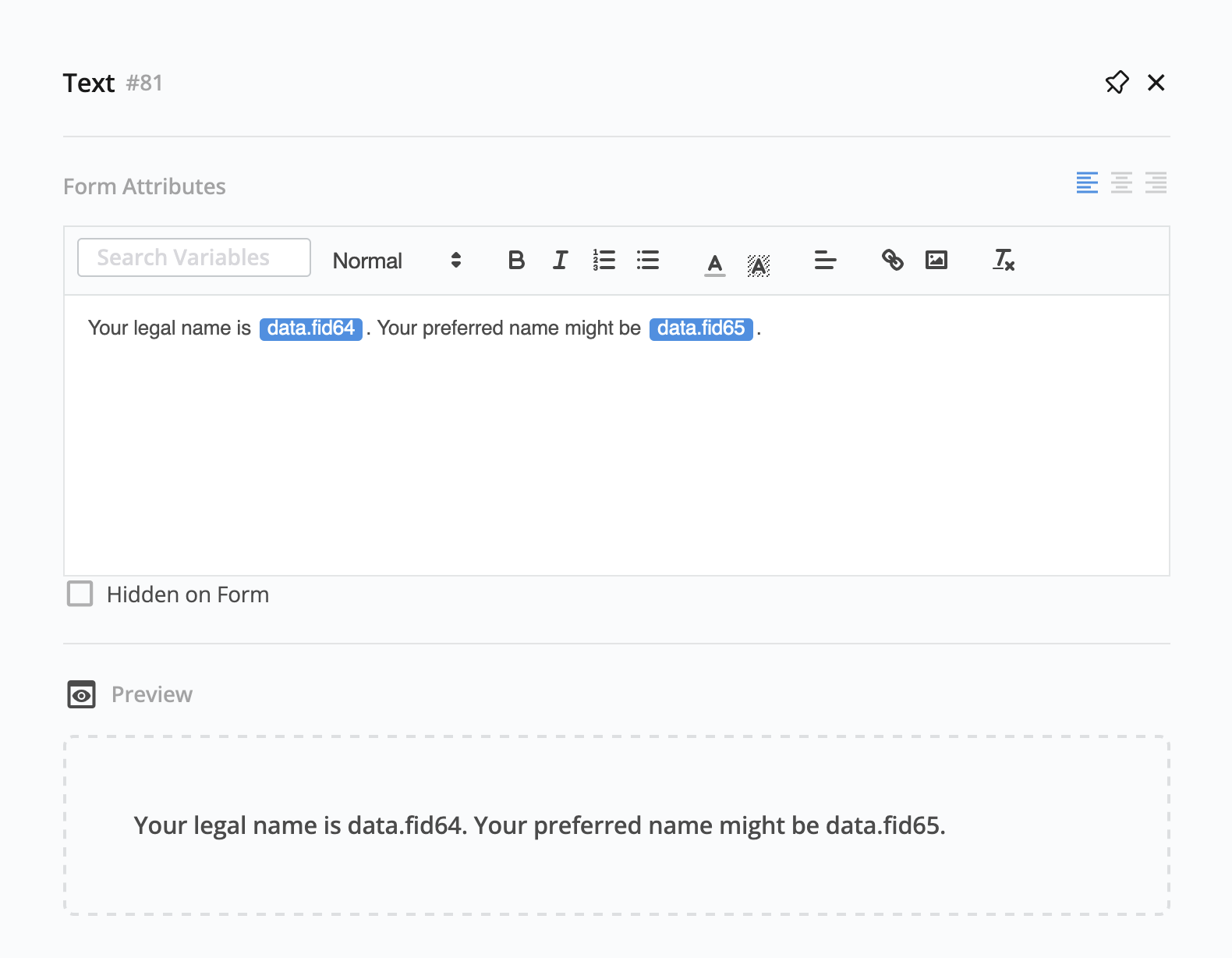
Introducing the new form field - Description/Static Text. Easily add static info and dynamic form-filler answers.
Key Features:
- Craft clear descriptions.
- Cut down on repetition by copying responses.
- Reduce errors with a consistent approach to sharing information.
How to Add:
- 👈 Select Description (Web PDF Form) or Static Text (Online PDF Form) from the Toolbar.
- ✍️ Add your info/description.
- 🔍 Choose other form field from the variable search box and place it where needed.
Upgrade for a smarter, user-friendly experience!
November 6, 2023
Automatic PDF Compression
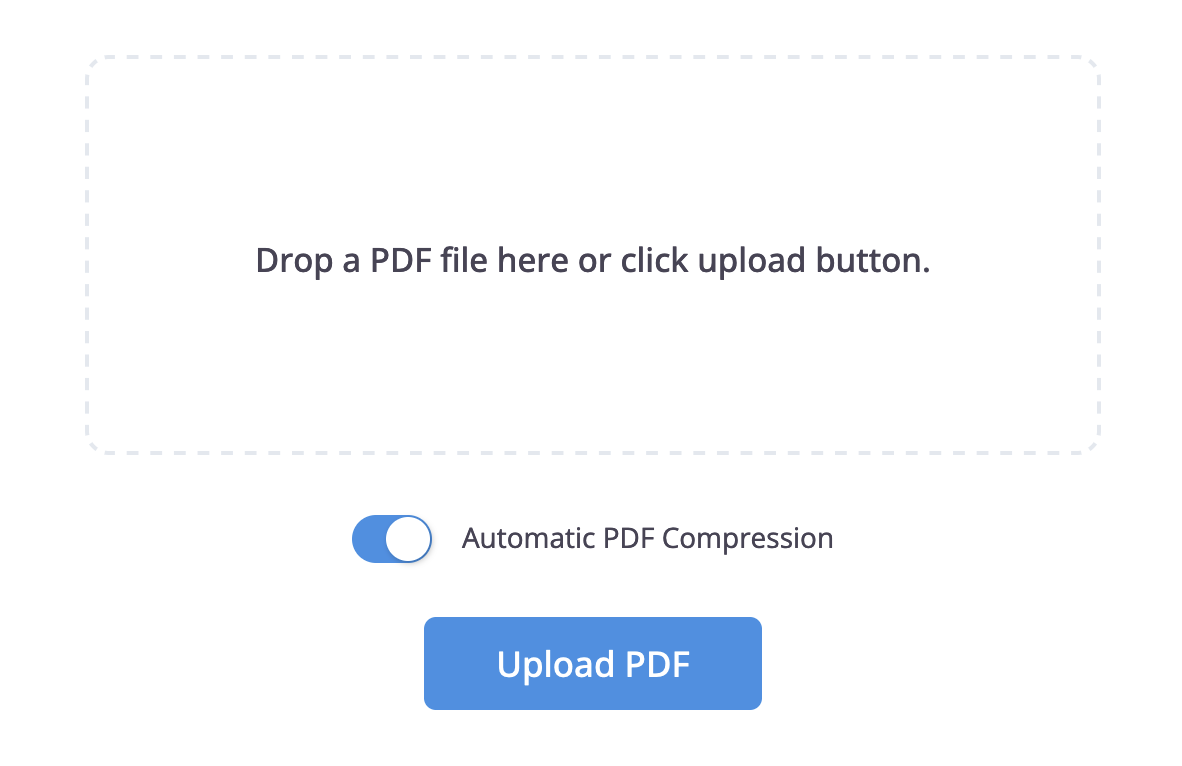
To make form creation and email delivery smoother, large PDFs can now be compressed automatically during upload.
When you upload a PDF larger than 10MB, you’ll see the Automatic PDF Compression option. Turn it on to reduce file size, speed up processing, and improve loading times for recipients.
A simple way to keep your forms fast, lightweight, and easy to share.
October 13, 2023
Keep the original form URL when cloning
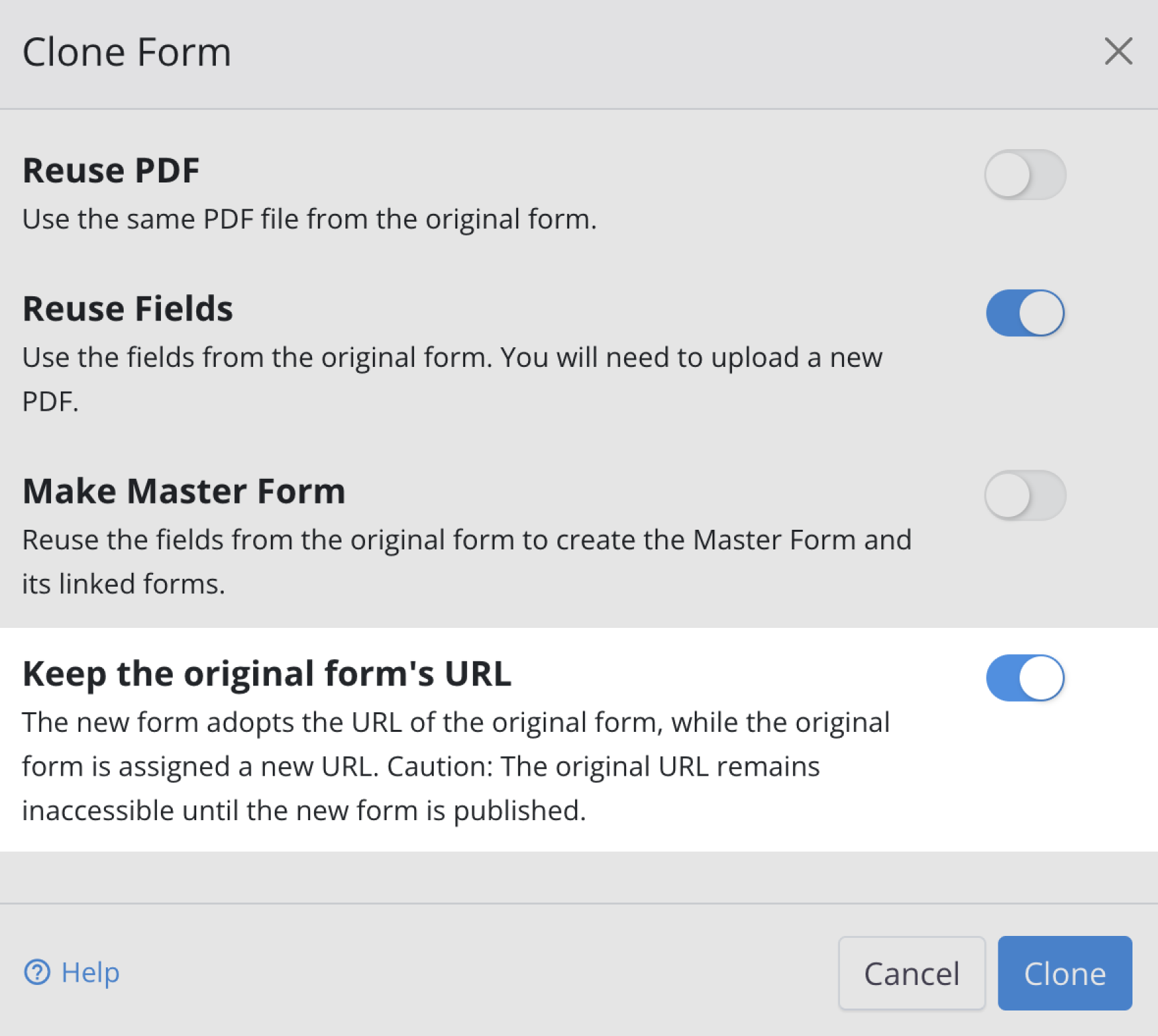
You can now keep the original form’s URL when cloning a form.
Enable Keep the original form’s URL, and the new cloned form will adopt the same URL, ensuring anyone using the old link is automatically directed to the updated version.
A few notes:
- The original form receives a new URL.
- The original URL will remain inaccessible until the new form is published.
A simple way to update forms without breaking links or disrupting your respondents.
September 21, 2023
Unveil our all-new form builder!
A redesigned form builder is now available, offering a cleaner interface, improved navigation, and more flexible tools for building online forms.
What’s new
-
🎨 Modern layout: A streamlined, more intuitive interface with organized toolbars and clearer field sections.
-
✨ Expanded Field Options: New interactive fields—including Slider, Rating, Video, and others—give you more ways to design dynamic forms.
-
🔗 Field–PDF mapping view: Left-side fields now visually connect to their corresponding PDF widgets, making it easier to understand and manage field mapping.
-
🔍 Field search: Quickly locate any field using the built-in search, ideal for long or complex forms.
You can switch to the new builder using the toggle at the bottom right of the existing interface. For a full walkthrough, see the Explore the form builder section.
Your feedback is invaluable, so please share your thoughts and suggestions.
🚀 Happy Form Building! 🚀
August 11, 2023
Share your form with a QR code
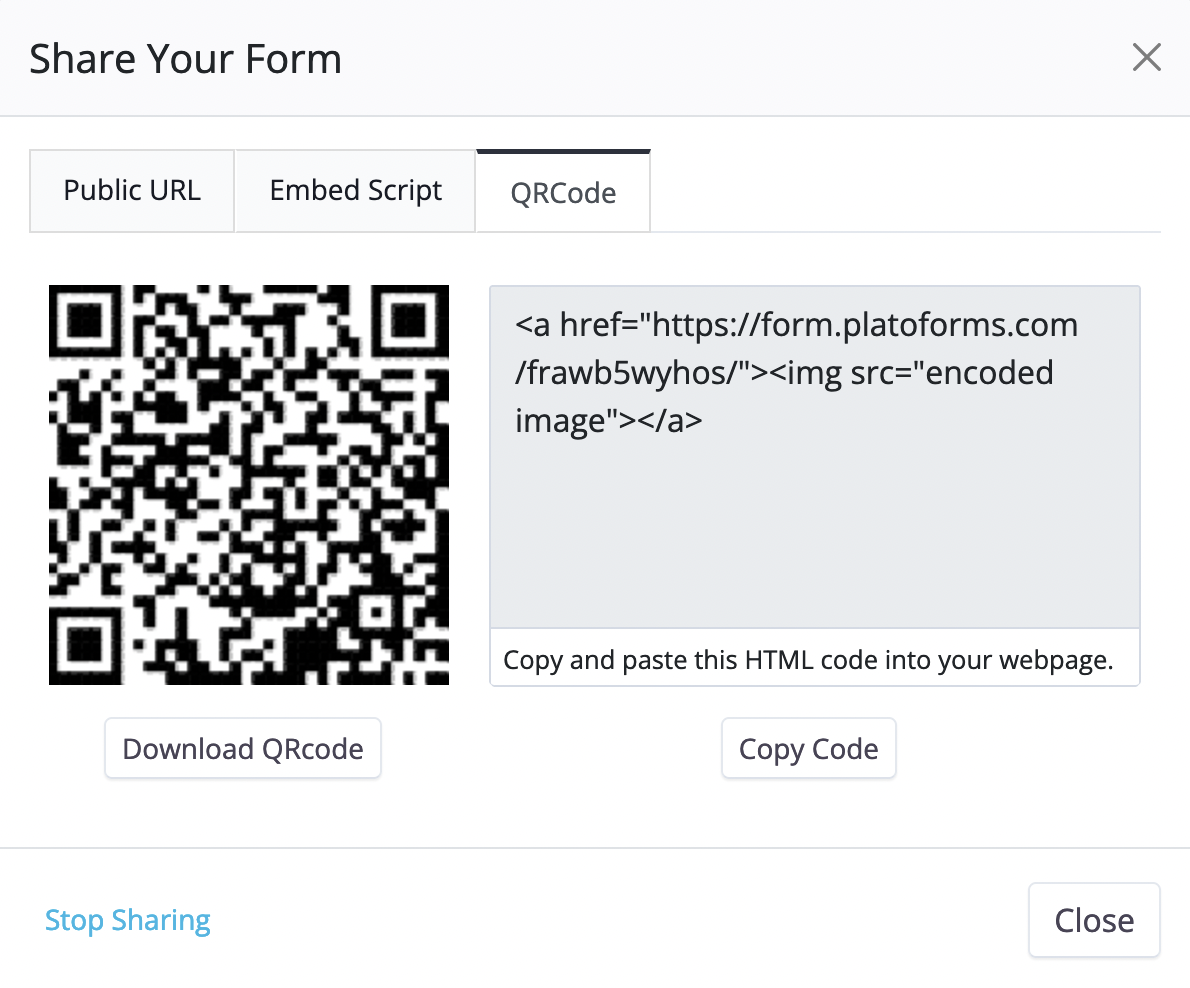
You can now share your form using a QR code—alongside the existing Public URL and Embed Script options.
What’s included
-
QR code download
Generate and download a QR code that links directly to your form. Ideal for print materials, posters, and in-person events. -
HTML snippet
Copy a ready-made HTML code block that embeds the QR code on your website with a single click.
A simple way to make your forms easier to access—especially for mobile users.
For more details, visit the Publish & Share guide.
August 4, 2023
Elevate your form design with enhanced properties
With new customization options in Design Form, adjusting how your form looks is now easier and more flexible.
What’s new
-
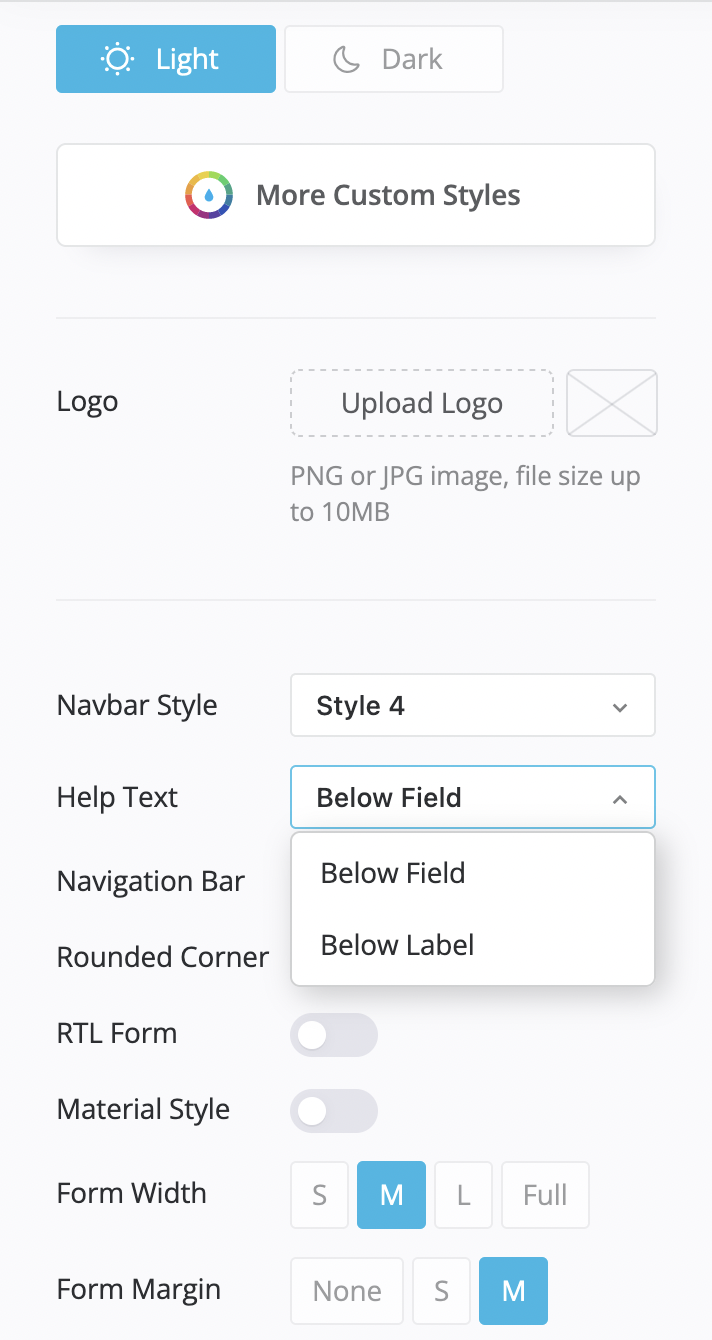
Help text placement
Choose whether help text appears below the field or below the label for clearer guidance.
-
Label layout styles
Adjust label positioning to match your preferred layout and improve readability.
These updates make it easier to fine-tune your form’s structure and create a cleaner, more user-friendly experience.
Learn more in the Form design properties guide.
July 15, 2023
Form building evolution: history versions
Stay in control with our new History Version feature — designed to give you clarity, safety, and flexibility while you build.
Here’s what it brings:
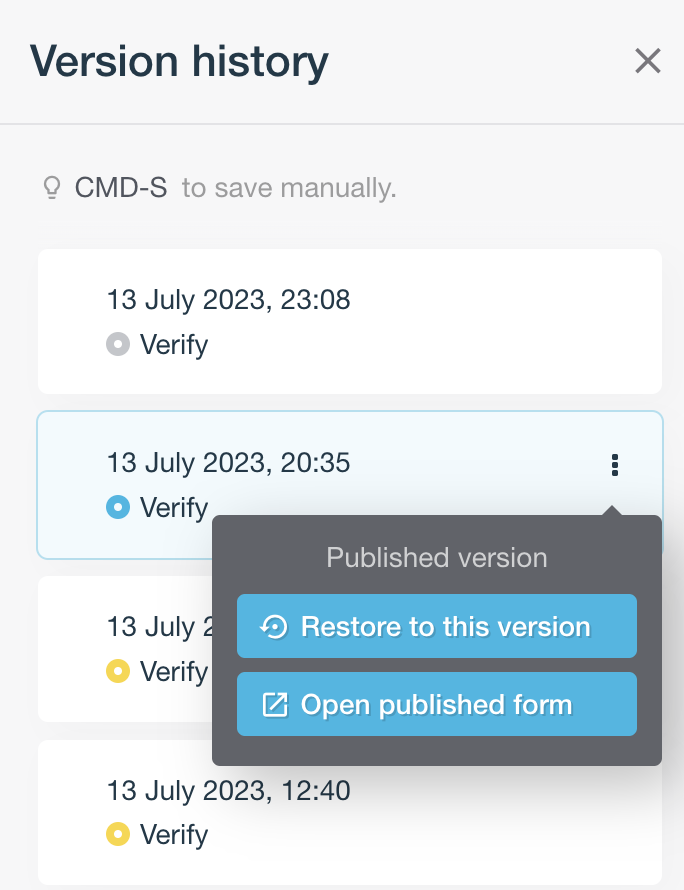
- Automatic periodic saves: Your form is saved for you at regular intervals.
- Manual saves: Capture a version instantly using
Ctrl + S(Windows) or⌘ + S(Mac). - Publish versioning: Every time you publish, a new version is created automatically.
Open the Version History panel to browse all saved versions. Each entry includes a colored indicator so you can easily see what type of version it is. Before restoring an older version, make sure to manually save your current work with Ctrl + S or ⌘ + S. For published versions, you can also jump directly to the live form from this panel.
With History Version, you get more confidence and control at every step of your form-building workflow. Learn more in Restore to history version.
July 2, 2023
API Playground
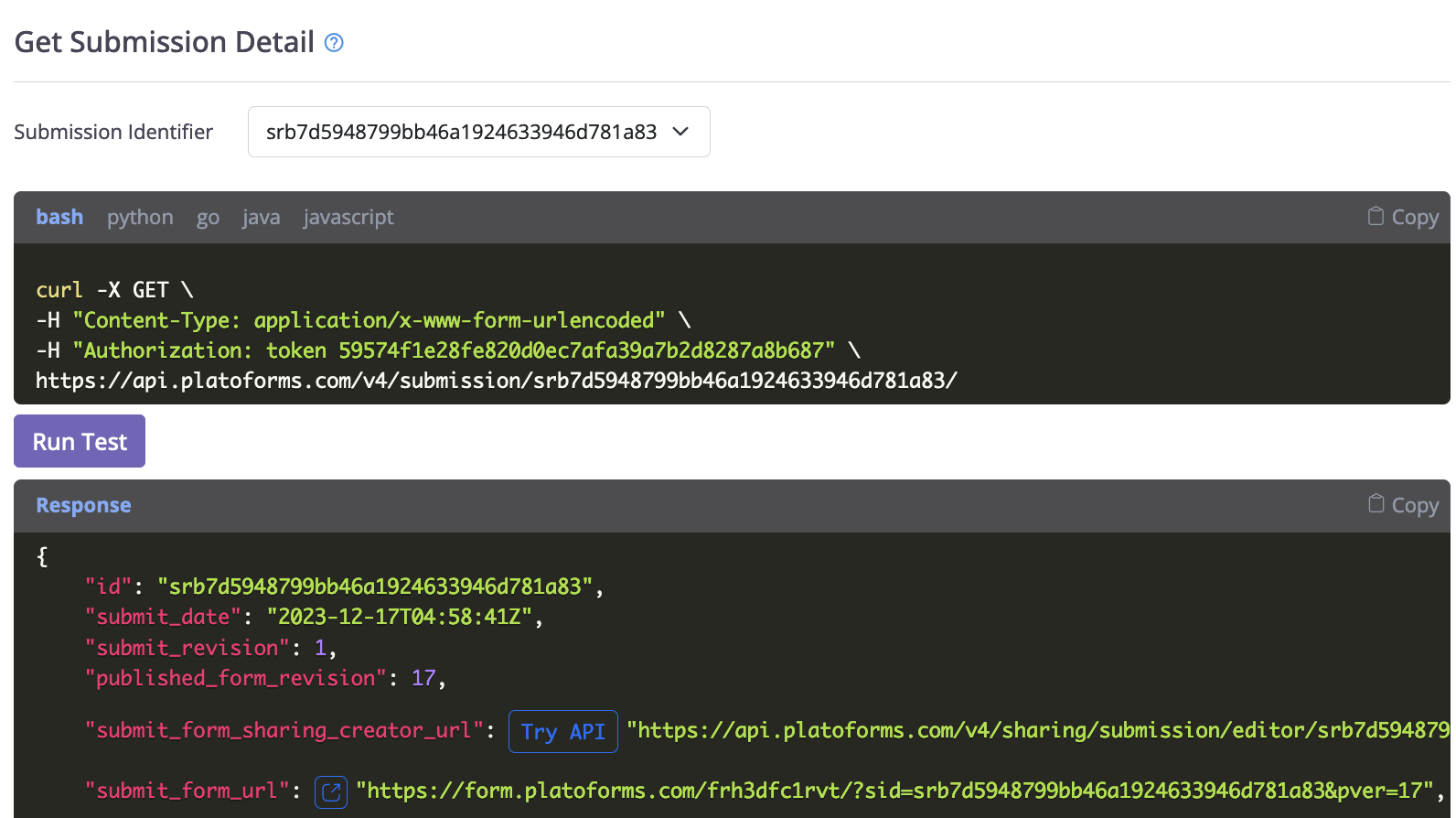
The API Playground makes it easy to try our API without writing any code. You can test real API requests using your actual form data — all in one place.
- Team Owners: You’ll automatically get a token that never expires, so you can start testing right away.
- Team Members: Just request access and you’ll receive an
OAuth2token to use in the Playground.
You can also copy sample code in different programming languages like Curl, Python, JavaScript, Java, and Golang if you want to use the API in your own apps.
We hope the API Playground helps you explore our API quickly and easily!
- Learn more about how it works in our user documentation.
- Any questions? Email us at support@platoforms.com.
May 10, 2023
Enhanced form design for web PDF form
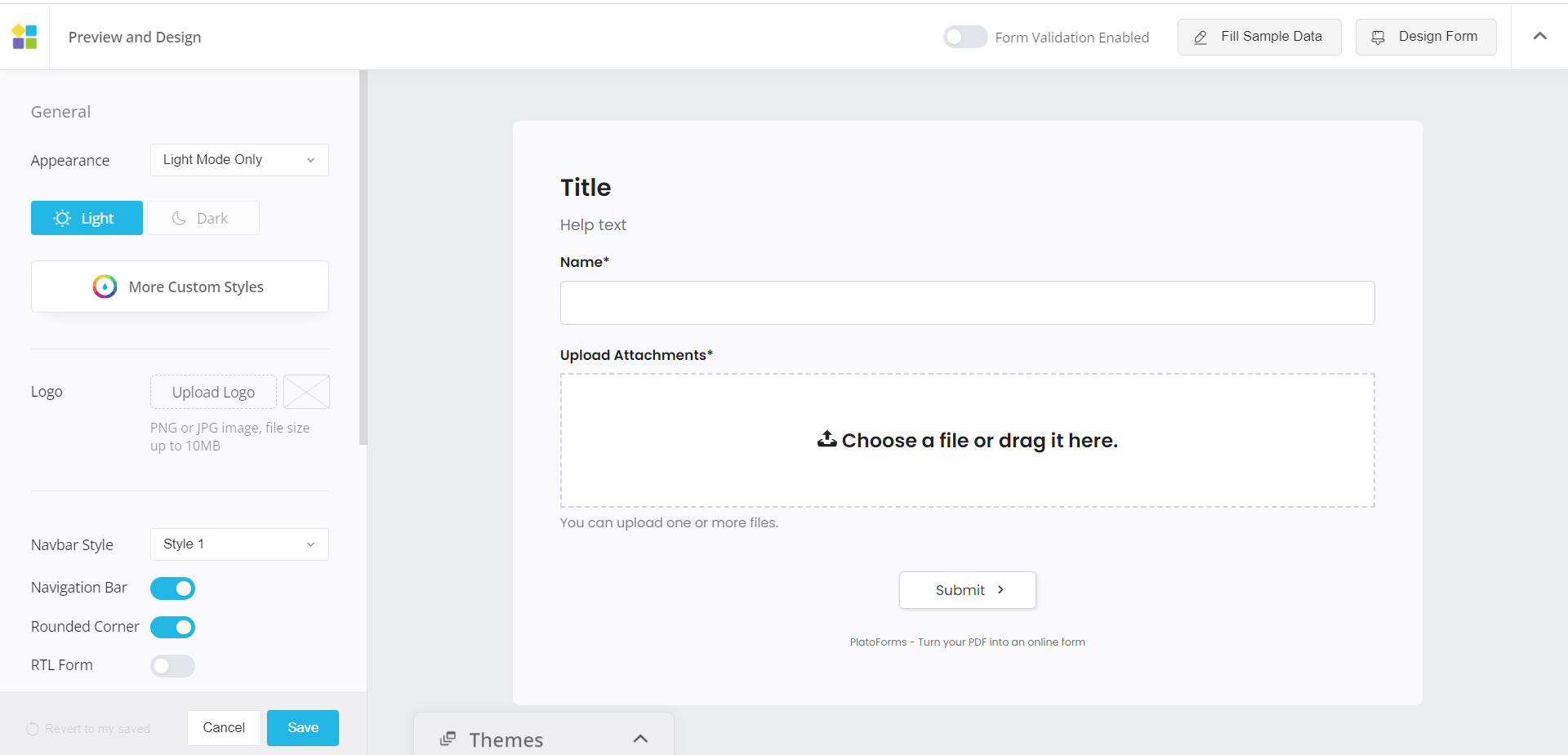
Unlock more design options, an intuitive interface, and effortless theme switching for stunning web PDF forms. Transform your form’s look with a single click.
In the new design interface, take control of fonts, styles, and pre-built themes. Customize typography with Google fonts, upload background images, and add banners for personalized, visually striking forms. Don’t forget the one-click dark mode option for a sleek and modern alternative.
These new styles apply to web PDF forms. Your feedback is essential; if you want this design for online PDF forms, please tell us. Your input drives us to improve online PDF form design.
Enjoy the enhanced form design experience, and create visually captivating forms. For questions or assistance, reach out to our support team.
May 10, 2023
Filter logics with ease
Do you have many logics in your online forms? Meet the Logic Filter – a handy feature that makes managing your logics a breeze.
You can find conditional logic in two ways:
-
Use the filter to search for keywords, which will help you locate all relevant logics based on the keywords.
-
Open the Logics panel from the attributes panel of a specific field, which allows you to find all the logics related to that field.
Save time and effort with the Logic Filter. See Filter multiple Form Logics for more details. Contact our support team for assistance. Enjoy using the Logic Filter!

May 8, 2023
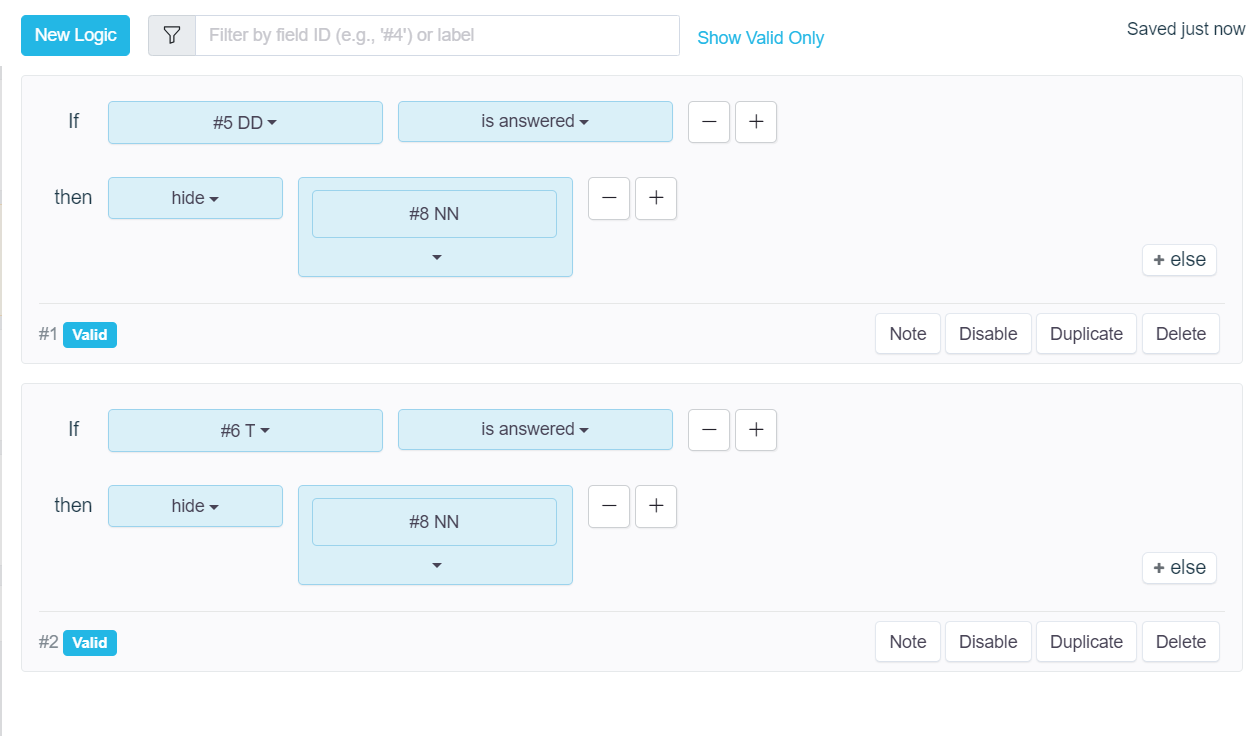
Enhanced logic control with ‘clear value’ action and ’else’ function
Make your forms smarter and more responsive with two helpful additions to form logic:
- clear value — automatically reset a field when conditions are met, preventing outdated or incorrect inputs.
- else — define an alternative action within the same logic rule, giving you more flexibility and reducing the need for extra logic blocks.
Want to learn more? Check out our guide: Set Form Logic.
May 7, 2023
Effortless selection with searchable dropdowns
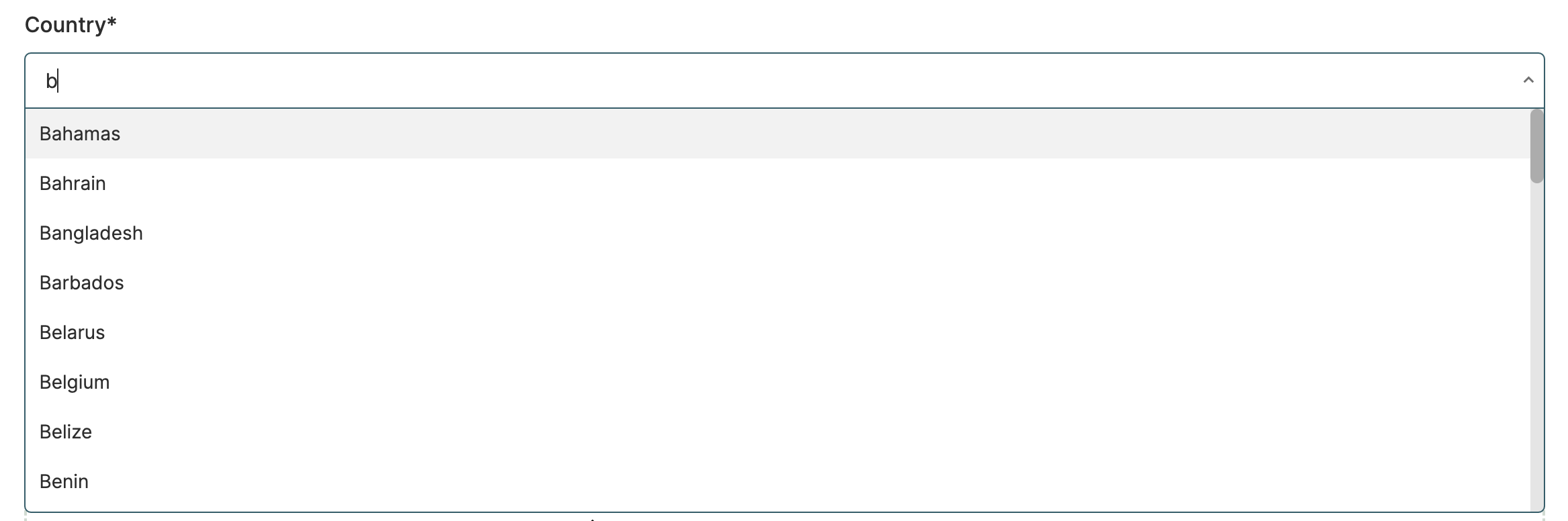
Exciting news! We’re thrilled to announce the release of our new Searchable Dropdown feature.
Your respondents can now type a few characters, and the dropdown will instantly display matching options. This user-friendly element simplifies dropdown interactions, making it quicker and easier for respondents to find and select options, even in long lists. Say goodbye to endless scrolling and hello to efficient form-filling.
Enhance your forms with the Searchable Dropdown for a superior user experience. For more information, visit Make options searchable. If you need assistance, our support team is here to help.
May 4, 2023
Verify your email domain with SPF and DKIM
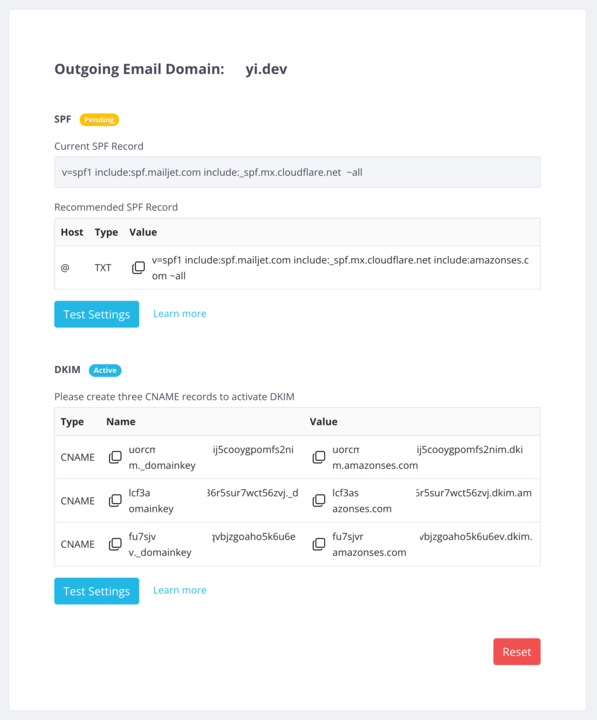
You can now verify your custom email domain using SPF and DKIM DNS records. This improves email deliverability by allowing recipient servers to authenticate emails sent from your forms.
Previously, verification was tied to a single email address, which could lead to delivery issues. With domain-level verification, your notifications and invitations are far more reliable.
Have your own domain ready, and follow the step-by-step guide in our FAQ to set it up.
April 30, 2023
Image thumbnail for uploaded images on your form
We’re excited to introduce thumbnail previews for uploaded images — a simple but powerful upgrade that improves accuracy and speeds up form completion.
Users can now instantly see a preview of the image they upload, helping them confirm the correct file and avoid mistakes before submitting your online PDF form. The thumbnail is also clickable, allowing users to open a larger view for better inspection.
To try it out, just add an Upload Image field to your form and upload any image — a thumbnail will appear automatically.
This enhancement makes image uploads clearer, faster, and more user-friendly. If you have questions or feedback, our support team is happy to help.

October 8, 2021
Email template for your online PDF form notification or invitation
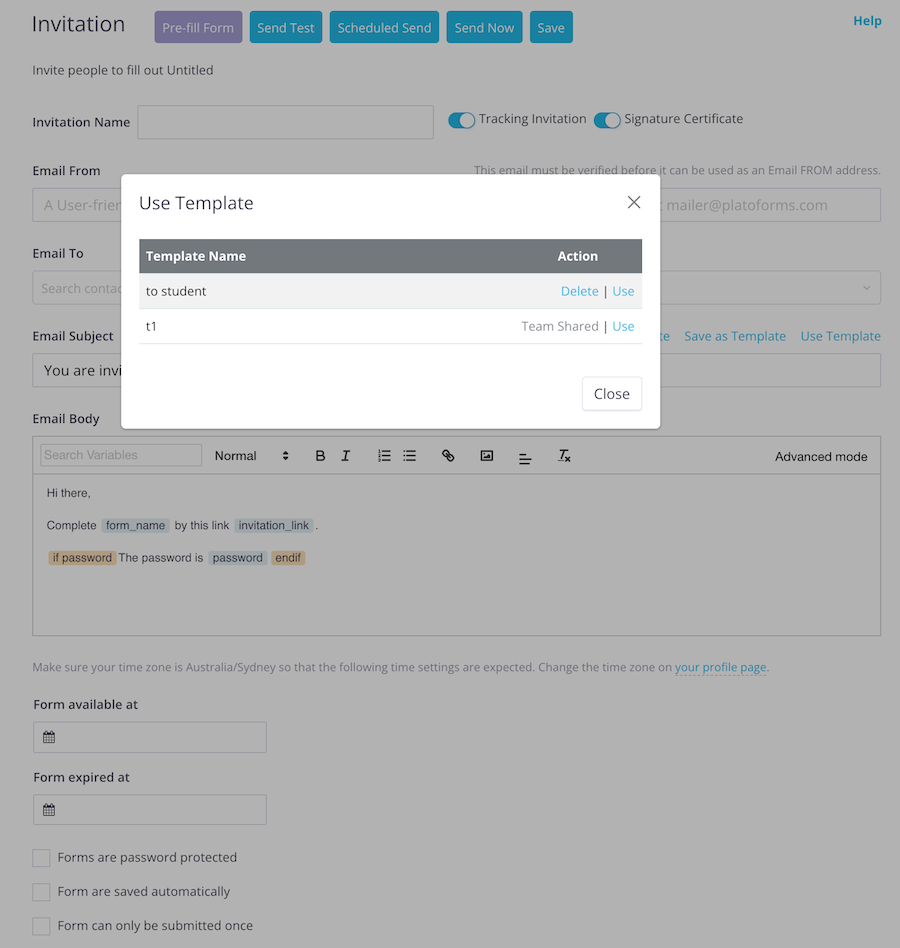
Tired of rewriting the same email for every form invitation or notification? Our Email Template feature lets you create, save, and reuse email content with ease—saving you time and ensuring consistent communication.
Where you can use templates:
- Form invitation emails
- Submission notification emails
Personal vs. Team Templates
- Create templates inside a single form for personal use.
- Create templates in the team’s default settings to make them visible and reusable by your entire team.
This makes it easy for teams to stay aligned, reuse approved messaging, and speed up communication—no more rewriting from scratch.
Want to learn how to create and reuse templates? Check out the full guide in our FAQ.
August 9, 2021
Elevate your form with e-signature certificates
More and more organizations are taking advantage of e-signatures today. Because of this, we finally launched an e-signature certificate feature here at PlatoForms!
With this feature, your online forms can now collect e-signatures from your clients.
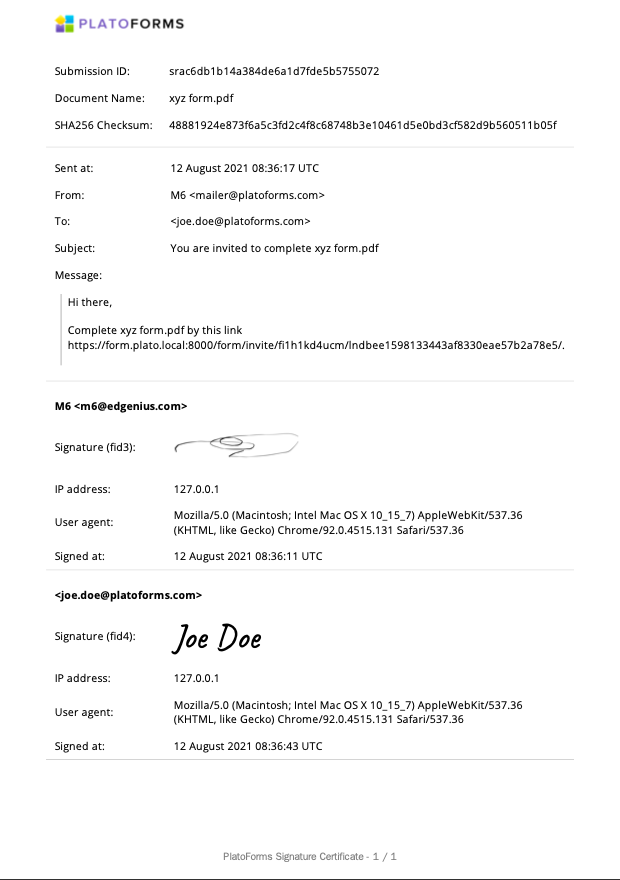
Although we’ve had signature pads included in our forms ever since the beginning–but with this update, we can now generate a PlatoForms-issued signature certificate along with the signature pad. This signature certificate can ensure that the signature from your forms isn’t altered. This certificate has complete information about the signer:
- Timestamp of the sign
- IP address of the signer
- Email address of the signer
For convenience, you can view and download the signature certificate from PlatoForms’ submission page.
E-signatures are legally bonded to some states in the US, so make sure to consult with your lawyer about their validity to your country.
For detailed instructions about our e-signature certificate, refer to our documentation page.
June 15, 2021
Stripe Integration
We’re thrilled to announce that PlatoForms now includes Stripe integration!
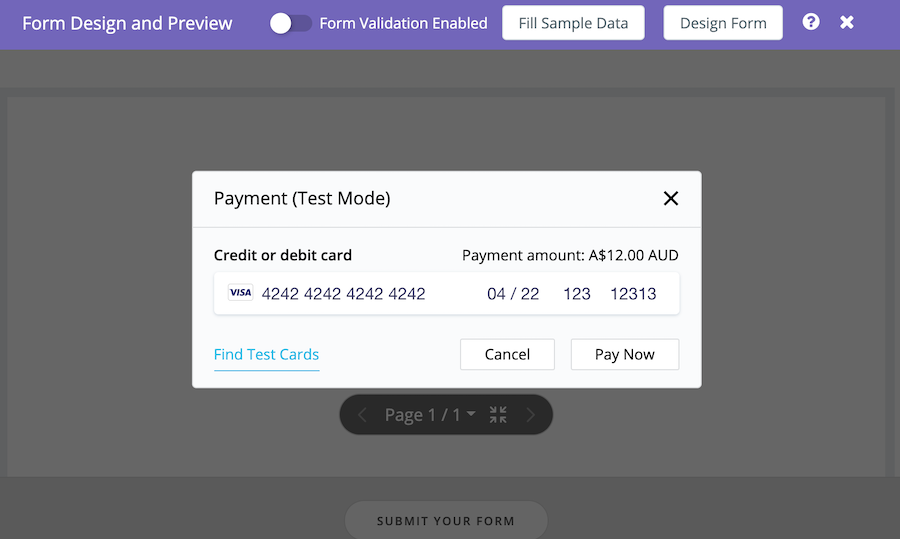
From small businesses to big companies, everyone uses Stripe to collect and manage payments. As one of the most common online payment processing providers today, you can now integrate your forms with Stripe using PlatoForms. In this update, our forms can now accept payments via Stripe.
The best thing? Aside from Stripe’s usual charge, there is no additional fee! PlatoForms won’t charge on any form payment transaction.
To help you verify the payment integration, we provided a Test Mode integration. Through this, you can check whether the payment works well or not. To start, you can use a test credit card to complete the payment (This won’t cost anything!). Aside from verifying the payment, this amazing feature gives you the confidence to launch any kind of form payment. Once you confirm if the payment completely works as it is, you can enable Live Mode to your form integration for real transactions.
With our Stripe integration, you can now collect card payments, donations, and recurring payments through your online forms—all for free!
For detailed instructions about our Stripe integration, go to our documentation here.
May 1, 2021
Pre-filled forms for faster form filling
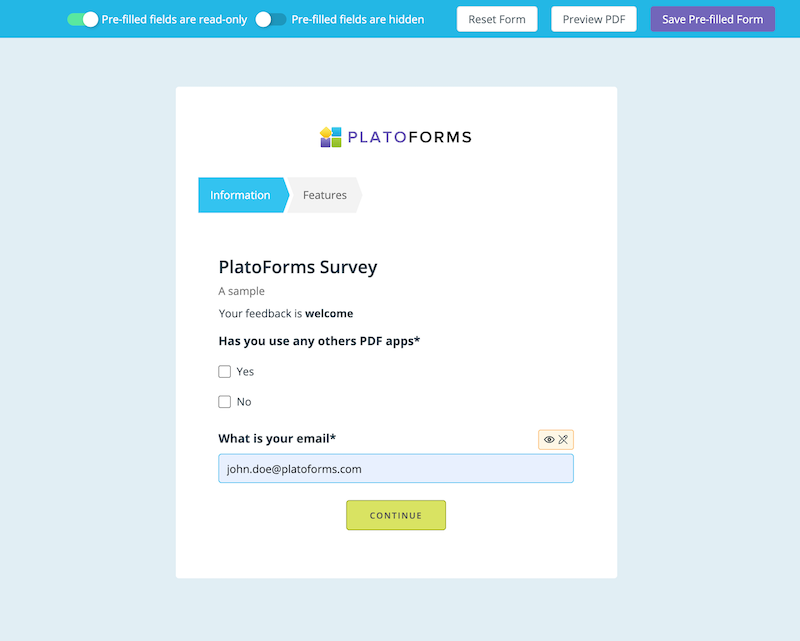
Get ready for easier form filling! With our new pre-populated forms, when people open a form from an invitation, some of the fields are already filled in. This means less work for them and fewer mistakes.
Send these pre-filled forms to your respondents for faster transactions. Whether they’re placing orders, applying for something, signing up, or making reservations, this feature makes everything simpler.
Your respondents won’t have to fill in every single field anymore. We’ll fill in some of the info for them, so they can quickly review, sign, and pay without any hassle. Learn more in our user guide or check out our video tutorial for a quick demo.
April 15, 2021
Email invitation: simplify form management
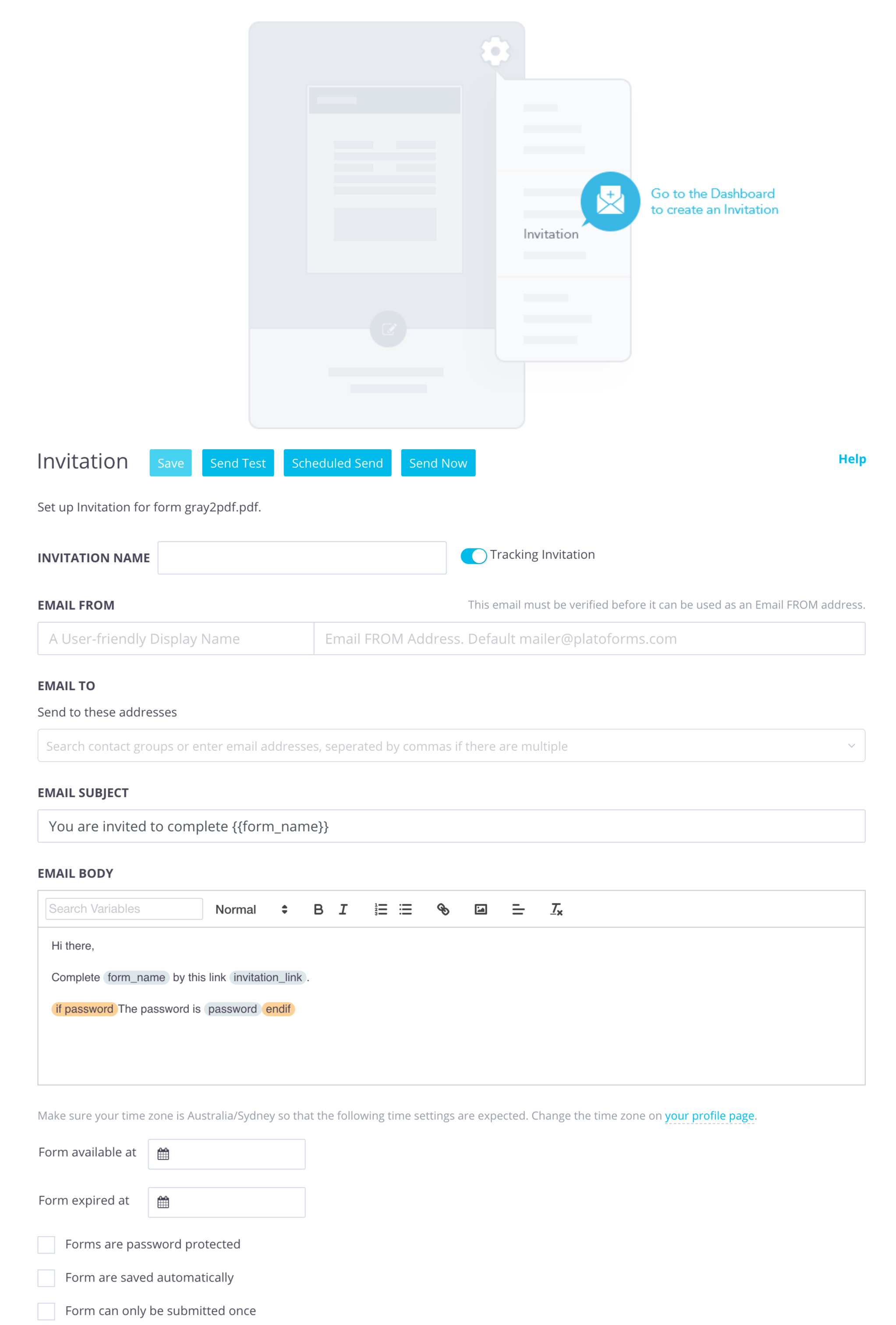
Upgrade from old sharing methods of static links or embedding forms on website. Welcome our Email Invitation feature for real-time form management.
With this feature, easily monitor invitation status, submissions, and form openings. You have control over settings like expiration dates, password protection, and auto-saving. Tracked invitations provide insights into email delivery, open times, and submissions, including email receipts.
What sets us apart is our focus on personalization. You have the freedom to fully customize your email content, allowing you to tailor the subject and message for a more personalized approach with your clients. Moreover, our feature offers unparalleled flexibility in email distribution. You can opt to send invitations instantly or schedule them for future delivery, with the ability to set any time limit within a 30-day window.
Furthermore, for those seeking to distribute the same form to multiple groups, our new feature streamlines this process by allowing you to duplicate invitations. Whether you opt to enter up to five email addresses manually or upload a contact list that can be saved as a group, our feature makes it easy to extend your outreach to a wider audience.
For more information, visit our documentation.
February 15, 2021
Form Submission Data Retention Policy
Form submissions often contain sensitive information—names, addresses, birthdays, and more. While PlatoForms provides a secure infrastructure and strict data security measures, you may still prefer not to store this data longer than necessary.
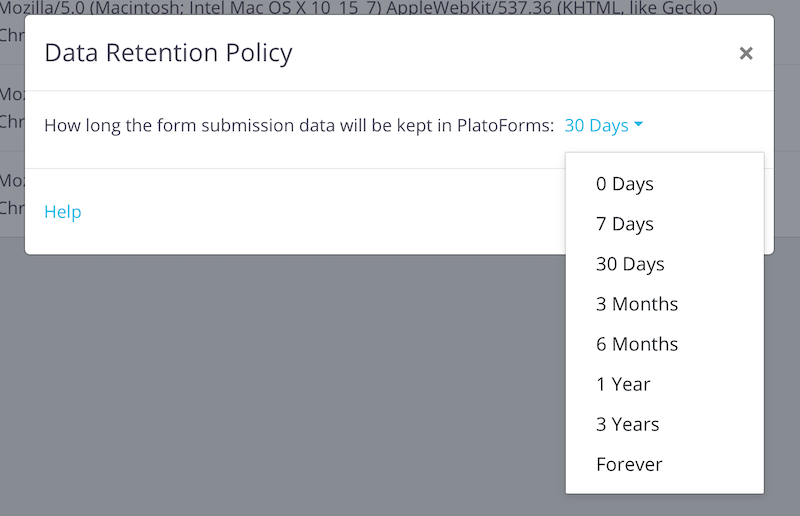
With our Data Retention Policy, you can fully control how long submission data stays in PlatoForms. Choose from multiple retention periods, from 0 days to forever.
By default, submissions are kept for 3 months after the last update. During this time, you can use all data-related features—re-editing forms, revision history, PDF downloads, search, sharing, and more. After the retention period ends, data is permanently deleted.
Special option: 0-day retention
To enable 0-day retention, you must connect at least one Cloud Drive Integration. Once the submission is uploaded to your cloud drive, it is deleted immediately from PlatoForms.
This maximizes data protection, but also disables all data-management features and workflows because the data no longer exists on our system.
For detailed instructions, see our documentation.
December 15, 2020
Receive instant submission notifications via Slack
Now, you can connect your forms with Slack for immediate submission updates. Get notified every time someone submits a form.
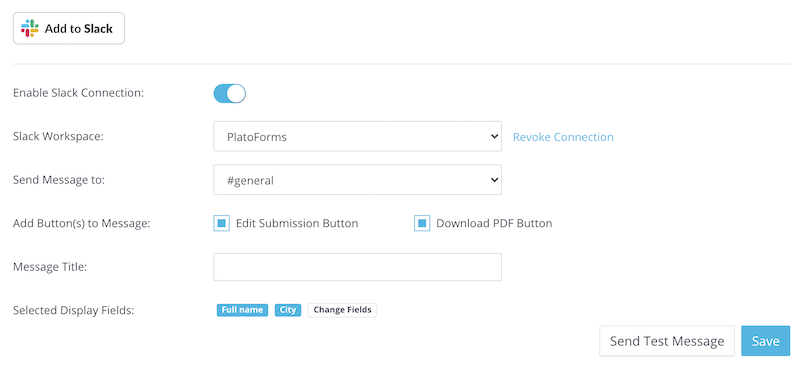
Open the Integration window in your form settings, click Add to Slack, and choose your preferred Slack Channels or direct message recipients to receive PlatoForms notifications.
You can choose which form information to display in your Slack message and add buttons for downloading the PDF or editing the form.
For detailed instructions, refer to our documentation. You can also watch our video tutorial for a quick start.
November 28, 2020
Fillable PDF Form Submission Summary Report
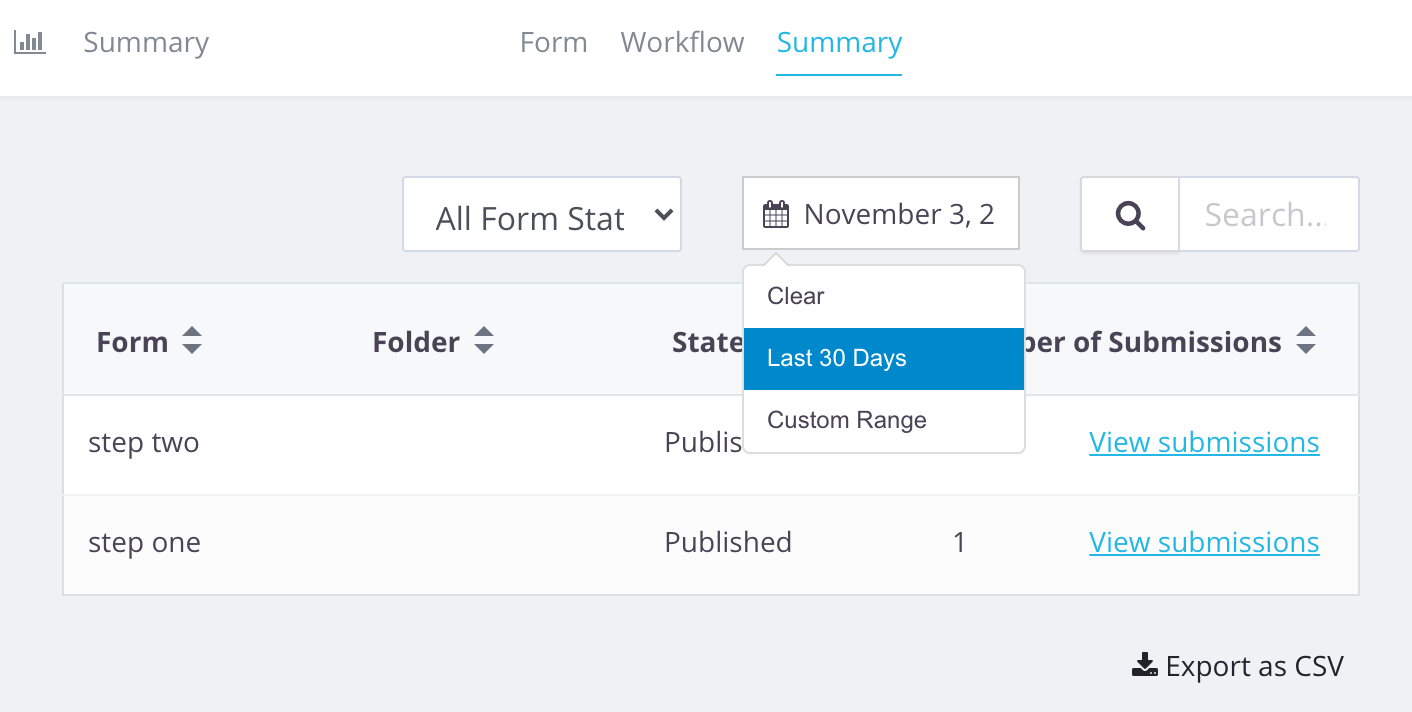
We’ve added a new Summary Report to the submissions page — making it easier to see how your forms are performing at a glance.
You can now:
- View the number of submissions for each form.
- Use filters to narrow the results, such as date range or keyword search (by form name or folder name).
- Export the summary as a CSV file to share with others or use in your own reports.
This is just the first version of our summary report, and we’d love to improve it further. If you have suggestions or feedback, we’re always happy to hear from you!

October 31, 2020
Appcues Integration
We’re excited to introduce our integration with Appcues — a platform that helps you create beautiful in-app guides, onboarding flows, and walkthroughs without writing code.
If your form is long or complex, Appcues is a great way to guide users step-by-step and significantly improve completion rates. With this integration, you can:
- Build interactive walkthroughs for your forms
- Reduce confusion and user drop-off
- Provide a smoother, more intuitive user experience
More third-party integrations are coming soon. If you’d like us to integrate PlatoForms with other tools you use, feel free to reach out — we’re always happy to explore new connections to support your business.
September 28, 2020
Cascading dropdown lists feature
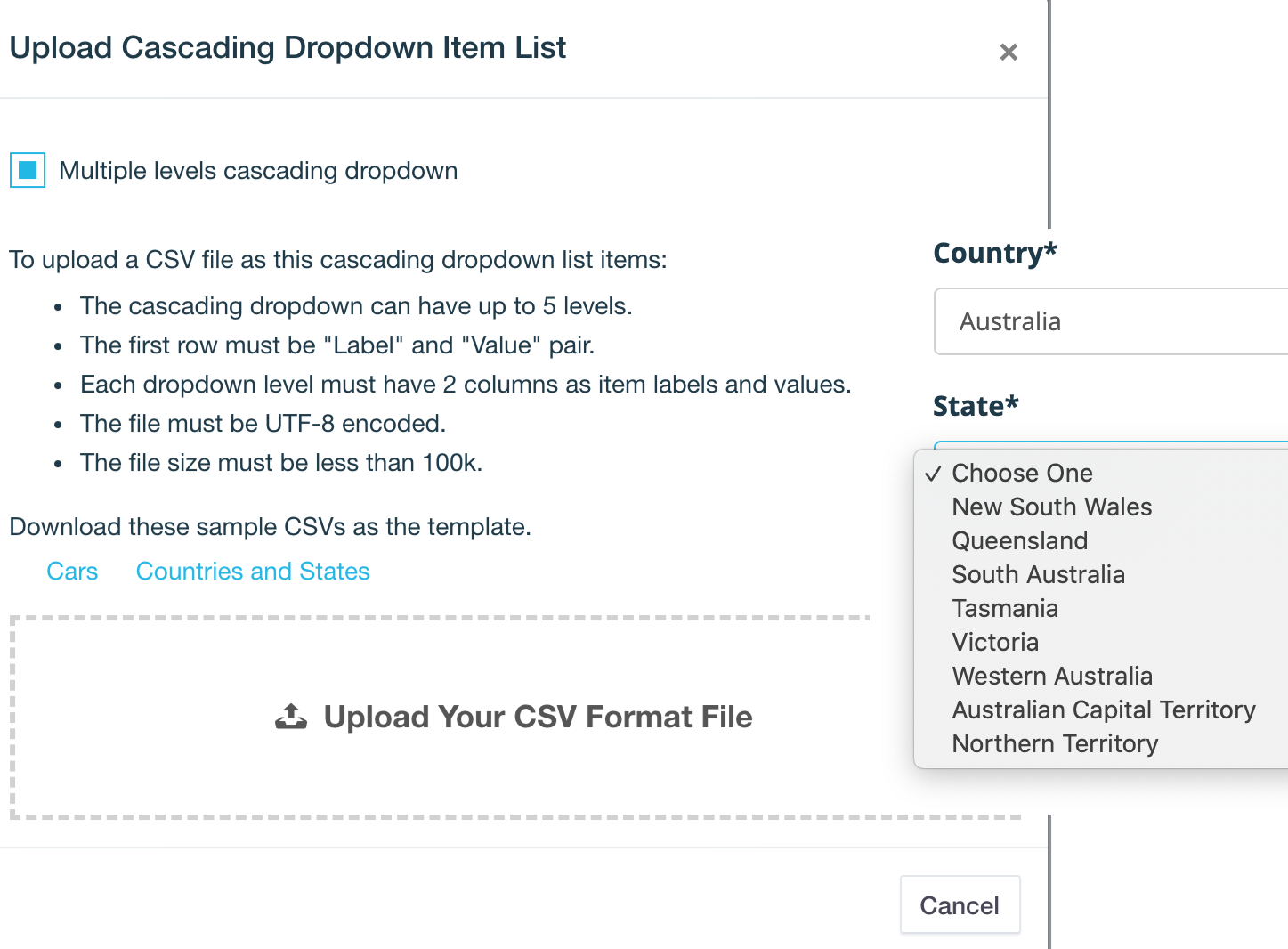
Meet our new Cascading Dropdown Lists — a smarter way to guide users through multi-step selections. With cascading dropdowns, each list updates automatically based on the user’s previous choice.
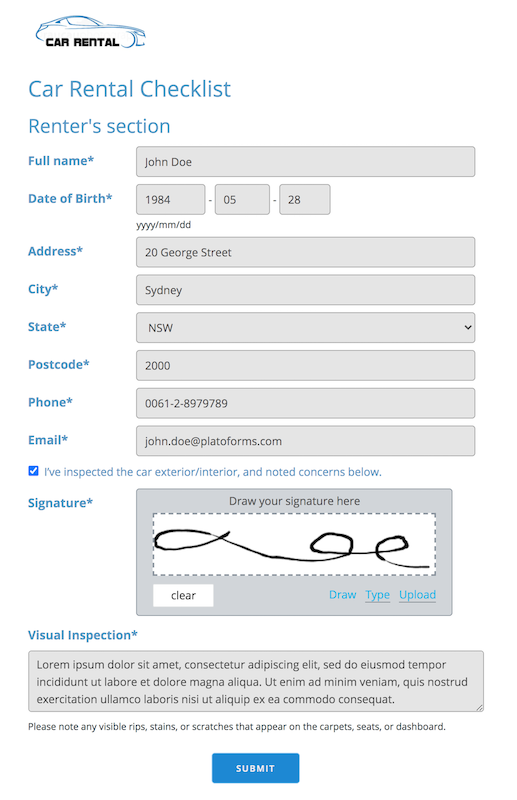
For example, in a car rental form, choosing a brand like Ford will update the next dropdown to show only relevant models such as Mustang or Focus. You can build multiple levels to create even more precise filtering.
This makes complex forms easier to complete and reduces input errors.
Give it a try in your forms: Set cascading dropdown options
September 20, 2020
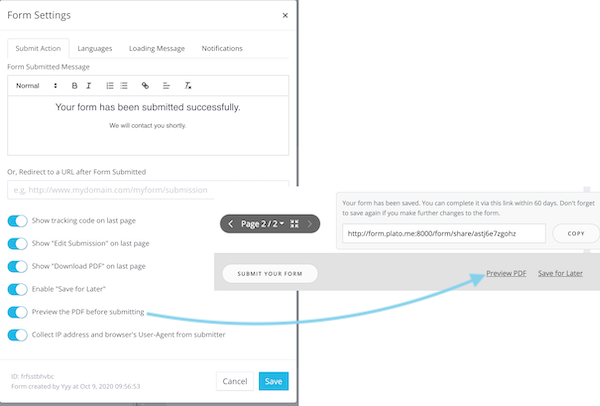
Enhance customer control: preview PDF before submitting
Now, you can offer your customers a more flexible experience.
Enable the Preview the PDF before submitting option in Form Settings.
With this feature, your customers can review the PDF at any point, even before submission. It’s all about giving them the confidence and control they deserve!
July 31, 2020
Customize your PDF forms with your own branding
Make your online PDF forms look and feel like your organization. Once you finish building a fillable PDF form in PlatoForms, you can easily adjust its branding and settings before sharing it.
Here’s what you can customize:
Custom domain
Replace the default https://forms.platoforms.com link with your own domain for a more professional, branded experience.
Sender email address
By default, notification emails are sent from mailer@platoforms.com (unmonitored). Set your own sender email so replies from users go directly to your inbox.
Logo & theme
Match your organization’s design by editing colors, fonts, and backgrounds in Form Designer. You can also upload your logo so your form fits seamlessly into your website.
API & Webhooks
For advanced customization, use our API to submit forms, fetch submission data, download generated PDFs, and more—nearly every feature can be automated or integrated.
With these tools, you can build fully branded, professional online PDF forms that feel like an extension of your organization while ensuring every user reply reaches you.
May 30, 2020
Save for Later PDF Form
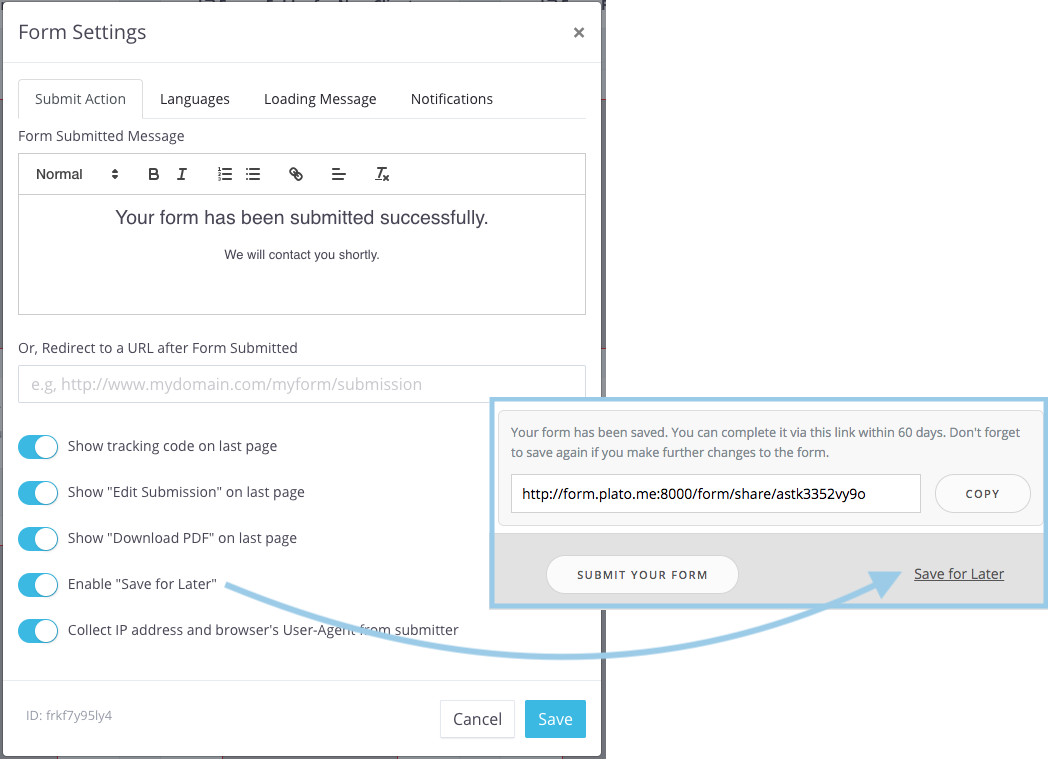
Long or multi-page PDF forms can take time to complete—especially when they include many fields or file uploads. Instead of forcing users to finish everything in one session, you can now enable the Save for Later feature.
When this option is turned on in Form Settings, a Save for Later button appears on the form. Once clicked, the user receives a unique URL where their progress is saved. They can return to this link anytime within the retention period and continue exactly where they left off.
This feature isn’t only useful for lengthy forms—it can also support simple workflows. For example:
One team member fills in their section, clicks Save for Later, and shares the generated link with the next person to complete the remaining fields before submitting.
The Save for Later feature is available to all trial and paid users. Learn more in our help documentation.
February 15, 2020
Collect sensitive info securely with HIPAA-compliant forms
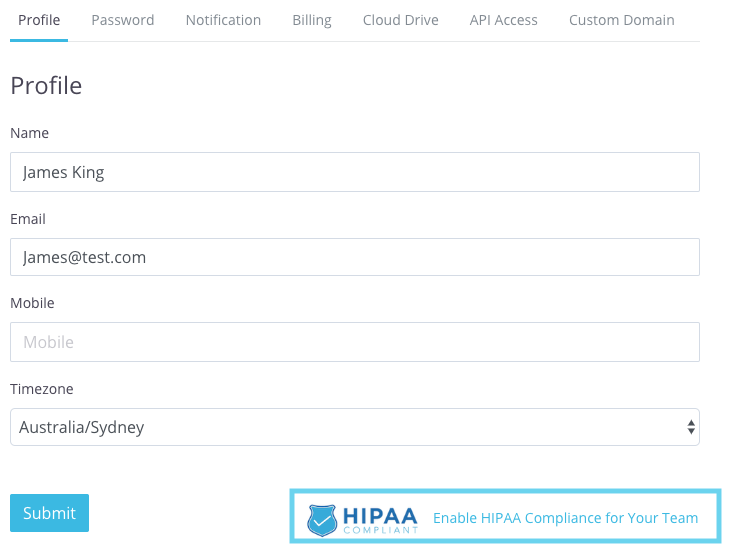
Handling personal or medical information requires strong security and strict compliance. With PlatoForms, you can now collect sensitive data using HIPAA-compliant online forms—perfect for healthcare, insurance, and any business handling protected health information (PHI).
Stay compliant with ease
Upgrade to our Silver or Gold plan and request HIPAA compliance for your team. Once enabled, all your forms automatically meet HIPAA security requirements.
BAA included
We support HIPAA compliance end-to-end. PlatoForms can sign a Business Associate Agreement (BAA) upon request to ensure your organization stays fully compliant.
Build secure forms in minutes
Creating a HIPAA-compliant form is just as simple as building any other form—upload your PDF, customize it, and publish. The form will automatically follow strict HIPAA data protection standards.
Want the full details? Visit our HIPAA compliance documentation.
December 1, 2019
Features Update
Over the past few months, we are working to improve our system. In this post, we highlight some main features that can help you build and use fillable PDF forms more efficiently.
Type or upload signature
In addition to drawing, the signature pad can also upload images or type to sign on a PDF.

Enhanced notification
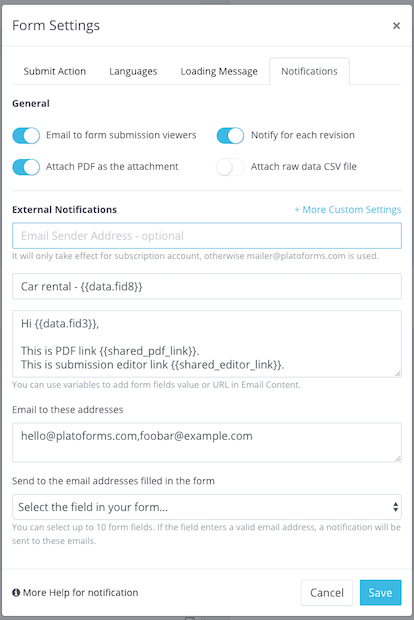
We have received many feature requests about how to send custom emails to their users (that is, people who submit forms). You can now create custom email content and send it to a set of emails or email addresses filled in a form. You can use variables in the email content, which can be the value of a form field. For example, if your form collects the names of users, you can add their names in the body of the email.
By default, the email sent through our email address is “mailer@platoforms.com”. In the new version, you can even set your email address as the email sender address.
In addition to the PDF, the email can also include submission data in CSV format. For more details, check out our documentation site.
Custom file name
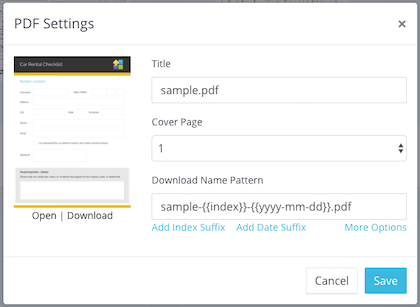
Older versions of PlatoForms assigned a fixed filename to the created fillable PDF, for example, “pdfoobar.pdf". You can now set the name yourself. In addition, you can use variables in the file name. For example, the file name could be “joe-registration-form.pdf”, where joe is the name of the customer who filled out the form.
Upload file in Online PDF form
Previously, web forms could upload files, now you can upload files as PDF fillable forms.

Download PDF or edit submission
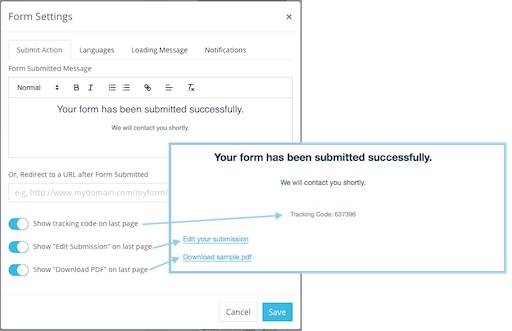
When users fill out and submit the form, they can directly download the created fillable PDF or re-edit the submission. There are two new options in the form settings for this feature. For more details, check out our documentation site.
Text field enhancement
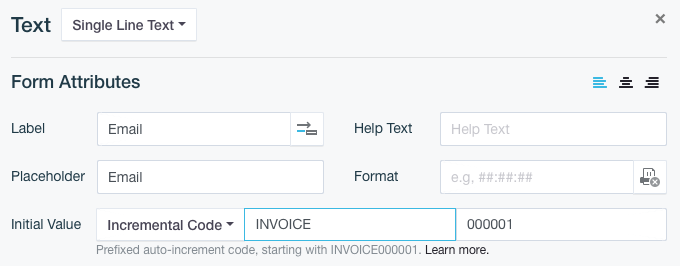
For a single line of text, it prints all text on one line, no matter how long it is. Now it can be more “smart”. You can set to automatically print in smaller fonts, wrap or truncate text if it overflows.
There is a new initial value type: incremental code. You can easily create code in PDF, such as “INVOICE001”, “INVOICE002”, “INVOICE003”, etc. For more details, check out our documentation site.
Redesigned PDF fillable form
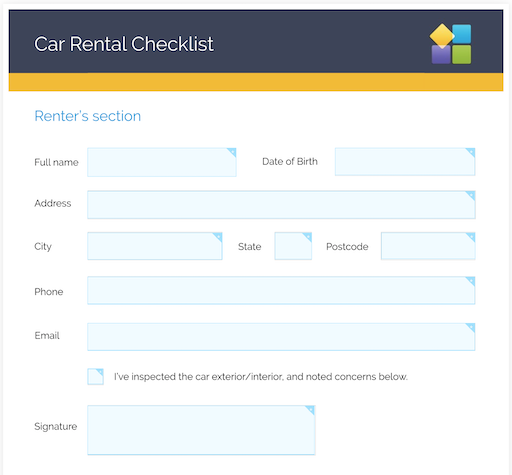
A brand new PDF fillable form that looks neat and easy to fill out.
Fresh help documentation portal
Discover our all-new documentation site.
While we’ve implemented numerous small improvements and bug fixes in our system, we want to highlight some of the major features developed in the past few months. Your feedback is invaluable, as many of these ideas originate from you, our valued customers.
June 26, 2019
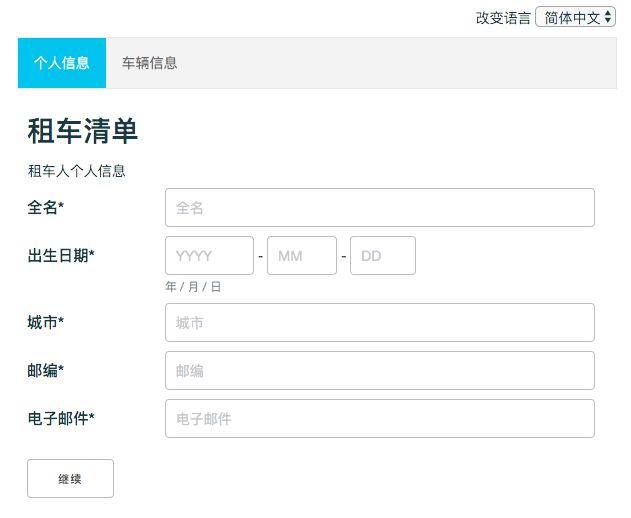
Send a form in multiple languages
Internationalization PDF form i18n form
Want to connect with customers globally? Our multi-lingual form feature lets you easily create one form in multiple languages!
What are the benefits:
- Each language version gets its own unique URL to share.
- A cool language selector drop-down right, allowing users to switch between languages.
Translating content is a breeze:
- Edit the translations right in your browser as you go.
- Or, if you prefer, import/export translations using an Excel file.
This multi-lingual magic is available on ALL our plans, even the free one! So you can engage audiences worldwide without any extra costs.
Interested in setting it up? Just check out our quick user guide or video tutorial. With multi-lingual forms, the world is truly your audience!
May 20, 2019
Reuse the submission content on PDF
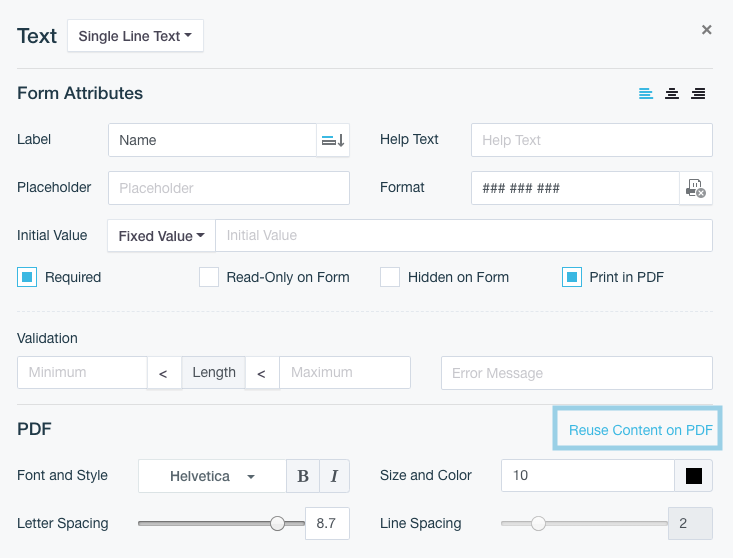
Some PDFs require the same information on multiple pages—like signatures, names, or checkboxes. Before, you had to create a Master Form to repeat those fields across linked PDFs. Customers signed once, and the master form filled in the rest.
Now you can do this directly in the Web PDF Form builder.
Open the Field Properties panel and click “Reuse Content on PDF”. This creates a copy of the field on your PDF, and you can drag it to any page and any position. It works for any field type—signatures, text fields, checkboxes, and more.
For classic PDF fillable forms, the method is slightly different: you’ll use form logic to copy a field’s value to another field. The result is still the same—one input, reused wherever you need it.
Learn more: 👉 Reuse Content on PDF
May 12, 2019
Set the initial value on the text field
In earlier versions, you could only set default values for checkboxes and dropdown fields. Now, you can also set an initial value for text fields—making your forms much more flexible.
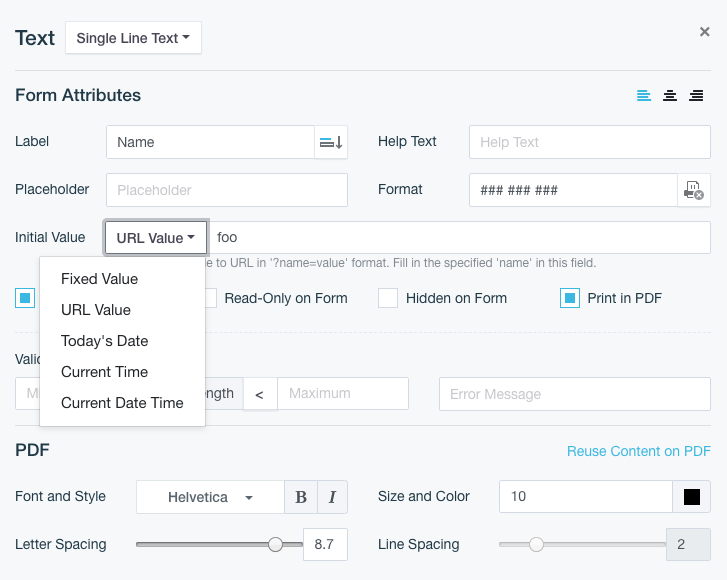
You can choose from several types of initial values:
- Fixed value
- Current date
- Current time
- Current date and time
- A value pulled directly from the URL
For example, if you open your form with a URL like ?foo=bar and configure the text field to use the URL value for foo, the form will automatically display bar in that text field when it loads.
April 16, 2019
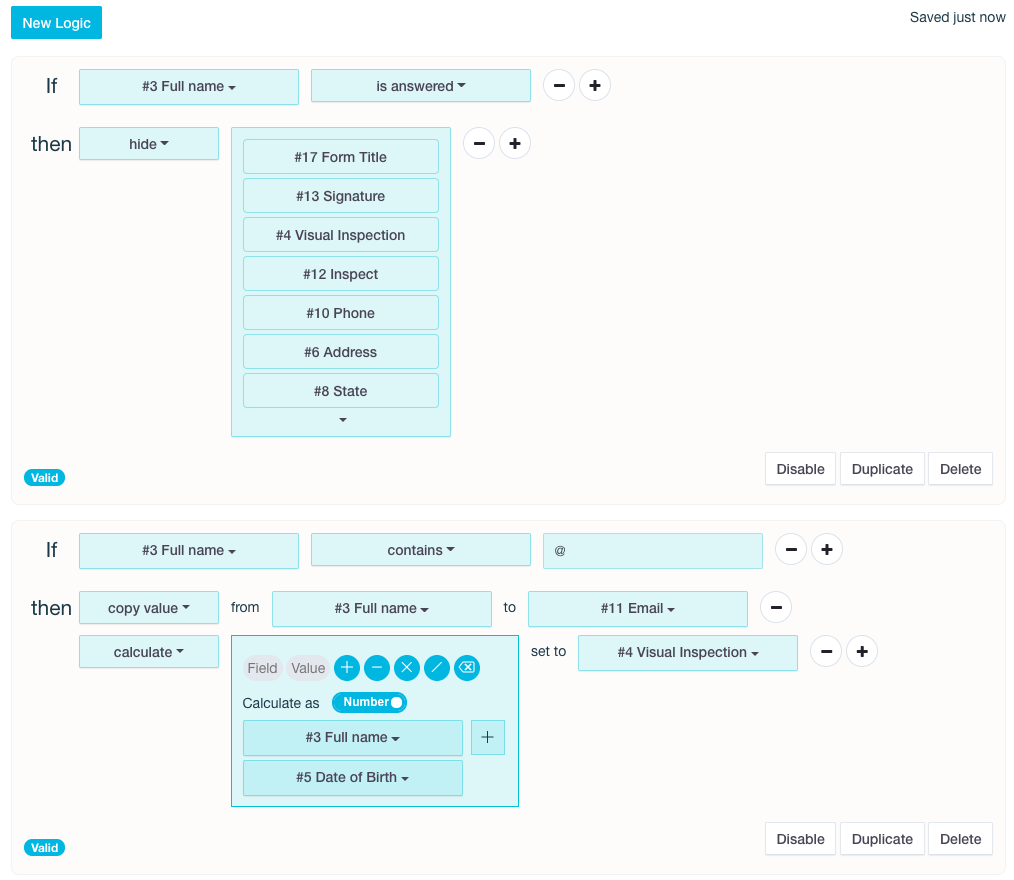
Make your online forms smarter with conditional logic
Want your forms to feel more dynamic and user-friendly? Conditional logic makes it happen. With this powerful feature, your online form automatically adapts based on each person’s answers—showing only the fields that matter.
With conditional logic, you can:
- Show, hide, enable, or disable specific fields
- Copy values from one field to another
- Auto-populate answers based on user input
- Run calculations directly inside the form
- Jump to specific pages to create smoother form flows
- And much more!
For example: if someone selects “No kids,” all child-related questions disappear. If they enter an email address, you can copy it to another field. If their age is under 18, different follow-up questions appear. Your form becomes smart, responsive, and easy to complete.
Conditional logic lets you build adaptive, efficient, and personalized online forms—no coding required.
Want ideas? Check out common logic examples.
Ready to build? See the full guide here: Set Form Logic.
February 6, 2019
Flexible e-mail notifications
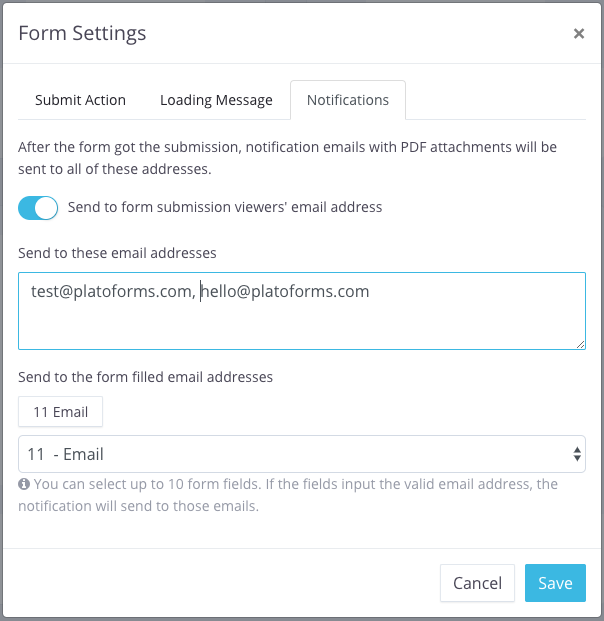
Previously, PlatoForms only sent submission notifications to the account owner’s email. Now you have much more control.
You can:
- Add up to 10 email addresses to receive form submission notifications
- Send notifications to emails entered inside the form itself—perfect for sending customers a copy of their completed PDF
- Attach the generated PDF automatically so recipients don’t need to log in to download anything
For example: include an email field in your form, have your customer enter their address, and they’ll instantly receive the completed PDF as soon as they submit. Easy, automated, and efficient.
December 20, 2018
Use PDF editor more efficiently
When creating a form or fillable PDF with our drag-and-drop editor, knowing the right shortcuts helps you work faster and more precisely. Many shortcuts follow standard system conventions (like Copy/Paste and Undo/Redo), while others are common to modern drag-and-drop tools, such as holding Shift while dragging.
Here are the most useful shortcuts:
- CTRL-C / CTRL-V (Windows), CMD-C / CMD-V (MacOS): Copy and paste
- CTRL-Z (Windows), CMD-Z (MacOS): Undo
- CTRL-Y (Windows), CMD-SHIFT-Z (MacOS): Redo
- CTRL-A (Windows), CMD-A (MacOS): Select all widgets
- Delete: Remove the selected widget
- Arrow keys: Move selected widgets pixel-by-pixel
- SHIFT + click: Select or deselect a widget within a group
- SHIFT + drag: Disable snapping between nearby widgets
- Double-click a widget: If it belongs to a Choice or Dropdown option list, all widgets in that list are selected at once
Mastering these shortcuts—and combining keyboard and mouse actions—significantly speeds up your workflow. It may take a little practice, but once they become second nature, building forms becomes much quicker and smoother.
Note: Copy, Paste, and Delete apply only when a single widget is selected.
November 12, 2018
Automate your online forms with Zapier integration
We’ve got some exciting news to share. You know how Zapier lets you connect different apps and automate workflows? Well, now you can integrate your PlatoForms online forms with Zapier too!
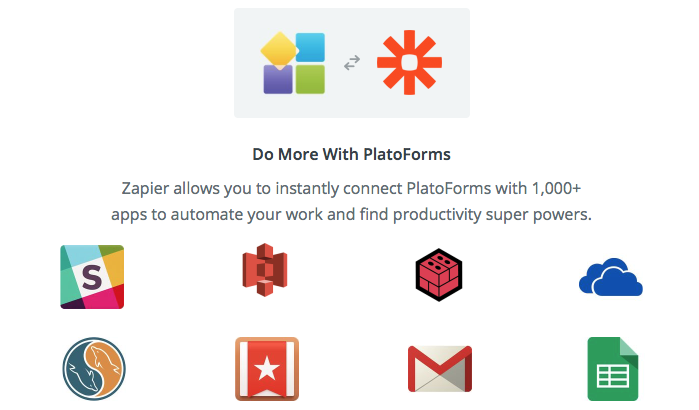
This means the power of PlatoForms can extend to over 5,000 apps and services like Gmail, Trello, Salesforce, social media, cloud storage, calendars, and more. It’s like having a super-powered sidekick for your forms!
How it works
Here’s how it works: whenever you receive a new form submission, PlatoForms will generate the submission as a PDF and trigger a “Zap” (that’s Zapier’s term for an automated workflow) that you’ve set up. From there, the possibilities are endless!
Example zaps
Need to notify your team on Slack? Done. Want to import data into a Google Sheet? Easy peasy. How about uploading that PDF to your CRM? You got it!
Get creative
Don’t be shy, use your imagination and create custom Zaps to automate your work in whatever way makes sense for you. We’ve put together a handy guide to walk you through setting up Zaps for uploading to Google Sheets or Amazon S3. And the best part? You can start using all of this for free!
Oh, and one more thing – we’ve updated our API to version 4 with full Swagger compatibility. Check it out if you’re a developer!
August 12, 2018
Folders for organized management
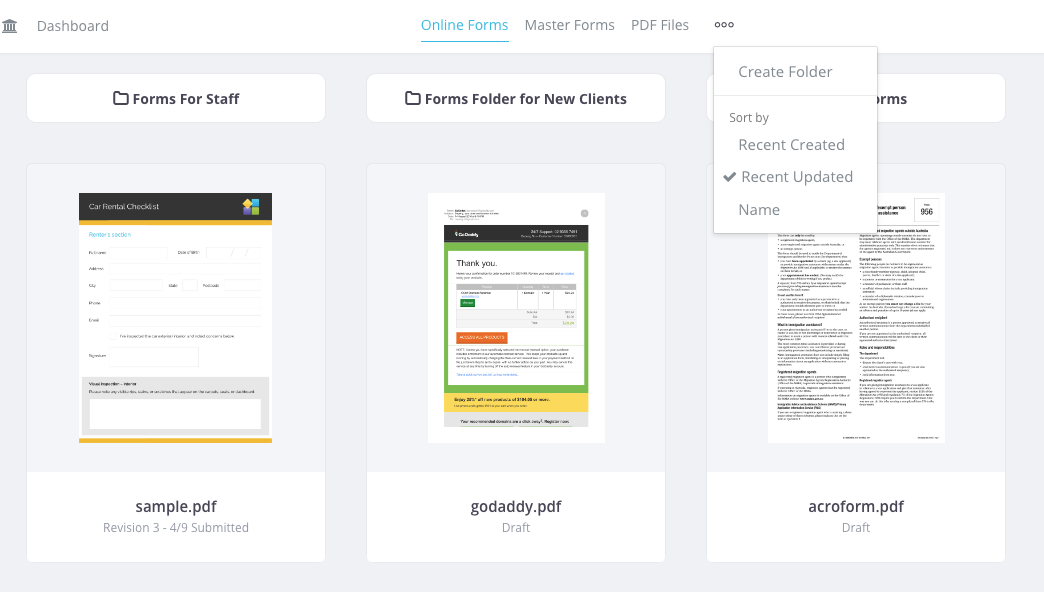
We’ve made your experience on PlatoForms even better with a more organized approach. We’re excited to introduce our new feature: Folders.
Now, on the Dashboard, you’ll find three tabs: Online Forms, Master Forms, and PDF Files. You can create folders under each of these tabs, allowing you to neatly categorize your content.
You can also keep things tidy by moving forms or files between folders.
We’ve also added sorting options for your convenience. You can sort your forms and files by name, creation date, or update date.
This update is all about making your workspace more organized and user-friendly. Try out the new Folders feature, and for more details, check our documentation.
July 15, 2018
Update your PDF attributes with more ease
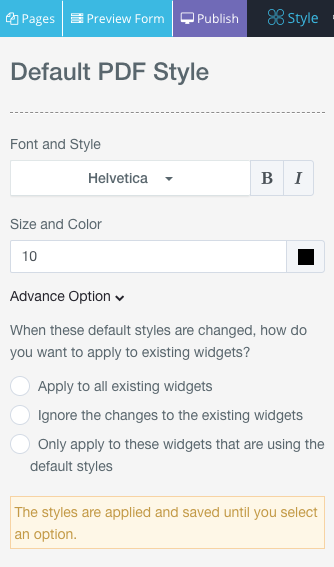
Previously, updating fonts or styles in your PDF form builder meant adjusting each widget one by one. Now you can apply these changes instantly.
All PDF-related builders now include a Style button in the top navigation bar. With it, you can update font family, size, color, and text formatting for your PDF widgets from a single panel.
The panel also includes Advanced Options, letting you choose exactly how the new styles apply:
- Apply to all existing widgets
- Ignore existing widgets and use the new style only for future ones
- Apply only to widgets still using default styles
A faster, more flexible way to keep your PDF form design consistent.
July 1, 2018
Save form submissions directly to your cloud drive
Premium plans or trial users exclusive
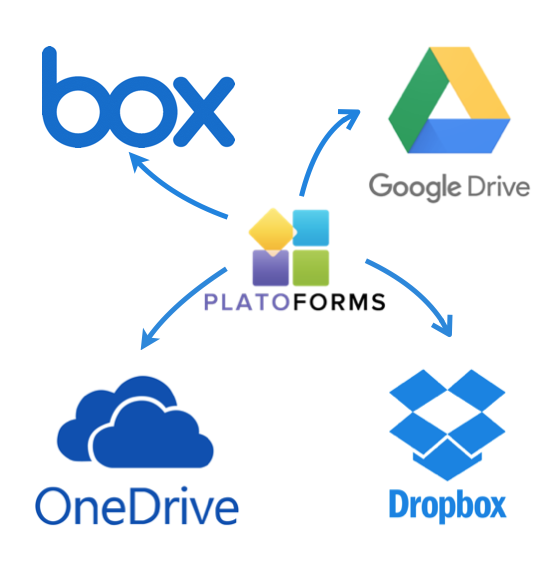
Tired of dealing with form data scattered across different places? We’ve got a convenient solution - automatically saving form submissions to your preferred cloud storage! With our latest integration, you can now connect PlatoForms to the most popular cloud drives:
- Google Drive
- Dropbox
- Box
- OneDrive
Here’s how it works: When someone submits a form, instead of just getting a PDF attached to an email, the submission can be instantly uploaded as a PDF file to the cloud drive folder of your choice.
This integration works with both new and existing forms. So you can start using it right away to streamline your data collection process. For more details, see our step-by-step guide.
Having submissions automagically waiting for you in the cloud saves so much time and headache. Give it a try and experience the convenience! Let us know if you have any other questions.
June 2, 2018
Create the PDF by API request
We’re excited to roll out API Version 3—our most flexible API yet!
Here’s what the new version adds:
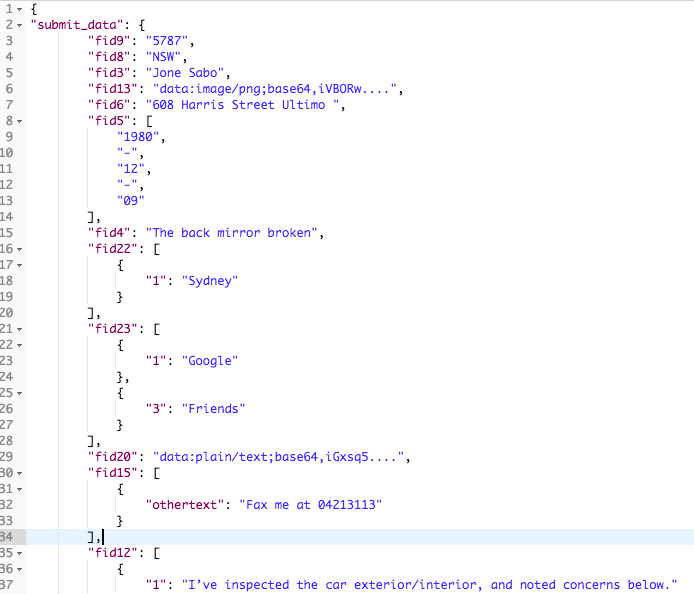
- Submit form data directly through the API
- Fetch all field definitions for any form
- Support for Non-Expiry Tokens and Session Authentication (OAuth2 remains available in API v2)
What makes API v3 better?
It makes integrating PlatoForms with your in-house system much smoother. Say your team needs to push data into several pre-designed PDF documents. Just upload the PDFs, build the matching web form, and use the API to send your data. PlatoForms takes care of generating the PDFs using your field mapping—no need to build or maintain your own PDF-rendering system.
Want instant delivery? Pair it with Webhooks to receive each generated PDF the moment it’s created.
A quick note: API v2 will be retired on January 1, 2019.
Check out the full details in our latest API documentation.
June 2, 2018
Form builder enhancement
Our form builder was enhanced so that it can answer to your requirements in a more professional and specific manner.
- Copy and Paste
- Undo and Redo
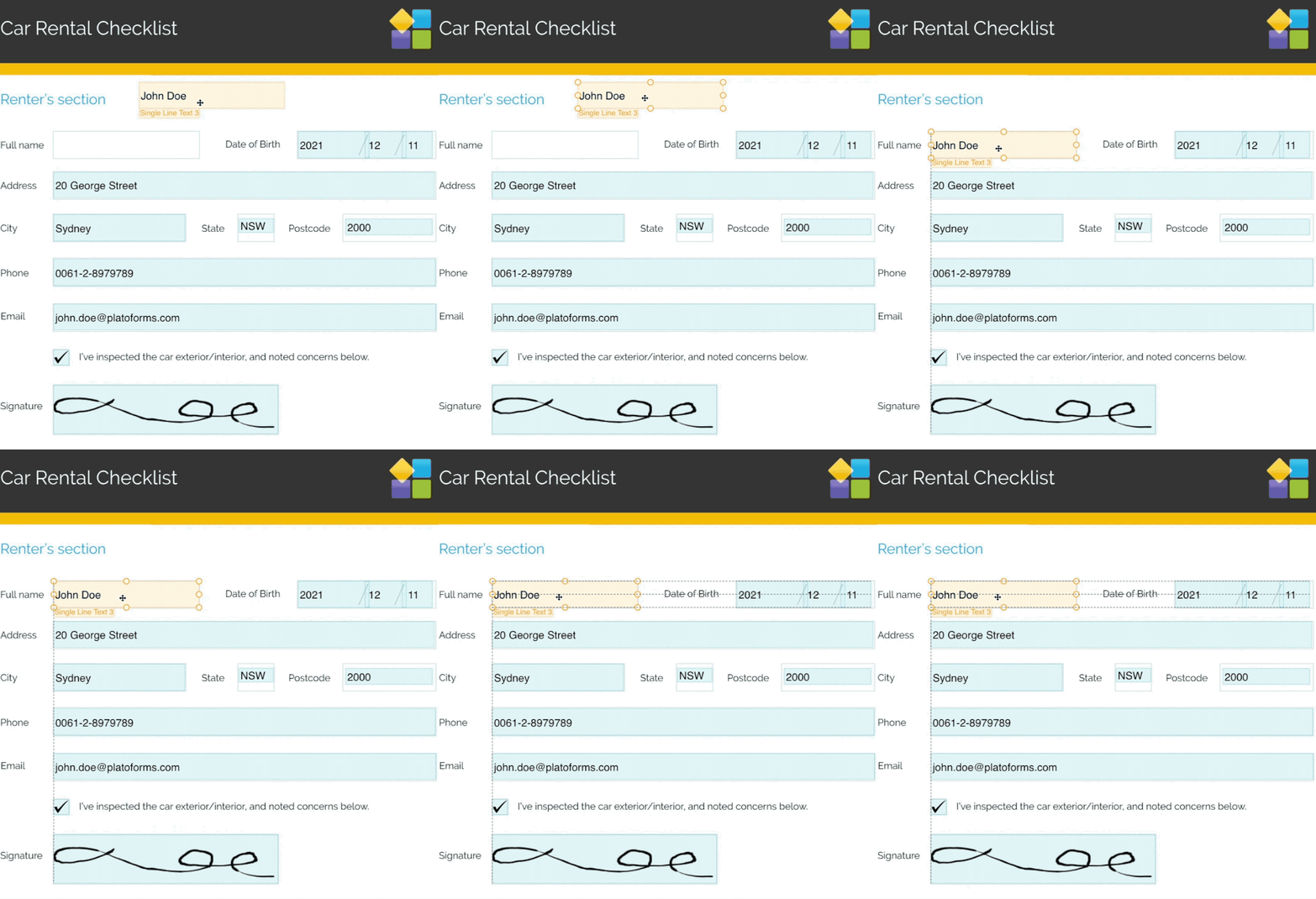
- Alignment guidance
- Snap between widgets
Allow us to get into more details and present our new PlatoForms features, so you will have a clearer view of what you will enjoy if you choose our services:
- Now, all form widgets can simply be copied and pasted (Windows:
CTRL-C,CTRL-V; MacOS:CMD-C,CMD-V), just as simple as that. This is a feature that can be used across any page within the same PDF. In other words, feel free to copy a widget from one PDF page and add it to another PDF page. - Don’t you enjoy how the form looks after the changes you made? Then do find out that Undo and Redo can be applied for adding, deleting, resizing or moving any widget(Windows:
CTRL-Z,CTRL-Y; MacOS:CMD-Z,CMD-SHIFT-Z). You can do this kind of operations on each page separately, so you don’t have to undo the entire form if you realize that one of its pages doesn’t respect your requirements; - We introduced the alignment guidance feature, which allows you to quickly align the widgets. While dragging or resizing a widget, the alignment lines will indicate if it is aligned with other widgets next to the borders or middle area in a visible manner.
- If you drag and drop a widget in the proximity of another, it will automatically snap in a place that is in the proximity of the closest widget. If you want to disable this feature, just press and hold the SHIFT key when dragging widgets.
- In PDF, you can use keyboard arrow key to move the widget by pixel ad pixel.
It doesn’t matter what form builder you choose to use, as these features are present in all our builders, for example, the Web form builder, PDF form builder, Master from builder and PDF maker. So, have fun at making your own tailored form!
April 5, 2018
Master Forms: one form to rule them all
Ever had to fill out the same basic info across a bunch of different forms? So tedious, right? Well, say goodbye to that hassle with PlatoForms’ Master Forms!
Here’s how it works in a nutshell:
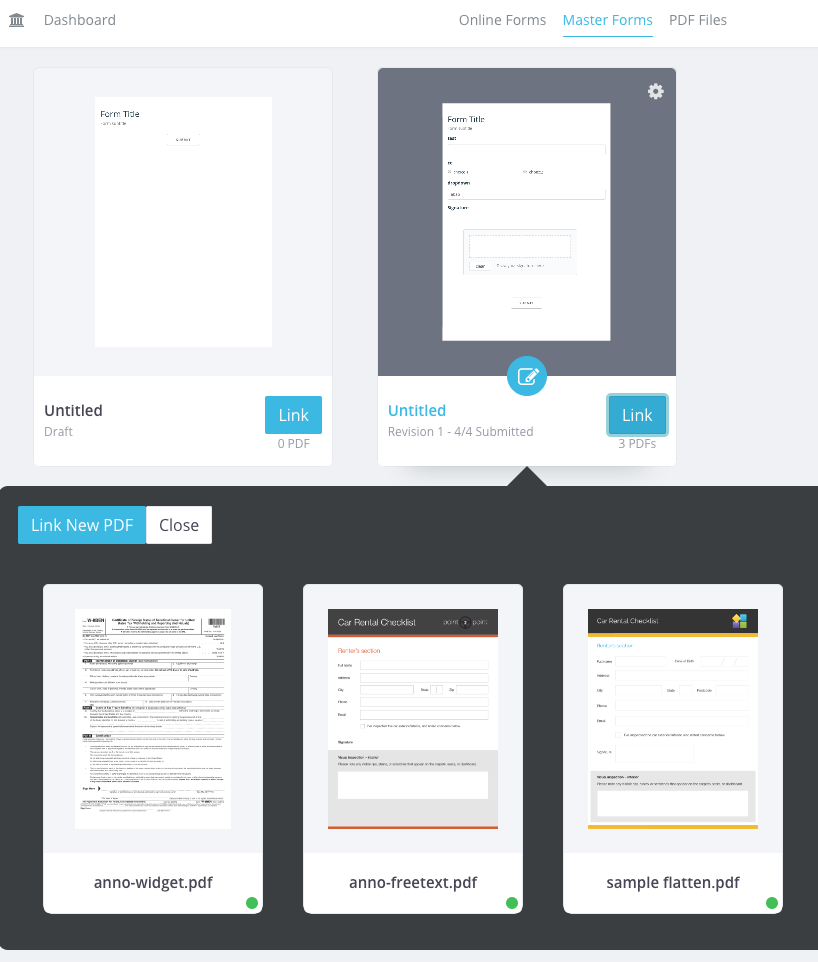
You build one Master Form with all the common fields like name, address, etc. Then you simply link and map that form to all the different PDFs you need.
Once your client/customer submits that single master form, PlatoForms automagically generates completed versions of every linked PDF using their data. Bam! No more repetitive re-entering.
For example, a lawyer could link 5 different PDFs to one master form. The client fills that out once with their personal details. And in seconds, they’ve got all 5 PDFs ready to go, pre-filled!
It’s like getting 5 forms for the effort of 1. Or 10. Or 20! You can link as many PDFs as needed to that master form.
Best part? You can view, download and manage all those generated PDFs right from your Submissions page. Revisions are tracked too.
Talk about a time-saving superpower! One smooth process replaces massive redundancy. Master Forms are definitely the smart way to work smarter. For more details, navigate to Master Form.
February 12, 2018
Multi-person collaborative form-filling with Workflows
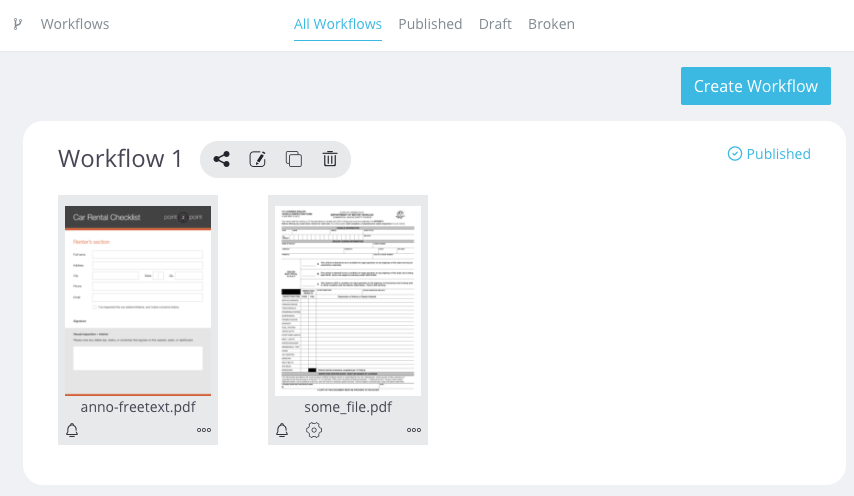
Sometimes forms are too long to complete in one sitting, right? With PlatoForms, you can break it up into multiple steps! Think of a car sale form. The customer fills out their personal details first. Then the salesperson adds the car info. Finally, the manager signs off. Three separate steps, but all part of one complete form. Here’s how it works:
- You build a workflow with multiple shorter forms (we call them Steps)
- Each step focuses on just a section of the full form
- After completing a step, the next person gets notified to fill their part
- All data overlaps onto the same PDF as you go
Super handy for forms that involve multiple people or back-and-forth. No more passing around one long form! Set it up however makes sense. Two steps or ten steps, you’re in control.
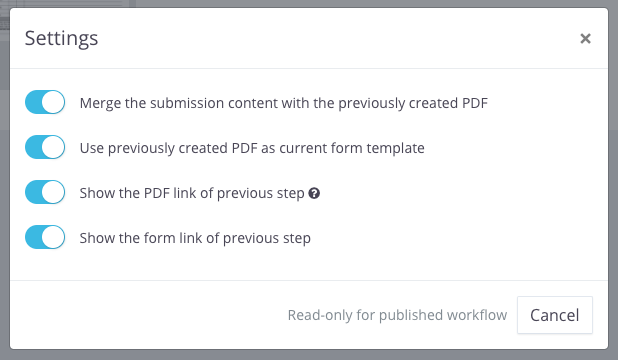
Workflows are super flexible. You control the settings.
Want each new step to start fresh? Or overlap data from previous steps? Your call. You can even mix form types in one workflow. Like a web form for the customer. And a PDF form for the manager’s final review.
The first two steps could be web forms - easy for the customer and salesperson. Then the manager gets a PDF form with everyone’s answers prefilled. That PDF can be the same file used earlier. Or a different one. You choose per step.
Overlapping data or not. Same PDF or different ones. Web forms or PDF forms. The flexibility is all yours! Set up workflows exactly how you need. Multi-step made simple and custom-fit for any situation.
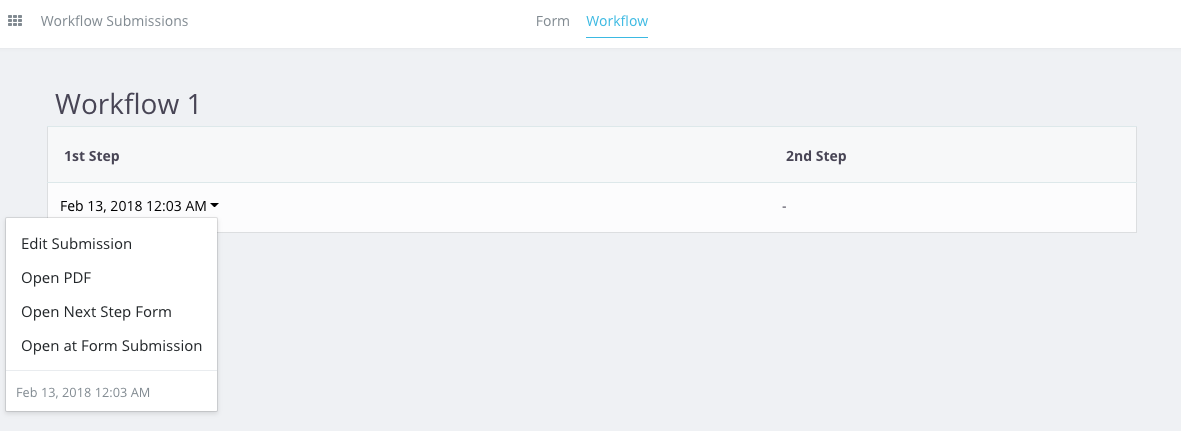
All workflow PDFs get collected in your Submissions page. You also get email notifications after each step. There’s a dedicated Workflow button on the top of Submission page. One click shows you:
- Total workflow submissions
- Which are in progress
- Steps completed so far
For more details, navigate to Collaborate with Workflows .
January 30, 2018
Letter Spacing
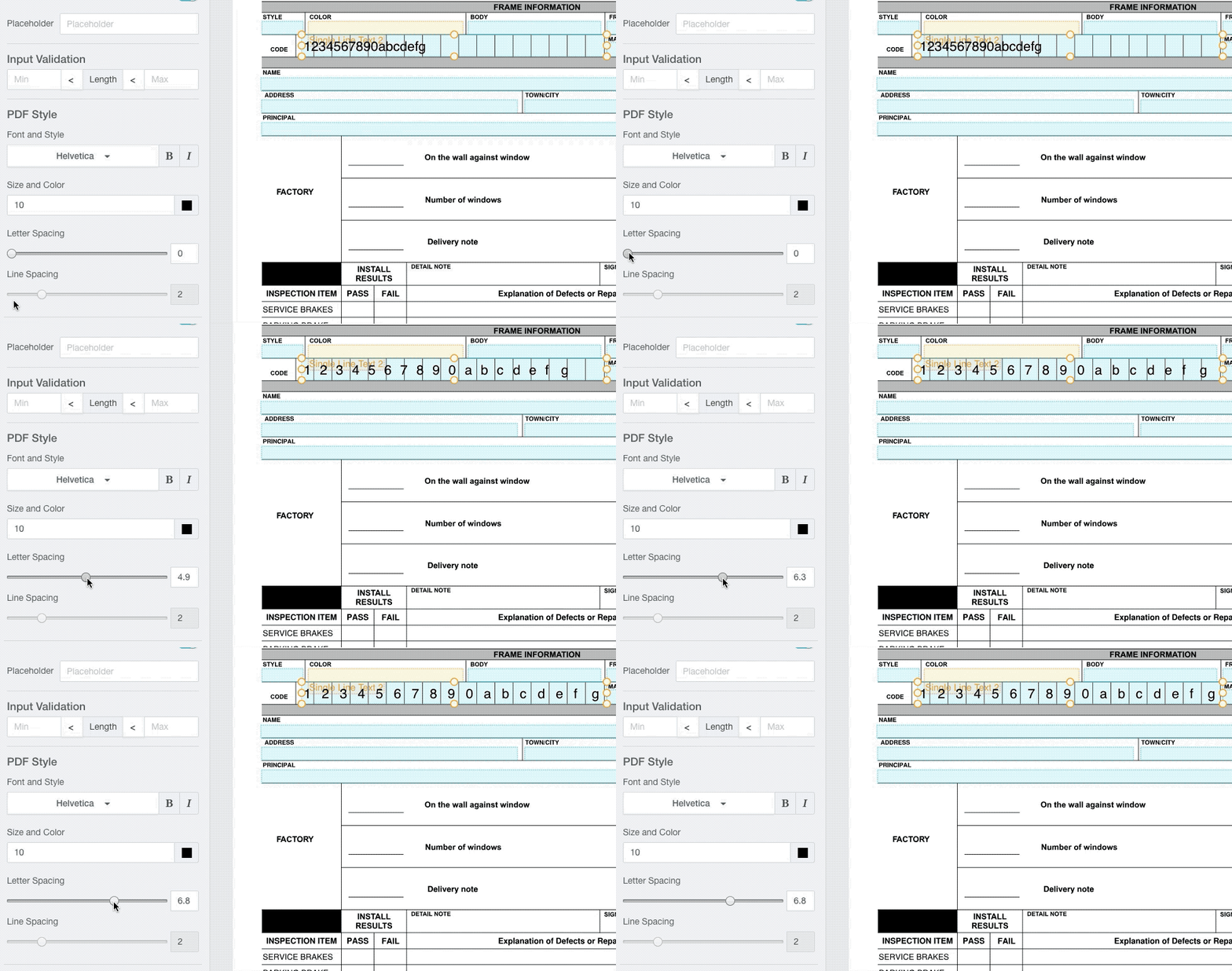
Many PDF forms—such as driver’s license numbers, passport numbers, or ID fields—use boxes or cells where each character needs to sit perfectly in its own space. Before, achieving this meant creating multiple tiny text fields and forcing users to type one character at a time. Not ideal.
With our Letter Spacing feature, you can now:
- Type the entire value once
- Adjust the spacing
- Automatically spread the characters evenly across the PDF’s cell-style boxes
This makes your fillable PDFs cleaner, more professional, and far easier for users to complete. No more jumping between fields—just smooth input and perfect alignment.
A simple adjustment that dramatically improves both data accuracy and PDF form design.
January 23, 2018
Use a custom domain name for your forms
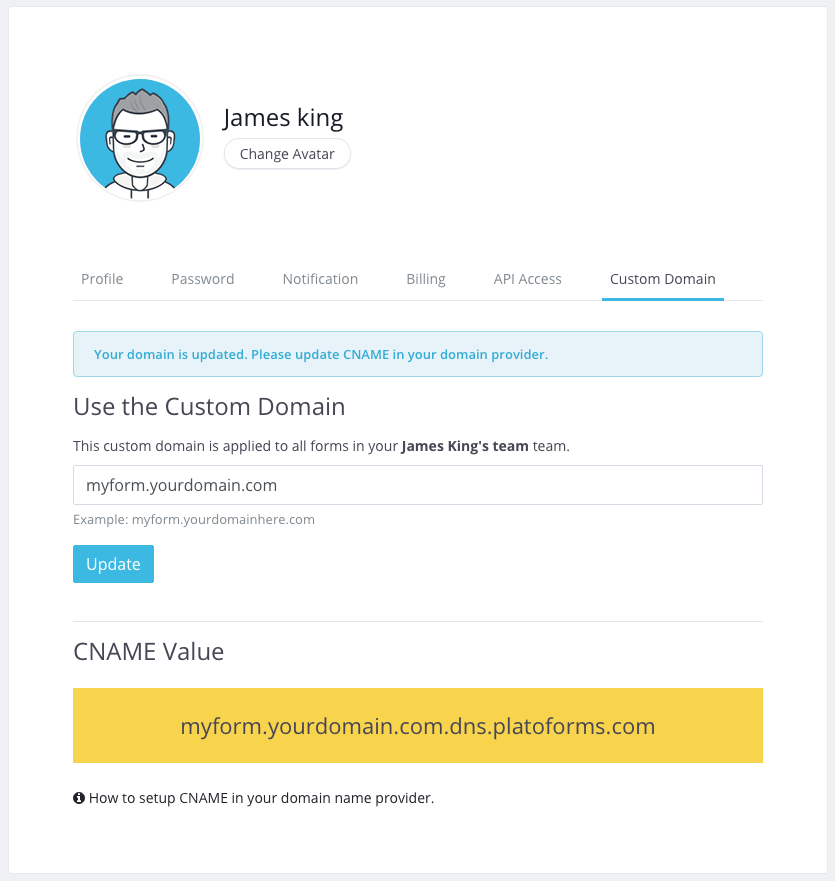
You can now share your forms using your own domain name—also known as a Custom Domain or Domain Name Masking.
For example, instead of using the default URL:
https://form.platoforms.com/frcaserswr
you can set it to:
https://sales.yourdomainhere.com/form/frcaserswr
This instantly removes platoforms.com from the URL and gives your form a fully branded, professional look.
To enable this feature, you’ll need to:
- Own a domain name
- Have access to update its DNS settings (specifically adding a CNAME record for your subdomain)
Once you’ve added the CNAME in your DNS provider, PlatoForms will automatically install an SSL certificate for your custom domain. Thanks to Let’s Encrypt, the certificate is completely free, and we handle the entire setup and renewal process for you.
For setup instructions, visit Custom Domain.
December 12, 2017
A new way to present your PDF Form Online
You’re already able to turn a PDF into a Web PDF Form, which lets people fill it out online just like a normal form. However, creating this type of form can take time, especially when the PDF is long or complicated.
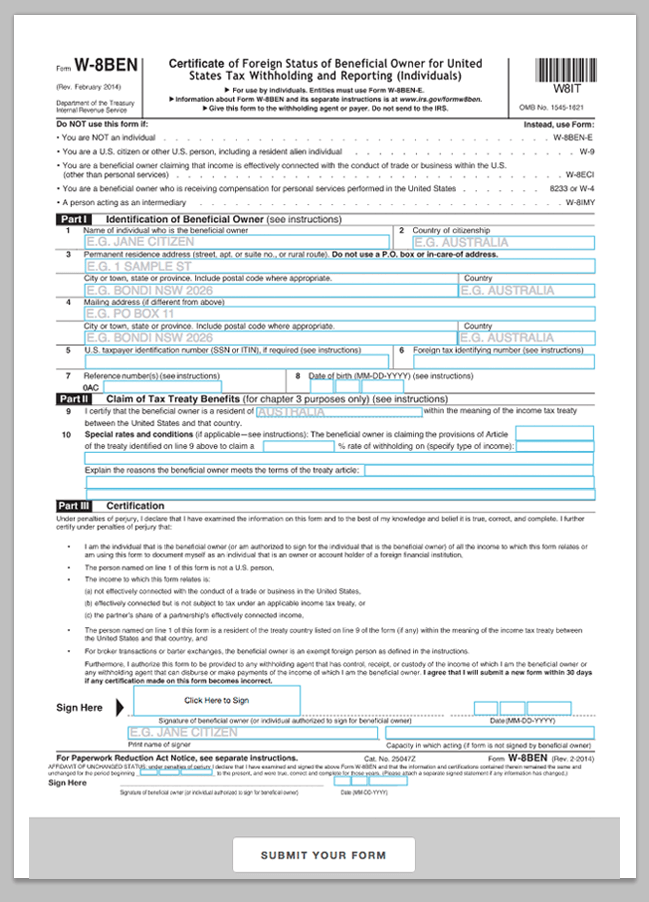
Now there’s a simpler option. With our new Online PDF Form mode, you can drag and drop fields directly onto your PDF to make it fillable. If your PDF already contains form fields, we’ll detect them and build everything for you automatically.
Once finished, you can publish the form as a web page, embed it on your website, or share a link. Your users just open the page, fill it out, and submit—no downloads needed.
Web PDF Form
A Web PDF Form converts your PDF into a responsive online form. It loads quickly, works on all browsers, and is very mobile-friendly. It takes a bit more setup because you need to configure both the online form and the PDF mapping.
Online PDF Form
This option keeps your original PDF layout exactly as it is. You simply add fields on top. It’s faster to build and great for complex PDFs. It works in all modern browsers (Chrome, Safari, Firefox, Edge) but not Internet Explorer. Very large PDFs with many images may load slightly slower.
One More Thing
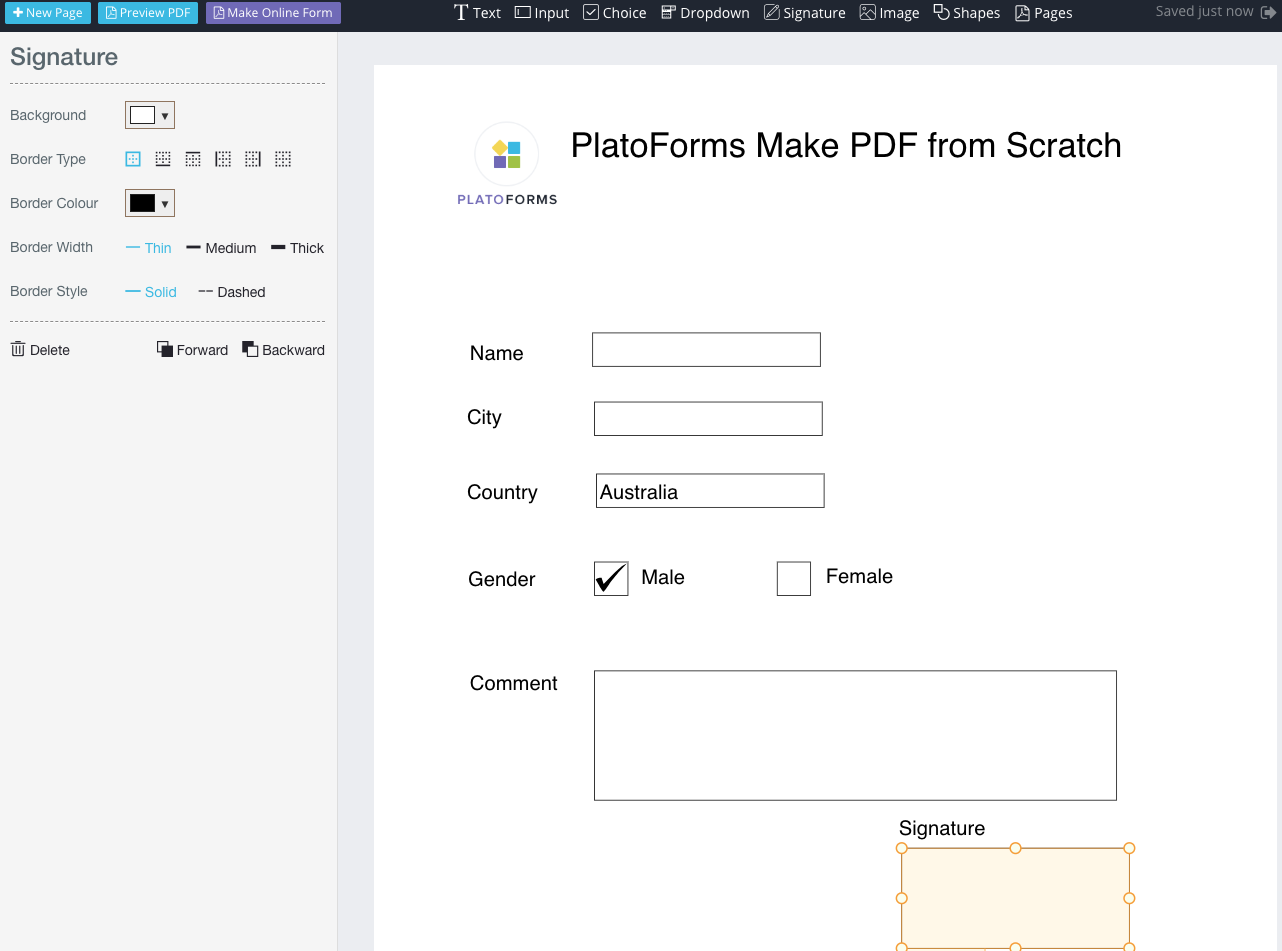
Don’t have a PDF yet? You can create one from scratch with our PDF Maker. Add text fields, dropdowns, signatures, and more, then convert it into a Web PDF Form or Online PDF Form with one click.
You’ll still need to map labels to the online form, but the rest is handled for you.
Learn more in Online PDF Form Builder.
September 1, 2017
Create PDFs from scratch
PlatoForms can now create fillable PDFs from scratch. Our PDF Maker is a drag-and-drop editor that lets you build a PDF layout easily. It supports multiple field types—text inputs, choices, dropdowns, signatures, and more—each with fully customizable properties such as font, size, color, borders, and background.
PDFs created in the editor start as read-only. To make them fillable, simply click Make Online Form in the toolbar. PlatoForms will automatically convert your PDF into an online form, mapping each PDF field to its corresponding web form field. When the conversion is done, you just need to bind labels, help text, or placeholders. To save time, we auto-suggest these values based on text detected inside your PDF.
You can create unlimited PDFs, and this feature is completely free.
Learn more in PDF Maker.