


Quick answer
PlatoForms is an Adobe Acrobat alternative for teams that need to create forms, collect responses, and manage the resulting documents together. You can design a new PDF in PDF Document Creator, convert an existing PDF into an online form, or build a new web form. Paid plans add e-signatures with signature certificates, Workflow, and automatic PDF delivery, with multiple team members included in the subscription.
Acrobat Pro suits work that combines direct editing of existing PDFs with form authoring and online signing. It includes OCR, redaction, and detailed PDF field controls, as well as Web Forms for browser completion. Adobe sells individual and team subscriptions; team plans charge per user license. Acrobat Sign Solutions offers additional agreement automation under separate licensing.
The choice is about the work and the people doing it. PlatoForms’ included members are useful when several colleagues need to edit forms or manage submissions. Acrobat licenses provide each licensed user with its PDF and signing tools. People who only receive a form or signature request should be counted separately from the staff who need access to the product.
Feature comparison
The Adobe column identifies features that belong to Acrobat Pro, Studio, or separately licensed Acrobat Sign Solutions. PlatoForms’ online form features and Document Creator’s downloadable exports are also distinguished below.
| What you need | Adobe Acrobat | PlatoForms |
|---|---|---|
| Edit text in an existing PDF | Pro edits PDF text and images, recognizes scanned text, and redacts content | Uploaded PDFs retain their source content; Document Creator edits designs created in its editor |
| Create a downloadable fillable PDF | Prepare Form adds and configures fields in an existing file or blank document | Document Creator designs a new document and exports a fillable PDF |
| Collect answers online | Pro Web Forms publish documents through links or embeds | Original-layout PDF forms, responsive Web PDF Forms, and standalone web forms |
| Guide form completion | PDF field properties include required fields, formatting, validation, and calculations | Online field validation and conditional logic; web forms also support Conversational layouts |
| Reuse answers across documents | PDF fields with matching names share values within a PDF; online agreements can include several files | Master Forms maps one set of answers to multiple linked PDF outputs |
| Collect signatures and approvals | Pro supports e-signature requests and Web Form participant roles; Custom Workflow Designer requires an enabled enterprise account | Paid plans add signature fields, signature certificates and Workflow form steps, approvals, and send-back paths |
| Give colleagues product access | Individual subscription: one person; team subscription: separately priced user licenses with centralized administration | Included member allowance with per-form permissions for editing, submitting, and viewing submissions |
| Track and export responses | Agreement records, completed PDFs, and Web Form field-data exports | Submission records, PDF/CSV exports, and configured email attachments; Workflow tracks steps and decisions |
| Automatically deliver completed PDFs | Acrobat Sign offers External Archive by email and Power Automate storage flows on eligible Sign plans | Paid Cloud Drive integration saves PDFs generated by a form to Google Drive, Dropbox, OneDrive, or Box |
| Use AI | Studio includes AI Assistant, PDF Spaces, and AI-powered PDF Actions; Prepare Form detects fields separately | AI field detection, web-form and document generation, logic, translation, Voice Filling, and Insights, with feature-specific setup and credits |
Pricing: what the subscription includes
USD list prices checked September 15, 2026. Annual billing terms differ, so both the payment basis and user coverage are shown.
| Plan | Price with annual commitment | Without annual commitment | Users covered by the listed price |
|---|---|---|---|
| Acrobat Pro — individual | $19.99/month; billed monthly or $239.88 prepaid yearly | $29.99/month | 1 licensed user |
| Acrobat Pro for teams | $23.99/license/month, billed monthly | Check Adobe’s current offer | 1 user per license; buy additional licenses for more users |
| PlatoForms Free | $0 | $0 | Up to 2 team members included |
| PlatoForms Bronze | $10/month equivalent; $120 prepaid yearly | $12/month | Up to 5 team members included |
| PlatoForms Silver | $30/month equivalent; $360 prepaid yearly | $36/month | Up to 20 team members included |
PlatoForms includes collaboration within each plan’s member allowance. Bronze includes signature certificates, Workflow, API access, and cloud-drive integration, with two live forms and 1,000 monthly submissions shared by the team. Silver increases those limits to 20 live forms and 10,000 submissions; Gold includes 50 members. The Free plan has one live form and 100 monthly submissions and includes signature fields but excludes signature certificates, Workflow, and cloud-drive integration.
Adobe team licensing supports multiple users, priced separately. Its individual price is not a team price. Studio adds AI Assistant, PDF Spaces, and Adobe Express Premium; Acrobat Sign Solutions requires a separate quote for its applicable business or enterprise capabilities. The team-cost examples below explain when to count a licensed user and when someone is simply a recipient.
Creating a new form or editing an existing PDF
The starting document matters. If you need to change wording inside a supplied PDF, recognize scanned text, or redact information, Acrobat Pro provides those editing tools. Its Prepare Form tool adds fields to an existing file or a blank page. Field properties let you configure required entries, formats, validation, and calculations for completion in a compatible PDF viewer.

PlatoForms’ PDF Document Creator provides a different authoring route: start with a blank canvas, a preset, or an AI prompt, then edit the document’s text, layout, and input components. Export a static or fillable PDF, or turn the design into an online form. You can create the document and collect responses within PlatoForms; preparing it in Acrobat is optional.
For a PDF you already have, PlatoForms uses the uploaded document as the background and output layout while you configure the form fields. That process does not rewrite the PDF’s original text. Its free PDF tools cover file operations such as merging, splitting, rotation, compression, and password protection.
Choose by the editing task: Acrobat fits changes to an imported PDF and detailed file-based form authoring. PlatoForms fits designing a new fillable document or turning an existing document into an online form. The fillable PDF creator comparison covers other tools for these outputs.
How people complete the form
Both products support online completion. Acrobat Pro Web Forms let you publish a document through a reusable link or website embed and assign participant roles. Sending a downloadable PDF is another option, with a return method you choose for the completed copies.
PlatoForms offers two filling experiences for an existing PDF. A PDF Fillable Form displays fields over the original pages. A Web PDF Form presents responsive questions and maps the answers back to the PDF. This lets you keep a familiar output document while adapting the questions for phone screens. Use conditional logic to show relevant questions and validation to check entries before submission.

AI field detection helps prepare both form types. Review the detected fields and their PDF mappings before publishing.
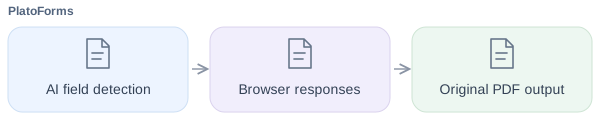
When no existing PDF is needed, build a web form from scratch, an application template, or an AI-generated draft. Web forms and Web PDF Forms support Classic and Conversational layouts; the latter presents one question at a time. PDF Fillable Forms use the Classic layout.

For a phone-heavy application process, compare the published forms on a phone and inspect the resulting PDF. Hosted completion requires an internet connection. For a downloadable form, check that recipients can fill, save, and reopen the exported file in a compatible viewer. These are different completion experiences even when the finished documents look similar.
Reusing information across a document packet
An onboarding packet may repeat a person’s name, address, and contact details across several documents. Acrobat supports fields with matching names that share a value within a PDF. Its online signing route can combine several uploaded files into one agreement PDF, with fields assigned to participants.
PlatoForms’ Master Forms lets you map one set of answers to several linked PDFs. For example, a new hire can enter an address once to populate an application, emergency-contact form, and equipment agreement. You configure which fields feed each document and how the generated files are delivered. The practical distinction is whether your team needs one agreement packet or several linked PDF outputs populated from a shared response.
For information already held by your team, pre-filled invitations provide a personalized starting point. You can lock values that should stay fixed and use CSV imports to prepare invitations in bulk. Master Forms addresses repeated information across documents; pre-filling addresses information you already know. A single application can use either or both.
Signatures, approval decisions, and corrections
Acrobat Web Forms supports signer, approver, and other participant roles. For organizations that need reusable sending procedures with predefined recipients and rules, Adobe’s Custom Workflow Designer is an enterprise capability that must be enabled in the account.
PlatoForms’ Workflow supports both form steps and approval steps. Use a form step to collect additional answers or a signature. Use an Approval step when someone needs to review a submission and approve it or send it back. A review-only decision does not require a separate form for the reviewer.
For example, a manager can review an equipment request and send it back for correction. Connecting the send-back path to the earlier form lets the employee revise and resubmit it. If the manager also needs to sign or provide additional details, add a form step on the approved path. Where form steps use the same PDF template, Combine data across steps carries the earlier PDF forward so later entries can appear in the same document.
For signing evidence, PlatoForms offers an optional signature certificate containing details such as the timestamp, IP address, email address, and PDF checksum. Certificates are available on paid plans and during the free trial, through tracked invitations or Workflow steps with the certificate option enabled. Public-link submissions do not generate certificates or display the signing consent notice. An approval decision and a signature are separate actions; configure the record your process requires.
The Acrobat PDF form workflow guide follows an equipment request through collection and review. This comparison focuses on which product and plan fit that work.
Tracking responses and delivering completed records
Adobe provides agreement management and Web Form data exports. Download completed agreements from their individual records; the parent Web Form’s PDF download is the blank form. Its form-field CSV export gathers data from completed agreements.
For automatic agreement archiving, Acrobat Sign’s External Archive emails the signed PDF and audit report, plus field-data CSV when available, to configured addresses. An archive that accepts inbound email can receive those records; check the setting in the account you intend to use.
Adobe also documents a Power Automate flow that saves completed agreements to Google Drive. Its embedded Power Automate integration requires an Acrobat Sign business or enterprise license, a Microsoft work or school account, and configuration. Adobe’s automation options therefore extend beyond email archiving.
PlatoForms’ submission dashboard provides records and PDF/CSV exports, subject to retention settings. Configure email attachments or Cloud Drive integration to deliver PDFs generated by a form to Google Drive, Dropbox, OneDrive, or Box. The cloud integration supports a destination folder and subfolders named using submission values.
For a Workflow with approvals, the optional approval record page is appended to a copy of the final PDF. The documentation provides that copy through the completion notification, the tracker’s final-PDF download, and the Workflow API. A form-level cloud upload is a separate delivery route: verify which PDF it saves if your archive must include the approval record.
For other systems, PlatoForms offers Zapier, Make, and API/webhook connections. Compare the actual destination and contents of the saved record, including signatures and approval history, rather than treating every storage connection as the same automation.
Where AI helps in each product
Acrobat AI Assistant helps with document questions and summaries. Acrobat Studio also includes AI-powered PDF Actions. Prepare Form’s field detection is another capability, separate from the generative assistant. Include Studio or the relevant AI entitlement when comparing costs.
PlatoForms applies AI at several stages of form work:
- Preparation: detect fields in uploaded PDFs, generate a new web form, or design and edit a PDF in Document Creator.
- Form behavior and language: draft conditional rules and suggest form translations.
- Completion and analysis: Voice Filling maps spoken answers into fields for authorized users on enabled forms; AI in Insights helps explore and summarize reports built from submissions.
Choose the AI capability that reduces work in your process, and review generated fields, wording, and results. Voice Filling needs its own setup and access permissions; it is not automatically available to everyone who opens a form. The AI feature guide explains access, credits, and data-handling scope.
How team access affects the cost
PlatoForms includes a set number of team members in each plan. Acrobat for teams charges for each user license. This difference matters when several colleagues need to work on forms together, so base the comparison on what each person needs to do.
| Who needs access? | Adobe Acrobat | PlatoForms |
|---|---|---|
| Staff creating and editing forms | Purchase a license for each person who needs Acrobat’s paid tools | Give included team members Form Editor permission; no separate subscription is needed within the member allowance |
| People completing forms or signing requests | Recipients can sign a request without an Adobe account | People can complete a publicly accessible form without joining your team or using a member seat |
PlatoForms also lets you give a colleague access to view and export submissions without granting form-editing access. This makes the included members useful for teams where one person builds the form and others handle the responses. For Adobe, receiving a signature request does not require a paid license; calculate team costs from the staff who need licensed tools.
A five-person team: compare the work, then the cost
If all five colleagues need Acrobat Pro, five Pro for teams licenses at the listed annual rate cost $119.95/month, billed monthly. That is $1,439.40 over a year. A PlatoForms Bronze team with up to five members costs $120 prepaid yearly, or $12/month without an annual commitment.
Bronze can suit five colleagues working together on forms and submissions within its two-live-form and 1,000-monthly-submission limits. Those allowances are shared; they are not multiplied by five. If the team needs more published forms or responses, compare Silver or Gold instead. Acrobat’s per-user price includes PDF editing capabilities that Bronze does not replace.
If one employee prepares agreements and four people only receive and sign them, do not assume that Adobe requires five paid licenses. Count the employee’s appropriate subscription and the features the process needs. PlatoForms’ included seats become a stronger cost consideration when several colleagues need ongoing access to form editing or submission management.
Choose capacity for the whole team
With PlatoForms, the team shares its plan’s live-form, submission, and storage allowances. A plan can include enough members but still need an upgrade to handle more forms or responses. For Acrobat, compare the selected subscription’s agreement-volume and document limits, including file size, page count, and number of signers. Acrobat Pro and separately licensed Acrobat Sign plans have different terms, so compare capacity for the actual forms and agreements you expect to process.
When the Free plan is enough
PlatoForms’ Free plan can cover a small online collection process: one published form, up to 100 submissions per month, and two team members. It is also a starting point for testing PDF conversion and browser completion with your own document. Choose a paid plan when you need signature certificates, approval workflows, automatic cloud delivery, or higher capacity.
Access, retention, and healthcare requirements
For shared form work, decide who can edit the form and who can view the responses. PlatoForms supports per-form permissions, two-factor authentication, and configurable data retention. Its Trust Center describes the security controls. Copies saved to your cloud drive are governed by that service’s access and retention settings.
For healthcare forms, compare the eligible plans and their setup requirements:
- PlatoForms: Silver or Gold with HIPAA enabled for the team and a signed BAA.
- Adobe: an eligible Acrobat Sign business or enterprise subscription, with a BAA and the required HIPAA configuration.

The services connected to the form also matter. For example, data processed through PlatoForms’ Voice Filling is outside its BAA. Check the scope of any AI or storage service included in your healthcare process.
Which setup fits your team?
Choose Acrobat when PDF editing is a core part of the job. It combines direct text editing, OCR, redaction, and detailed fillable-field controls with online collection and signing. It can also be a good fit when your team already uses Adobe’s agreement tools and those tools cover the required process.
Choose PlatoForms when your team needs to create forms and work with the responses together. Start with an existing PDF, a new web form, or a document designed in PDF Document Creator. You can offer browser completion, reuse answers across PDFs, route approvals, and deliver generated documents to cloud storage. Paid plans include multiple team members, making collaboration part of the subscription within its member and usage allowances.
The tools can also complement each other: edit a supplied PDF in Acrobat when needed, then publish it through PlatoForms for online completion and review.
To try PlatoForms, use your own PDF or adapt an application form template. Submit a sample response and review the completed document with a colleague. Add an approval or delivery step if your process needs one, then choose the plan that covers that work.
Frequently asked questions
When should I choose PlatoForms as an Adobe Acrobat alternative?
Consider PlatoForms for converting existing PDFs into online forms, creating new web forms, or designing documents for fillable PDF export. It also supports online signing, shared answers across PDFs with Master Forms, participant Workflow, and cloud delivery. Acrobat remains relevant for direct editing, OCR, and redaction of imported PDFs.
Does PlatoForms include team seats, and does Acrobat charge per user?
PlatoForms Bronze includes 5 members, Silver 20, and Gold 50 in the plan price, with permissions assigned by form. Acrobat individual subscriptions cover one person; Acrobat for teams charges per user license. People who only receive an Adobe signature request do not need an Adobe account, and public PlatoForms respondents do not need a team seat. Compare paid product access separately from recipient participation.
Can PlatoForms use one response to fill several PDFs?
Yes. Master Forms lets you map shared answers to several linked PDFs, so a client enters repeated details once. Configure the mappings and check each generated document before publishing the packet.
How does PlatoForms help after a PDF form is submitted?
PlatoForms provides submission records with PDF and CSV exports, subject to retention settings. Configure Workflow for approval decisions and later form steps, and Cloud Drive integration to save generated PDFs to Google Drive, Dropbox, OneDrive, or Box. AI in Insights helps summarize and explore reports built from responses; staff make review decisions.
Try PlatoForms with Your Own Form
Turn an existing PDF into an online form, or create a new form for your team.
Create your free PlatoForms account →


